 Jason Finance
Adding a Referral Code After Sign-Up (2026): Deadlines at 17 Crypto Exchanges, 30 Days at Most, and 3 Close Early Once You Deposit or Trade

On this page
- 1.Adding a referral code after sign-up at 15 international exchanges
- 2.Beyond the days: 3 conditions that decide whether you can add a code
- 2.1Your first deposit or order
- 2.2The type of code
- 2.3Your account and identity
- 3.Past the deadline: official rebinding for inactive accounts
- 4.Taiwan TWD apps: MAX lets you add one any time, BitoPro takes applications
- 5.Still within the window: where to add the code
- 6.Not signed up yet: enter the code when you sign up
- FAQ
The short answer
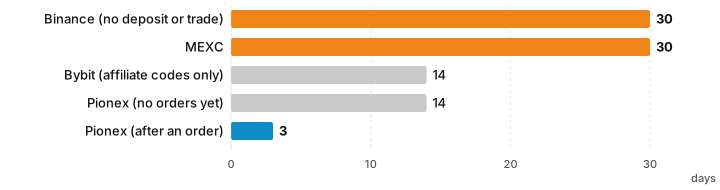
Of the 17 exchanges this site has codes for, only 6 let you add a referral code after sign-up: Binance and MEXC within 30 days, Bybit and Pionex within 14, BingX before your first deposit, MAX any time. A first deposit or order ends it early at Binance and BingX and cuts Pionex to 3 days. OKX and BitoPro take applications; LBank and Bitfinex say no; 7 say nothing. Enter the code at sign-up.
Suits
- People who just signed up, forgot the referral code and want to know if there's still time
- People about to open an account who want to know which exchanges don't let you add a code later
Doesn't suit
- People already bound to an inviter who want to switch codes: every exchange says the relationship can't be changed, and only inactive accounts have official rebinding rules
What would change this verdict
- An exchange changes its deadline or conditions for adding a code
- An exchange adds or drops its rules for rebinding inactive accounts
When people ask whether they can still add a referral code, they look at the day count first: 30 days at Binance and MEXC, 14 at Bybit and Pionex. But after going through the official rules of all 17 exchanges this site has codes for, I found that what usually closes first isn’t the day count but your first deposit or order. Binance requires that the account has “no deposit or trading activity”, BingX stops allowing it once you have deposited or bought crypto, and Pionex cuts the window from 14 days to 3 once you’ve placed an order. If you fund your account the day you sign up, your only chance to add a code at these exchanges is between sign-up and that first deposit.
Of the 17, only 6 let you add a code in your account yourself. OKX and BitoPro take applications that go through review; LBank and Bitfinex say no; the other 7 say nothing about it. So the conclusion is simple: enter the referral code when you sign up. If you’ve already missed it, the second half of this article covers the official rules for rebinding accounts that have been inactive for a long time.
This article summarizes information and is not investment advice. The rules come from each exchange’s official help center, terms and official forms, all checked again on 7 November 2026; pages that blocked access that day are marked with the date they were last checked. Exchanges change their rules, so check the current page before you act. This site does not cover unofficial methods such as asking support to switch your referrer or closing your account and signing up again.
Any crypto you keep on an exchange carries that exchange's own risk, so weigh it yourself; only coins in a cold wallet you control leave the risk in your own hands.
Adding a referral code after sign-up at 15 international exchanges
Here are the rules for the international exchanges, sorted by whether you can add a code yourself. The “conditions that matter more than the days” column is the part I think readers most often miss.
| Exchange | Can you add a code yourself after sign-up? | Deadline | Conditions that matter more than the days | Official source (page date) |
|---|---|---|---|---|
| Binance | Yes | Within 30 days of sign-up | No deposit or trading activity; parent account; no existing referral relationship; KYC information not used on another account in the past 180 days; the code must be a Referral Pro or Affiliate code | “FAQ on Binance Referral Pro Mode”, question 4 (2026-08-05) |
| MEXC | Yes | Within 30 days of sign-up | Main account; the referrer must have signed up before you; cannot be changed later | “Self-Service Referrer Linking Guide” (2026-04-15) |
| Bybit | Yes, affiliate codes only | Within 14 days of sign-up | Main account; not yet registered under any affiliate or referrer; referral codes from other users are not supported; cannot be cancelled or changed once added | “How to Add and Check Registered Affiliate Code” (2026-06-05) |
| Pionex | Yes | Within 14 days of sign-up; only 3 days once you’ve placed an order | You did not enter a code at sign-up | “Refill Referral Code” (2026-09-24) |
| BingX | Yes | No day limit | No deposit yet (including depositing or buying crypto) and no friends invited yet; cannot be changed or removed once bound | “Account Signup FAQs” (2023-05-22) |
| OKX | No, but you can submit a rebind application | No deadline stated | Affiliate codes only; the application page lists a main account, not a broker or market maker account, and no regulatory restrictions, and says other conditions may apply depending on the situation; reviewed daily | “Referral program rules” (2026-10-05), “How do I invite existing users to join the affiliate program?” (2026-09-07) |
| LBank | No | None | “The referral code must be entered during the initial registration of an LBank account.” “The referral code cannot be added or modified after registration.” | “Referral Program FAQ” (2025-10-23) |
| Bitfinex | No | None | A referred member is defined as someone who opens a Bitfinex account with an affiliate’s referral code; existing users cannot become referred members | “The Bitfinex Affiliate Program” (2026-05-21; the official page blocked access on 7 November, so this reflects the 1 November check) |
| Bitget | Not stated | None | The affiliate program rules say that any attempt to invite already-registered users “will not be recognized”; the “add a code within 7 days” claim online is a Bitget Wallet rule, not the exchange’s | “Join the Affiliate Program” (2026-10-08) |
| Gate, KuCoin, BTCC, Ourbit, WEEX, XT.COM | Not stated | None | On 1 November I found no way to add a code after sign-up in their help centers, and a new search on 7 November found none either; enter the code at sign-up | None |
A few notes:
- MEXC’s exception: if the system says your account does not support self-service referrer linking, MEXC’s official guide tells you to contact customer service. That is a channel MEXC itself announces, unlike the “support can switch it for you” claims you see online.
- OKX’s rebind application has no deadline, so you can try it at any time; people who don’t qualify see a notice as soon as they open the page. The conditions and a reason you can copy are in “How to change your OKX referral code”.
- “Not stated” does not mean you can add one. These 7 exchanges have no add-a-code feature in their help centers and no explicit ban either; this site doesn’t guess and simply recommends entering the code at sign-up.
Beyond the days: 3 conditions that decide whether you can add a code
Your first deposit or order
This is the one people trip over most. Binance’s 30 days apply only if the account has “no deposit or trading activity”; BingX has no day limit, but says that if your account has already deposited (including depositing or buying crypto) or has invited friends, it cannot add a referral code for you; Pionex says that if you have placed trade orders after registering, “you can only enter the referral code within 3 days.”
Put that on a real timeline: sign up, verify your identity, deposit, make your first trade. If it goes smoothly, that can all happen in a day. In that order, Binance and BingX close the door the moment you deposit, and Pionex leaves you 3 days after your first trade. If you want to add a code, do it before you deposit.
MEXC’s and Bybit’s official conditions don’t mention deposits or trades, so you can still add a code after depositing as long as you’re within the window.
The type of code
Not every code can be added later:
| Exchange | Codes you can add later |
|---|---|
| Bybit | Affiliate program codes only; a “referral code provided by other Bybit users (Referral Program) is not supported” |
| Binance | Referral Pro or Affiliate codes |
| OKX | The rebind application accepts affiliate codes only, not the codes regular users share through “Invite friends” |
| MEXC | The referrer must have signed up before you; an account whose identity matches the referrer’s cannot be linked |
| BitoPro | The form says that, for now, users can only add KOL referral codes |
In other words, at Bybit and OKX a code a friend copied for you from the “Invite friends” page in the app cannot be added once you’ve missed sign-up.
Your account and identity
- Main account: Binance, MEXC and Bybit only allow it from the main (parent) account, not sub-accounts.
- Unused identity: Binance requires that your KYC information has not been used on another account in the past 180 days.
- One chance only: question 6 of Binance’s Referral Pro FAQ says “once the referral relationship has been established, it cannot be changed or removed”; MEXC, Bybit and BingX also say a bound code can’t be changed. Before adding a code, open the official sign-up page through its referral link and check the rate, because there’s no second try.
Past the deadline: official rebinding for inactive accounts
Once the window has closed, only 3 exchanges have official rules for rebinding inactive accounts, and all of them hinge on not having used the account for a long time:
| Exchange | Who counts as inactive | How the account is rebound | Official source |
|---|---|---|---|
| OKX | No deposits, trades or withdrawal transfers in the past 180 days | Log in through the new referral link, not by opening the app; the previous referral relationship is removed | “Affiliate program rules” (2026-09-29) |
| Binance | Account older than 90 days, never bound to an inviter, and no trading or use of any product in the past 90 days | Log in through an affiliate’s new-format invitation link; binding through a referral code is not supported | “FAQ on Affiliates Recall Program” (2026-03-24; the threshold changed from 180 to 90 days on 24 March 2026) |
| Bybit | Registered on or after 1 September 2025, with trading volume under US$1 in any 180 consecutive days | Come in through a new affiliate’s link and resume trading | Affiliate Program Terms and Conditions, section 7.7 (effective 2026-11-02; the official page blocked access on 7 November, so this reflects the 4 November check) |
Two more rules worth knowing:
- Binance’s rebind application: an account with trading history but no inviter can apply if it has completed KYC, uses the master account and traded under US$5,000 in the past 90 days. The relationship is only established once it reaches US$150,000 in trading volume within 30 days of applying, and requests are subject to review (“FAQ on Affiliates Rebind Feature”, 2026-09-28).
- Bybit accounts registered before September 2025: Bybit’s “Affiliate Program FAQ” (2026-10-29) only says that if a user doesn’t trade for 180 consecutive days, the affiliate relationship may be terminated. It doesn’t say how to rebind after that.
The same applies at all three: the exchange decides whether you qualify, and you can’t check it yourself. Step-by-step instructions and the common myths for each are in “How to change your Binance referral code”, “How to change your OKX referral code” and “How to change your Bybit referral code”. For the other 12 international exchanges, I found no official rules for rebinding inactive accounts.
The flip side: an OKX account with a deposit, trade, withdrawal or transfer within 180 days, or a Bybit account that never goes 180 consecutive days with under US$1 in trading volume, doesn’t count as inactive, so its referral relationship won’t be replaced on those grounds. Binance’s recall only applies to accounts that have never had an inviter.
Taiwan TWD apps: MAX lets you add one any time, BitoPro takes applications
The two Taiwan apps for buying crypto with New Taiwan dollars work very differently from the international exchanges, so they’re listed separately:
| Exchange | Can you add a code after sign-up? | Conditions | Official source |
|---|---|---|---|
| MAX | Yes, any time in the app | Adding a code later doesn’t extend the discount period: the referee’s fee discount still runs 6 months from the registration date | “MAX 超級推薦計劃細則” (in Chinese; 2026-10-30; the official page blocked access on 7 November, so this reflects the 1 November check) |
| BitoPro | Application only | Only users who have never entered anyone’s referral code and have not traded in the past 180 days; for now only KOL referral codes can be added; reviewed by staff, with the result sent by email | BitoPro’s official “邀請碼補填/確認” form (in Chinese; a Google Form linked from BitoPro’s help center) |
MAX is the only one of the 17 that lets you add a code yourself at any time, but the discount period counts from the registration date, so adding it a month late costs you a month of discount. BitoPro’s condition says no trades in the past 180 days; read literally, a new account that hasn’t traded yet also qualifies, and the review result decides. The steps and costs of buying USDT with New Taiwan dollars are in “How to buy USDT”.
Still within the window: where to add the code
If you qualify, use each exchange’s entry point below. This site’s codes are included so you can copy them:
-
Binance: log in and open the binding page to enter the code. If the page says you already have a referral relationship or are not eligible for referral binding, you can’t add one; the steps and what each message means are in “How to change your Binance referral code”.
Invitation codeJASONFIN -
MEXC: follow the “Self-Service Referrer Linking Guide” and enter the referral code or the referrer’s UID. How to check the rate is in “MEXC referral code”.
Invitation codemexc-JASONFIN -
Bybit: Account page → “Account Info” → “Join an Affiliate’s Community”, then enter the affiliate code and a reason. If you don’t see the entry, you don’t qualify. This site’s Bybit code offers Bybit’s official sign-up rewards; details in “Bybit referral code”.
Invitation codeJASONFIN -
BingX: in the app, tap your profile picture on the home screen, then “My Inviter” on the settings page; on the website it’s on the “Account & Security” page. See “BingX referral code”.
Invitation codeJASONFIN -
Pionex: Pionex says you can add the code in the app or on the website but doesn’t say where the entry is. An overview of the exchange is in “Pionex review”.
Invitation codeJASONFIN
Not signed up yet: enter the code when you sign up
After the tables above, the easiest approach is simply this: enter the referral code on the sign-up page itself, and check the offer shown on the official sign-up page before you submit. How to verify each exchange’s codes yourself, and what the high rates advertised online really are, is covered in “Binance referral code”, “OKX referral code”, “Bitget referral code”, “KuCoin referral code” and “LBank referral code”. How the fee rebate is calculated and how to confirm it’s working is in “Crypto exchange fee rebates”.
If a family member or friend is already planning to open an exchange account, you can send them this article so they know before signing up that a missed code is hard to add later. Ask them to sign up in their own name and use the account themselves, and not to open an account with someone else’s identity.
Any crypto you keep on an exchange carries that exchange's own risk, so weigh it yourself; only coins in a cold wallet you control leave the risk in your own hands.
This site’s referral codes are not for residents of the UK or Hong Kong; please follow the laws where you live.
FAQ
Can I add a referral code after signing up for an exchange?
It depends on the exchange. Of the 17 exchanges this site has codes for, only 6 let you add one in your account yourself: Binance and MEXC within 30 days of sign-up, Bybit and Pionex within 14 days, BingX before your first deposit or crypto purchase, and MAX at any time. OKX and BitoPro only take applications, LBank and Bitfinex say no, and the other 7 say nothing about it.
Which exchange gives you the longest time to add a referral code?
Binance and MEXC, both 30 days after sign-up. But Binance also requires that the account has no deposit or trading activity, so a Binance account that has already been funded cannot add a code even within the 30 days.
Can I still add a referral code after I've deposited or traded?
Not at Binance or BingX: Binance requires no deposit or trading activity, and BingX stops allowing it once you have deposited or bought crypto. At Pionex, placing an order shortens the window from 14 days to 3. MEXC's and Bybit's official conditions don't mention deposits or trades, so you can still add one within their windows.
Can I add an OKX referral code after signing up?
Not by yourself. OKX's referral program rules say a referral code can't be added or changed once the account has been created. OKX also has a rebind application page where you enter an affiliate code and a reason; OKX reviews requests daily and binds eligible users within 24 hours, but it does not publish the full eligibility criteria.
Can an exchange account I haven't used for a long time be bound to a new referral code?
Only 3 exchanges have official rules for this: at OKX, an account with no deposits, trades, withdrawals or transfers in 180 days logs in through a new referral link; at Binance, an account older than 90 days that has never had an inviter and has not traded or used any product in 90 days logs in through an affiliate's new-format link; at Bybit, it applies to accounts registered on or after 1 September 2025 that traded under US$1 in any 180 consecutive days. The exchange decides whether you qualify.
Can I change a referral code after I've added it?
No. Binance, MEXC, Bybit and BingX all say a referral relationship can't be changed or removed once it is set. Check the code's rate and type before adding it, because you only get one chance.

Comments
Sign in with Google to comment. Your comment will not show your Google profile picture or name; it appears under a randomly generated nickname to protect your privacy.
By signing in you agree to this site's privacy policy.