 Jason Finance
How to Change Your OKX Referral Code After Sign-Up (2026): 2 Official Ways, Invitation Link Login and Rebind Application, Conditions and Steps

Disclosure: this page contains exchange invitation links and codes. If you sign up through them, the exchange may pay Jason Finance a referral commission. It does not raise the fees you pay; the invitation fee rebate is set by the exchange. Our ratings follow the published methodology, where the invitation rebate counts only toward the fees item.
On this page
The short answer
You can't add an OKX invitation code yourself after sign-up, nor via support or re-registering. OKX has 2 official ways: after 180 days of no activity, log in via a new invitation link; otherwise, submit an affiliate code and a reason on OKX's rebind page in a browser (reviewed daily, bound within 24 hours if eligible). Both remove the old referral relationship; eligibility isn't fully public.
Suits
- People who forgot to enter an invitation code when signing up for OKX, or used one with no fee rebate, and haven't used their account for a long time
- People who want to know whether someone else could change their referral relationship
Doesn't suit
- People who don't qualify for a rebind application and still use their account: the only option is to wait until it has had no activity for 180 days
- People living in Hong Kong: OKX does not provide trading services to Hong Kong residents
What would change this verdict
- OKX changes the number of days or the definition of an inactive account
- OKX redesigns its sign-up page and the login button moves
You can’t add an OKX invitation code yourself after signing up, but OKX has 2 official ways to rebind. Try Way 1 first: log in through an invitation link, which takes a minute. If the binding hasn’t worked after 3 hours, use Way 2 and submit a rebind application.
| Way 1: log in through an invitation link | Way 2: submit a rebind application | |
|---|---|---|
| Who can use it | Accounts with no activity at all for 180 days | Anyone who doesn’t get an ineligibility message when opening the application page |
| What to do | Open the invitation link and tap “Log in” next to “Already have an account?” | Log in, paste the invitation code and a reason, and submit |
| How long it takes | You can check about 3 hours after logging in | OKX reviews daily and binds within 24 hours at the latest |
This article is a summary of information, not investment advice. The rules come from the Affiliate Program rules, FAQs and Referral Program FAQ in OKX’s help center, and the screens are from screenshots taken on 2 November 2026. OKX changes its rules and pages, so go by the page as it is when you act.
Way 1: log in through an invitation link (try this first)
Condition: no deposits, trades, withdrawals or transfers, and no logins, in the past 180 days (two official OKX pages define this differently, and meeting both is the safest; see “What the official rules say” below for why).
Steps:
- Open this site’s OKX invitation link in a browser. Don’t open the OKX app directly: logging in from the app doesn’t count. On a phone, a private (incognito) window is recommended.
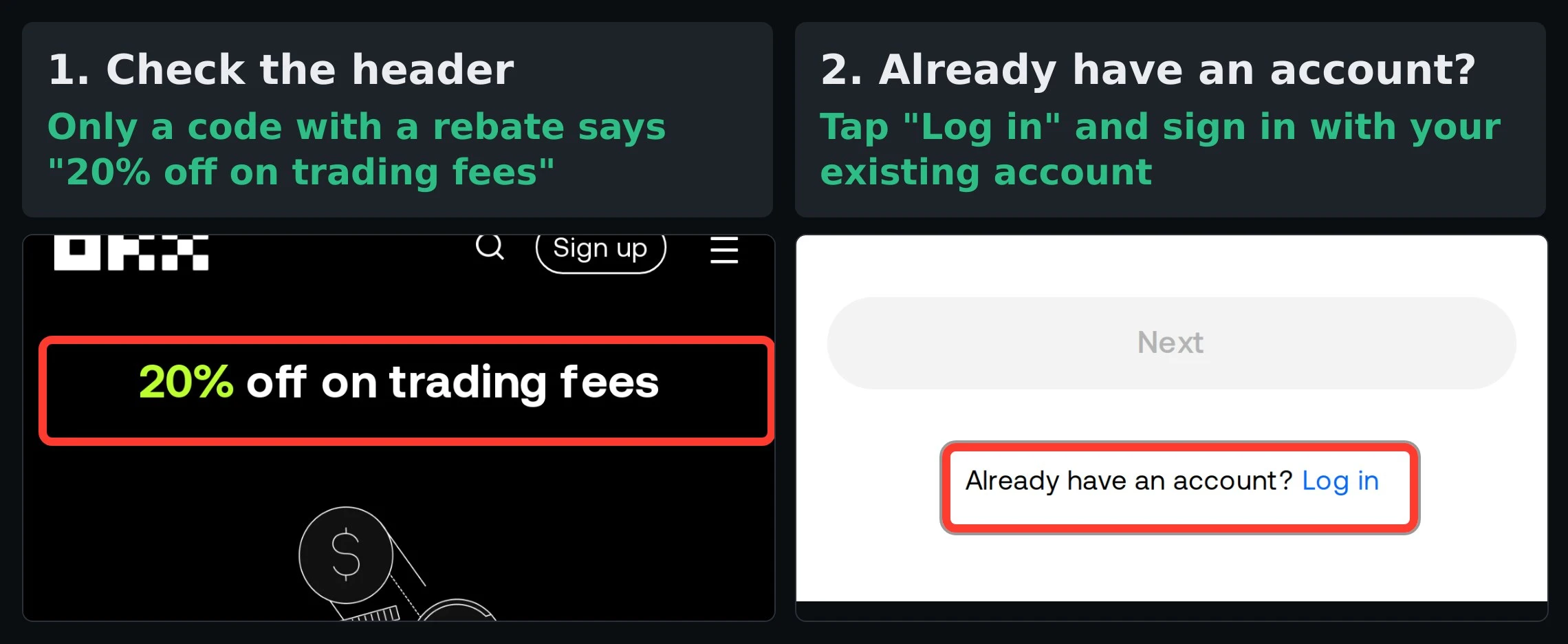
- Check that the header says “20% off on trading fees” (the left image at the top of this article).
- Tap “Log in” next to “Already have an account?” further down the page (the right image at the top) and log in with your existing account and password.
- Check after 3 hours: in the app, go to your profile page (user center → account info) and look at “Invite perks”. If it shows a rate, the binding worked.
Not sure whether 180 days have passed: OKX has no page where you can check whether you qualify. You can look up the date of your last record yourself:
- “Funding history” on the Assets page: your last deposit, withdrawal or transfer.
- “Order history” on the Trade page: your last filled trade.
You only stand a chance of qualifying if both dates are more than 180 days ago and you haven’t logged in during that time. If you don’t qualify, logging in shows no message and your referral relationship stays as it is. If “Invite perks” hasn’t changed after 3 hours, switch to Way 2.
Way 2: submit a rebind application (if Way 1 doesn’t work)
-
Open OKX’s rebind application page in a browser and log in to your OKX account. OKX’s instructions say to log in on the web, so don’t use the app. If a message says you don’t meet the conditions, you can’t use this way; see “If neither way works for you” below.
-
Paste this site’s OKX invitation code into “Invite code”:
Invitation codeJASONFIN -
Paste this text into “Reason for joining” (100 characters at most):
Reason for joiningI would like to rebind to this affiliate invitation code to use the trading fee rebate the affiliate provides. -
Tap “Submit” and wait for the notification: OKX reviews daily and binds eligible accounts within 24 hours at the latest. The notification appears in “Chat” at the top right of the OKX app home page. The new fee rebate takes effect from the next hour.
Rebinding doesn’t affect your trades, positions or assets; it only changes the referral relationship. The application page link is the same for everyone, and who you are rebound to depends on the invitation code you paste in step 2. A regular user’s invite-a-friend code doesn’t work here: you need an affiliate’s invitation code, and this site’s OKX invitation code is an affiliate invitation code.
Source: OKX’s “How do I invite existing users to join the Affiliate Program?”, updated 7 September 2026. Under “Who is eligible to apply?”, the application page lists: “Must be logged into their main OKX account”, “Not a broker or market maker account”, “Not restricted by any regulatory conditions” and “Other conditions may apply”.
Four things to know before you rebind
- Your original referral relationship is removed: this is the same for both ways. Once it works, your fee rebate changes to the new invitation code’s rate.
- Support can’t change it, and closing your account and signing up again doesn’t work: OKX’s FAQs say support can’t manually change a referral relationship, and you can’t switch by deleting and re-creating an account; one set of identity details can verify only one account.
- A failed recall can’t be redone: the Affiliate FAQ says that if a registration or recall fails for any reason, the account can’t be bound to an affiliate afterward.
- A rebound account can be rebound away again: an account that has been rebound can still be rebound from another link if it later has no activity for 180 days. To keep your fee rebate, just trade or move funds now and then.
What the official rules say
You can’t add a code yourself: OKX’s “Referral Program FAQ” says “Referral codes must be added before invitees create their accounts. It won’t be possible to add or change the referral code once the account has been created.”
The 180-day recall: OKX’s Affiliate Program rules, “What’s OKX Affiliate Program?”, say:
A lapsed user is someone who has had no deposits, trades, or withdrawal transfers within the past 180 days. This includes friends who already have an OKX account but haven’t been active.
To count as a valid re-engagement, the lapsed user must log in via your referral link (not by opening the OKX app directly). Upon re-engagement through any approved channel (excluding organic traffic), a new channel relationship is established and the system automatically removes the previous referral relationship.
The two official pages define “no activity” differently, and OKX doesn’t say which one applies:
| Official page | Records you can’t have in 180 days |
|---|---|
| Affiliate Program rules (“What’s OKX Affiliate Program?”) | Deposits, trades, withdrawals, transfers |
| Affiliate FAQ | Deposits, trades, logins (“logged in”) |
Read the other way, the same rule means that if your account is in use and you haven’t submitted a rebind application yourself, your referral relationship won’t be changed. But once an account has had no activity for 180 days, it isn’t only invitation links: logging in after clicking an OKX paid ad may also assign it to a new channel.
Common claims online that OKX’s official pages don’t support
| What people say online | What OKX’s official pages say |
|---|---|
| Contact support and they can change your invitation code | Affiliate FAQ for the European Economic Area: support can’t manually assign or change it |
| Close your account and sign up again to change it | Affiliate FAQ: you can’t change it by deleting and re-creating an account |
| You can still add a code within a few days of signing up | Referral Program FAQ: it can’t be added or changed once the account has been created |
| Logging in on the app binds you again | Affiliate Program rules: you must log in through a referral link; opening the app directly doesn’t count |
| 180 days without logging in is enough to switch | The rules page says deposits, trades, withdrawals and transfers; only the FAQ mentions logging in, so meeting both is safer |
If neither way works for you
The only ways left to lower your fees are VIP tiers and maker rates, covered in “OKX fees”.
If family members or friends were already planning to open an OKX account, they can sign up with this site’s invitation code in their own name and for their own use, and get a 20% trading fee rebate. Please don’t use someone else’s identity to open an account for yourself: under OKX’s rules, one set of identity details can verify only one account.
OKX is an international exchange. The invitation code, link and rate in the box below come from data synced daily. Sign up with this site’s invitation code and you get a 20% trading fee rebate, the same for spot and futures:
This site’s invitation code is not for UK or Hong Kong residents. Please follow the laws where you live. OKX’s fee rebate rates and the conditions under which the rebate stops are in “OKX invitation code”, security and proof of reserves are in the “OKX review”, and another exchange’s rebinding rules are in “How to add or change a Binance referral code”. Whether other exchanges let you add a code after sign-up, and for how long, is covered in “Adding a referral code after sign-up”.
FAQ
Can I change my OKX invitation code?
You can't change it yourself in your account, but OKX has 2 official ways to rebind. First: if your account has had no activity for 180 days, logging in through a new invitation link binds it again. Second: open OKX's rebind application page in a browser, log in, enter an affiliate invitation code and a reason, and submit; OKX reviews daily and binds eligible accounts within 24 hours at the latest. Both remove the original referral relationship.
I forgot to enter an invitation code when I signed up for OKX. Can I add one later?
Not yourself in your account. If your account has had no activity for 180 days, log in through a new invitation link; if it doesn't qualify, open OKX's rebind application page in a browser and enter an affiliate invitation code to apply for rebinding. The application page lists who is eligible: "Must be logged into their main OKX account", "Not a broker or market maker account", "Not restricted by any regulatory conditions" and "Other conditions may apply"; if you don't qualify, you'll see a message as soon as you open the application page.
How does OKX count 180 days of no activity?
Two official OKX pages put it differently: the Affiliate Program rules say no deposits, trades, withdrawals or transfers in 180 days; the Affiliate FAQ says no deposits, trades or logins. The safest approach is to meet both, meaning 180 days with no money movements of any kind and no logins.
How long does an OKX rebind application take?
OKX's "How do I invite existing users to join the Affiliate Program?" says OKX reviews requests daily, and eligible users have the rebinding completed within 24 hours of submission at the latest and receive a system notification; the new fee rebate rate takes effect from the next hour. Rebinding doesn't affect your trades or positions.
How do I rebind an OKX account that has had no activity for 180 days?
Open a new invitation link in a browser, tap "Log in" next to "Already have an account?" on the sign-up page, and log in with your existing account. Opening the OKX app and logging in directly doesn't count. 3 hours after logging in, check whether "Invite perks" on your profile page shows the new rate.
Can I change my OKX invitation code by contacting support or closing my account?
No. OKX's FAQ for the European Economic Area says support can't manually assign or change your referral relationship; the Affiliate FAQ says you can't change channels by deleting and re-creating an account, and one set of identity details can verify only one account.

Comments
Sign in with Google to comment. Your comment will not show your Google profile picture or name; it appears under a randomly generated nickname to protect your privacy.
By signing in you agree to this site's privacy policy.