 Jason Finance
Crypto Exchange Invitation Codes Tested 2026: 263 Codes Found Online at 8 Exchanges, and Nearly Half Give No Fee Rebate at All

Disclosure: this page contains exchange invitation links and codes. If you sign up through them, the exchange may pay Jason Finance a referral commission. It does not raise the fees you pay; the invitation fee rebate is set by the exchange. Our ratings follow the published methodology, where the invitation rebate counts only toward the fees item.
On this page
The short answer
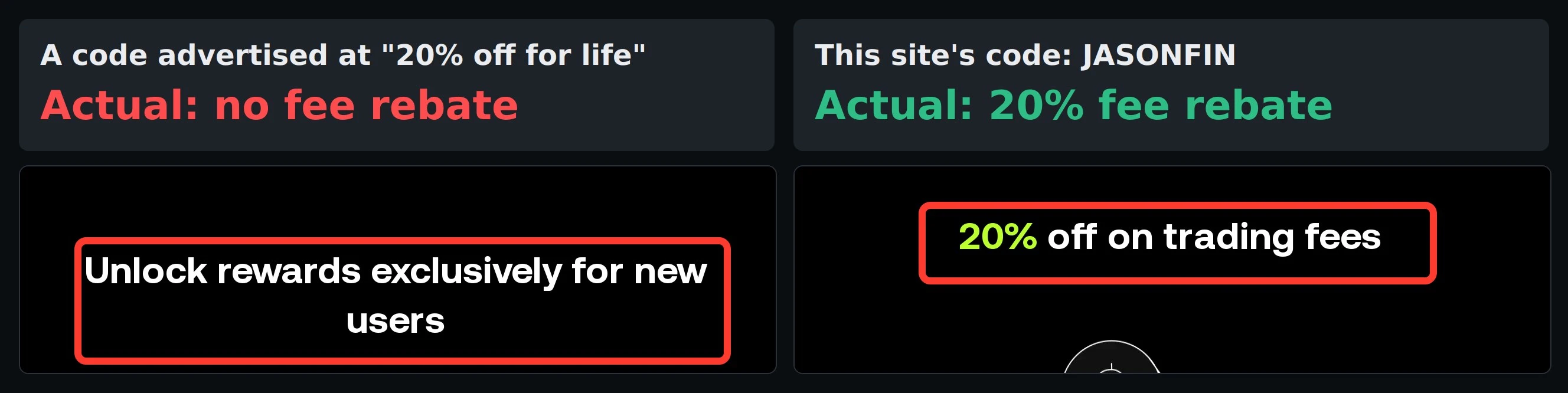
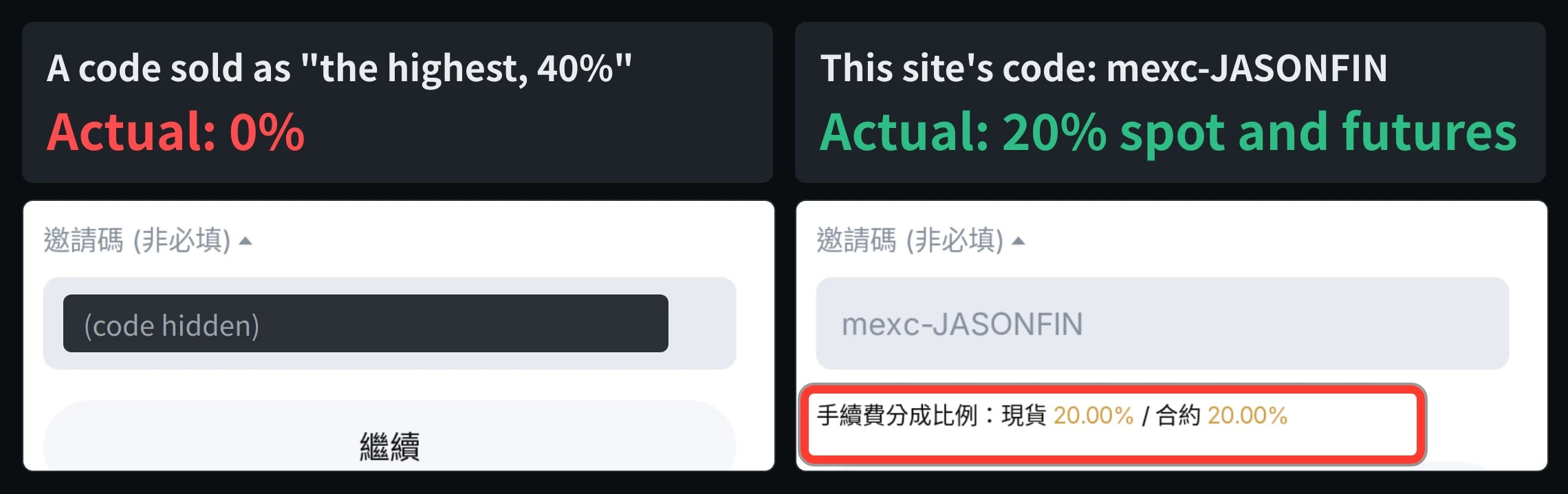
The inviter sets an invitation code's rate, anywhere from 0% to the exchange's official cap. From 31 October to 4 November 2026 I checked 263 codes found online for 7 exchanges: 123 gave no fee rebate, and none of the 45 codes advertised above the 20% cap at OKX, Binance and MEXC exceeded it. To check a code, open the official sign-up page through its dedicated address and read the rate shown.
Suits
- People who haven't signed up yet and want to check a code's rate first
- People who have seen 40% or 50% codes and aren't sure whether to believe them
Doesn't suit
- People who have already signed up: most exchanges don't let you change the code afterwards, so see the post on deadlines for adding a code first
- People looking for extra third-party payouts: this site neither offers nor compares them
What would change this verdict
- An exchange changes its cap on the invitee's rate or how the sign-up page shows it
- Codes found online change their rates (these are the results of checks from 31 October to 4 November 2026)
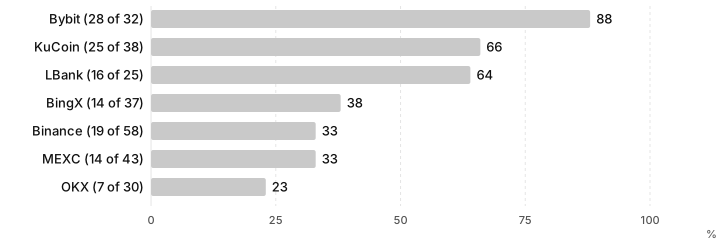
Codes that all go by “invitation code” can give anything from 0% to the exchange’s cap as a fee rebate; it all depends on what the inviter set. From 31 October to 4 November 2026, I took 263 invitation codes found online for 7 exchanges and checked each one on the exchange’s official sign-up page or official data: 123 (about 47%) gave no fee rebate at all. OKX, Binance and MEXC all have an official cap of 20%, and of the 45 codes advertised online above 20%, not one actually exceeded it. Bitget’s sign-up page doesn’t show a rate; of the 36 pages I checked, 9 advertised more than the official cap, and none could show official proof.
This post is the summary table for all 8: each exchange’s official cap, what I found, the patterns that show up across exchanges, and how to check a code yourself before signing up. Each exchange’s detailed rules and sign-up steps are in its own invitation code post.
This article is a summary of information, not investment advice. The results are what the exchanges’ official sign-up pages and official data showed from 31 October to 4 November 2026. Codes found online and exchange rules both change, so go by the page as it is when you sign up. This site does not name other websites or creators, and does not compare extra payouts from third parties; for its own offer, this site only describes the fee rebate the exchange officially provides.
Exchange invitation code summary: official caps at 8 exchanges vs the rates I found
| Exchange | Official cap on the invitee’s rate | Codes checked | No rebate at all | Codes advertised above the cap | Checked |
|---|---|---|---|---|---|
| OKX | 20%, set by the affiliate | 30 | 7 | 9 advertised above 20%: none exceeded it, 4 at 0% | 31 Oct |
| Binance | 20%, spot, margin and futures | 58 | 19 | 26 advertised above 20%: none exceeded it, 5 at 0% | 1 Nov |
| MEXC | 20%, set separately for spot and futures | 43 | 14 | 10 advertised above 20%: none exceeded it | 4 Nov |
| BingX | 45% | 37 | 14 | 4 advertised at 45% or 50%: all 0%; highest found 25% | 3 Nov |
| LBank | Not published | 25 | 16 | 5 advertised at 50% or more: all 0% | 4 Nov |
| KuCoin | Set by the inviter (partner codes) | 38 | 25 | Highest found 31% | 4 Nov |
| Bybit | Neither the referral nor the affiliate program gives invitees a fee rebate | 32 | 28 | 6 advertised at 33% or more: only 1 had any, and it was 20% | 4 Nov |
| Bitget | 20% (official guide) | 36 pages | Can’t be checked before sign-up | 9 pages advertised above 20%; 0 showed official proof | 3 Nov |
“No rebate at all” counts codes the official page showed at 0% or with no fee rebate text. It leaves out codes that couldn’t be found (1 each at OKX, Binance, MEXC and Bybit). For KuCoin only partner codes are counted, since regular users’ codes show no rate before sign-up.
5 patterns across the 8 exchanges
1. No figure above the official cap ever appeared. OKX, Binance and MEXC all state in their official guides that the invitee gets at most 20%. Across the three, the 45 codes advertised online above 20% showed at most 20% on the official pages, and 5 at Binance and 4 at OKX showed 0%. BingX’s cap is 45%, and the 4 codes advertised at 45% or 50% all showed 0%. Any amount above the cap, if it exists at all, can only be something the website itself promises to pay. It doesn’t come from the exchange.
2. Figures that look high are mostly stacked. Binance’s 40% is often 20% plus the 25% off for paying fees with BNB. OKX’s “up to 52%” adds OKB deductions and VIP tiers to the code, but OKX’s trading fee FAQ says OKB deductions are not currently offered. Bybit’s “up to 58%” adds the MNT deduction. You get these discounts without any invitation code, so they are not extra from the code.
3. The most copied codes don’t necessarily give a rebate. The most cited LBank code, which appears on many English pages, is advertised as “up to 50%” and shows 0% on the sign-up page. A Bybit code advertised as a “50% permanent rebate” actually gives 20%. A code being copied onto many pages doesn’t mean anyone has checked it.
4. Few pages can show proof from the official page. None of the 9 OKX pages advertising more than 20% included a screenshot of OKX’s sign-up page. Of 54 Binance pages, only 1 had a recent screenshot of the sign-up page. Of 36 Bitget pages, none showed official proof of the rate. Where pages did include screenshots, the rates mostly matched the official pages.
5. “Permanent”, “for life” and “the highest anywhere” are everywhere, but the rules don’t back them up. None of OKX’s, Binance’s or LBank’s official rules guarantee a rate for life, and pages whose codes actually give 0% or 5% use the same words. The inviter sets the rate, and the inviter can change it.
Check it yourself before signing up: where to look at each exchange
Most exchanges show the code’s rate on the sign-up page, but only when you open it through the code’s dedicated address. If you type the code yourself on the regular sign-up page, you usually won’t see the rate. Make sure the address is on the exchange’s official domain.
| Exchange | Open this address (followed by the code) | What you see when there is a rebate |
|---|---|---|
| OKX | okx.com/join/ |
The header reads “X% off on trading fees”; without a rebate it reads “Unlock rewards exclusively for new users” |
| Binance | accounts.binance.com/register?ref= |
The left side reads “UP TO X% TRADE REBATES”; without a rebate it shows only a sign-up reward amount |
| MEXC | mexc.com/acquisition/custom-sign-up?shareCode= |
Under “Referral Code (Optional)”: “Commission sharing: Spot X% / Futures Y%” |
| BingX | bingx.com/en/partner/ |
Under the referral code field: “You’ll enjoy X% rebate” |
| LBank | lbank.com/en-US/register?icode= |
Under “Referral Code”: “You will receive a X% futures fee discount” (futures only) |
| Bybit | bybit.com/en/invite?ref= |
Under “Referral Code (Optional)”: “You will be eligible to X% fee cashback” |
| KuCoin | Official lookup URL kucoin.com/_api/growth-ucenter/invitation/user-by-rcode?rcode= (then &lang=en_US) |
The cashback percentage in “cashbackRatioText”; the sign-up page shows no rate |
| Bitget | The sign-up page shows no rate | The only option is to ask for a screenshot of the inviter’s Bitget partner dashboard settings and read the direct-client column |
This is how the pages looked from 31 October to 4 November. The exchanges haven’t officially explained these displays, and they may change with a redesign. If you can’t see a rate and the inviter can’t show a screenshot, treat it as 0%.
How I checked
- Finding codes: I searched for “{exchange} invitation code”, “referral code”, “rebate” and similar terms in Traditional Chinese, Simplified Chinese and English, and noted the codes and claimed rates from the first few pages of results.
- Checking rates: I opened each code at the official address in the table above, or checked the official data behind the exchange’s sign-up page (Binance, KuCoin), and recorded the rate shown. I didn’t rely on the pages’ own claims or screenshots.
- No names: neither the article nor the comparison images say which website or creator a code came from, and other people’s codes are hidden in the images.
- Ongoing checks: the comparison images at the top of the article are in a daily check. If the rates haven’t changed, the verified date in the caption is updated; if they have, the image is retaken. Comparison screenshots that can’t be checked automatically carry only the date they were taken, and I review them by hand every month.
- Limits: these are results from particular days, and codes found online can change their rates at any time. Some exchanges show different pages by region, so what you see may differ from what I saw.
Already signed up without the rebate?
At most exchanges you can’t change the code after signing up, and where you can add one, there are time limits and conditions: Binance within 30 days of registration and before any deposit or trade, Bybit within 14 days and only for affiliate codes. Each exchange’s deadline and conditions are in Deadlines for adding an invitation code after sign-up.
OKX, Binance and Bybit also have official ways to switch or re-bind an inviter, with stricter conditions: see OKX: changing your invitation code, Binance: re-binding an invitation code and Bybit: changing your invitation code.
This site’s invitation codes
Below are this site’s invitation codes for each exchange and the official fee rebate, with rates synced daily from the data table. You can check them yourself before signing up in the same way.
FAQ
How many exchange invitation codes found online actually give a fee rebate?
From 31 October to 4 November 2026 I checked 263 codes found online for 7 exchanges. 123 of them (about 47%) gave no fee rebate at all on the exchange's official sign-up page or official data. Leaving out Bybit, whose codes mostly have no fee rebate in the first place, it is still 95 of 231, about 41%.
Are the 40% and 50% invitation codes real?
OKX, Binance and MEXC all cap the invitee's rate at 20%. Of the 45 codes I found advertised above 20% (OKX 9, Binance 26, MEXC 10), none showed more than 20% on the official pages, and quite a few showed 0%. Anything above the cap does not come from the exchange.
How can I check a code's rate before signing up?
OKX, Binance, BingX, MEXC, LBank and Bybit show the rate on the sign-up page when you open the code's dedicated address. KuCoin has an official lookup URL. Bitget's sign-up page shows no rate, so the only option is to ask for a screenshot of the inviter's Bitget partner dashboard settings. The table in the article lists each address and the text to look for.
Where do figures like 40%, 52% and 58% come from?
Mostly from adding the code's rate to the discount for paying fees with the platform token, or to VIP tiers: for example Binance's 25% off with BNB, or Bybit's MNT deduction. You get those discounts without any invitation code, so they are not extra from the code.
I entered the wrong code, or none, when signing up. Can I change it?
At most exchanges you can't change it after signing up, and where you can add one, there are time limits and conditions: Binance within 30 days of registration and before any deposit or trade, Bybit within 14 days. See Deadlines for adding an invitation code after sign-up, exchange by exchange.

Comments
Sign in with Google to comment. Your comment will not show your Google profile picture or name; it appears under a randomly generated nickname to protect your privacy.
By signing in you agree to this site's privacy policy.