 Jason Finance
KuCoin Referral Code 2026: A 60% Fee Rebate. Are the 30%, 40% and 50% Codes Real? I Checked 43 Codes, and How to Verify One With KuCoin's Official URL Before Signing Up

On this page
- 1.KuCoin has two kinds of invitation code, with different rules
- 2.I checked 43 KuCoin referral codes found online
- 3.Verify a KuCoin referral code before signing up: three checks
- 3.1Check 1: look up the rate with KuCoin’s official lookup URL
- 3.2Check 2: work out which kind of code it is
- 3.3Check 3: who pays anything above the rate, and how
- 4.The 10,650 USDT new user reward has nothing to do with the invitation code
- 5.Signing up for KuCoin with an invitation code: steps
- 5.1Where you can’t sign up
- 6.Already signed up without an invitation code?
- 7.How much a 60% fee rebate saves
- FAQ
The short answer
KuCoin calls a code's fee rebate "cashback": the inviter sets one rate per code, and this site's is 60%. The sign-up page hides the rate, but KuCoin's official lookup URL shows it. On 4 November 2026 I checked 43 codes online: 25 of the 38 affiliate codes were 0%, the highest 31%; none advertised at 40% or 50% was as claimed. Regular user codes last 365 days and can't be looked up before sign-up.
Suits
- People who haven't signed up for KuCoin yet and want to check an invitation code's rate first
- People who have seen 30%, 40% or 50% KuCoin codes and aren't sure whether to trust them
Doesn't suit
- People who have already signed up for KuCoin: there is no official way to add a code afterward
- People living in KuCoin's restricted locations, such as the United States, Singapore, mainland China, Hong Kong, Malaysia, Russia, Belarus, France and the Netherlands
What would change this verdict
- KuCoin changes the rules of its Affiliate Program or its Invite Friends program
- KuCoin's sign-up page starts showing the rate, or the lookup URL is no longer open
- The fee rebate rate on this site's invitation code changes (the invitation box is synced daily)
Disclosure: this page contains exchange invitation links and codes. If you sign up through them, the exchange may pay Jason Finance a referral commission. It does not raise the fees you pay; the invitation fee rebate is set by the exchange. Our ratings follow the published methodology, where the invitation rebate counts only toward the fees item.
Sign-up screenshot

The image above shows the settings for this site’s invitation code JASONFIN in KuCoin’s dashboard: the rate is set to 60%. The screenshot comes from this site’s daily-synced invitation code data. KuCoin’s official lookup URL shows the same number: “60% cashback” (Check 1 below).
KuCoin calls its fee rebate “cashback”. The inviter sets the rate, and codes that all go by “KuCoin referral code” can give anything from 0% to 60%. On 4 November 2026 I searched for terms such as “KuCoin 邀請碼” (KuCoin invitation code) and “KuCoin referral code”, and checked the 43 codes on about 28 pages one by one with KuCoin’s official lookup URL: of the 38 affiliate codes, 25 were 0%, and the highest rate was 31%. The one advertised as “40% OFF” was actually 20%, and the one advertised as “20% lifetime” was actually 10%. This article covers KuCoin’s official rules, what my check found, how to check a code yourself before signing up, and the sign-up steps.
This article is a summary of information, not investment advice. The rules come from KuCoin’s announcements, its Invite Friends page and its terms of use, and the check results are the data KuCoin’s official lookup URL showed on 4 November 2026. KuCoin changes its rules and pages, so go by the page as it is when you sign up. This site does not name other websites, and does not give advice on futures or leveraged trading.
KuCoin has two kinds of invitation code, with different rules
KuCoin’s invitation codes come in two kinds, and the official lookup URL tells you which one a code is. Articles online often mix up the rules for the two:
| Affiliate code | Regular user code | |
|---|---|---|
| Who has one | Promoters who have joined the KuCoin Affiliate Program | Every KuCoin user |
| Rate | Set by the inviter, one rate per code | Set by the inviter; the Invite Friends page headline says “Up to 35%” |
| Can you look up the rate before signing up? | Yes (official lookup URL) | No |
| Period (KuCoin’s rules) | “Lifetime” for invitees registered after 22 September 2022 | 365 days after sign-up |
| When it stops (KuCoin’s rules) | Trades by invitees at level LV4 or above don’t count (another passage of the same guide says Level 3); zero-fee trades don’t count | When the invitee reaches VIP 3 or above; API trading is not eligible |
| Official source | “KuCoin Affiliate Program 2025 Latest Guide” (11 September 2025), “KuCoin Affiliate Program: Everything You Should Know (Overview)” (25 July 2025) | “Invite Friends to Earn” (rules from May 2025) |
This site’s invitation code is an affiliate code, with a 60% rate.
Affiliate codes aren’t guaranteed to stay the same either: under KuCoin’s Affiliate Program rules, if the inviter’s conditions change, the invitee’s cashback rate may drop with them, possibly as low as 0. None of the pages claiming “permanent” or “unconditional permanent binding” mention this.
How the cashback works: KuCoin’s word is “cashback”, and the Invite Friends page says “The cashback amount set will be distributed automatically”, meaning it is refunded after you trade. KuCoin doesn’t say officially which account it goes to or when it arrives.
One rate per code: KuCoin’s lookup data has a single rate, with no split between spot and futures.
I checked 43 KuCoin referral codes found online
On 4 November 2026 I searched for terms such as “KuCoin 邀請碼” (KuCoin invitation code), “KuCoin 推薦碼” (KuCoin referral code), “KuCoin 返佣” (KuCoin rebate) and “KuCoin referral code”, collected about 28 pages that listed codes (in Traditional Chinese, Simplified Chinese and English), and checked the 43 codes one by one with KuCoin’s official lookup URL: 38 were affiliate codes, 4 were regular user codes (no rate shown) and 1 was invalid.
| What the page claimed | Codes | KuCoin’s official data |
|---|---|---|
| More than 30% (31%, “40% OFF”, 50%) | 5 | 31%: 2; 20%: 1; 0%: 1; regular user code, no rate shown: 1 |
| 30% (most said “permanent” or “lifetime”) | 9 | 30%: 5; 20%: 1; 0%: 2; regular user code: 1 |
| 20% to 28% | 11 | 10%: 1; 0%: 10 |
| 5% to 10% | 2 | 10%: 1; 0%: 1 |
| No rate given | 16 | Mostly 0%, plus one each at 25% and 20%; 1 invalid, 2 regular user codes |
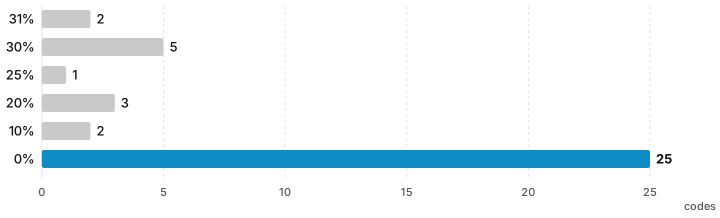
A few patterns:
- Of the 38 affiliate codes, 25 were 0%. Codes advertised at 28%, 21%, 20% and “30% permanent” all included some at 0%.
- The highest rate was 31%, and none came close to 60%.
- The code advertised at 50% was a regular user code: its rate can’t be looked up before signing up, and KuCoin’s Invite Friends page headline says “Up to 35%”.
- “44%” comes from adding the KCS discount: paying spot fees in KCS on KuCoin gives a 20% discount, which you get without any invitation code, and it applies to spot only.
- Some pages had clearly copied another exchange’s template, for example saying KuCoin uses a model where “the fee is built into the quoted price”. That is not how KuCoin charges fees.
- No page showed a screen of KuCoin displaying the rate. The most any offered was a diagram they had made themselves.
My view: KuCoin’s sign-up page doesn’t show the rate, so whatever number a page writes, readers can’t see it on the sign-up page. The lookup URL in the next section lets you confirm it yourself before signing up.
For the results at all 8 exchanges side by side, see Crypto exchange invitation codes tested.
Verify a KuCoin referral code before signing up: three checks
Check 1: look up the rate with KuCoin’s official lookup URL
KuCoin’s sign-up page reads the code’s data in the background, but the page doesn’t show the rate (I tried the desktop and mobile versions, in Traditional Chinese and English). You can open KuCoin’s official lookup URL directly in your browser:
https://www.kucoin.com/_api/growth-ucenter/invitation/user-by-rcode?rcode=INVITATION_CODE&lang=en_US
What you see is a block of text data. Look for these two items:
- “cashbackRatioText”: for example “60% cashback”, which is the code’s rate; “0% cashback” means there is none.
- “inviterCategory”: “TobReferral” is an affiliate code; “TocReferral” is a regular user code, which doesn’t show a rate.
First make sure the URL is kucoin.com. The data also includes a masked version of the inviter’s account (for example a partly hidden email address), which KuCoin itself displays. For this site’s code, the lookup shows “60% cashback” and “TobReferral”. This is the format I saw on 4 November 2026; KuCoin has not formally documented this URL, so it may change.
Check 2: work out which kind of code it is
If the lookup shows “TocReferral”, or the person calls it a “KuCoin friend invitation code”, it is a regular user code: under KuCoin’s rules it lasts only 365 days, stops once you reach VIP 3, and its rate can’t be looked up before signing up. When a page says “permanent”, first confirm that it is an affiliate code.
Check 3: who pays anything above the rate, and how
If someone advertises a higher rate than the lookup shows, get clear answers to the following. If they can’t answer, assume there is nothing:
- Evidence: a screen from KuCoin’s lookup URL or dashboard showing the rate, or records of actual payouts.
- Who pays: a company name or a responsible person, not a nickname.
- How it is calculated and when it is paid: on what basis, how often, and where it is paid to.
- Written rules: whether there is a public terms page, rather than “message me and join the group”.
The 10,650 USDT new user reward has nothing to do with the invitation code
KuCoin’s sign-up page says new users can get rewards of up to 10,650 USDT. The steps in the Rewards Hub are sign up, verify your identity, make a first deposit and make a first trade, and signing up earns a coupon pack “worth 400 USDT”. When I opened the sign-up page with a 0% code and with a regular user code, both showed the same 10,650 USDT, so this number has nothing to do with a code’s rate and can’t be used to compare codes. KuCoin doesn’t list the full task conditions on a public page, so go by what the Rewards Hub shows after you log in. I checked from a network in India, and it may differ by region.
Signing up for KuCoin with an invitation code: steps
- Confirm the rate with Check 1 first, then open the sign-up page from the invitation link.
- Check that the invitation code field (marked optional) already holds the code you want to use. KuCoin’s invitation codes are not case sensitive.
- Enter your email or phone number, set a password and complete verification as shown on screen.
- Complete identity verification: the new user tasks in the Rewards Hub also include identity verification.
Where you can’t sign up
The Restricted Locations in KuCoin’s Terms of Use (updated 29 October 2026): the United States (including its territories), Singapore, the mainland of China and Hong Kong, Malaysia, Kazakhstan, Uzbekistan, Russia, Belarus, Ontario and British Columbia of Canada, France, the Netherlands, and the Crimea, Donetsk, Luhansk, Zaporizhzhia and Kherson regions of Ukraine. Compared with the 29 September version, this one adds Russia and Belarus. In addition, the KuCoin Affiliate Program is not available to residents of Belgium, Turkey, France or the Netherlands.
Already signed up without an invitation code?
I found no official way to add a code later on KuCoin. The invitation code field is only on the sign-up form, and there is no rule for rebinding long-inactive accounts. Whether other exchanges let you add a code after sign-up, and for how long, is covered in “Adding a referral code after sign-up”.
If family members or friends were already planning to open a KuCoin account, they can sign up in their own name with this site’s invitation code, for their own use. Please don’t open an account under someone else’s identity for your own use: exchanges require identity verification in your own name.
If you have already signed up, the only ways left to lower your fees are VIP levels and the KCS discount (spot only), covered in “KuCoin fees”.
How much a 60% fee rebate saves
Based on KuCoin’s regular user (VIP 0) fees: Class A spot coins 0.1% for both maker and taker, futures 0.02% maker and 0.06% taker (“KuCoin VIP Fee Structure”, updated 7 May 2026).
| Case | Fee | 60% cashback | What you pay |
|---|---|---|---|
| A 1,000 USDT spot trade (Class A coin) | 1 USDT | 0.6 USDT | 0.4 USDT |
| A 10,000 USDT futures trade (contract value, taker) | 6 USDT | 3.6 USDT | 2.4 USDT |
| 10,000 USDT of spot a month, for a year | 120 USDT | 72 USDT | 48 USDT |
For the same trading volume, a 30% code gives 36 USDT of cashback a year, and a 0% code gives none. KuCoin’s spot fees also differ across Class A, B and C coins (0.1%, 0.2% and 0.3%), and the cashback stops once you reach VIP 3 or VIP 4. Both, with a level-by-level comparison of VIP fees with and without the rebate, are covered in “KuCoin fees”.
KuCoin is an international exchange. The invitation code, link and rate in the box below come from data synced daily. Sign up with this site’s invitation code and you get a 60% trading fee rebate, the same for spot and futures:
This site’s invitation code is not for UK or Hong Kong residents. Please follow the laws where you live. KuCoin’s security, proof of reserves and regulatory record are covered in the “KuCoin review”; how fee rebates work at each exchange is in “Crypto exchange fee rebates”.
FAQ
What fee rebate does a KuCoin referral code give?
It depends on the code. The inviter sets the rate, which KuCoin calls "cashback"; each code has a single rate, the same for spot and futures. This site's code is 60%; of the 43 codes online that I checked, the highest was 31%.
Are the 30%, 40% and 50% KuCoin referral codes online real?
Not necessarily. On 4 November 2026 I checked 43 codes with KuCoin's official lookup URL: 25 of the 38 affiliate codes were 0%; the one advertised as "40% OFF" was actually 20%, and the one advertised as "20% lifetime" was actually 10%. The code advertised at 50% was a regular user code, whose rate can't be looked up before signing up.
How can I find out a KuCoin referral code's rate?
KuCoin's sign-up page doesn't show the rate. Open KuCoin's official lookup URL in your browser: kucoin.com/_api/growth-ucenter/invitation/user-by-rcode?rcode= followed by the code, then &lang=en_US, and see what percentage of cashback "cashbackRatioText" shows. Regular user codes don't show a rate.
Is the cashback from a KuCoin referral code permanent?
It depends on the type of code. Under KuCoin's Affiliate Program rules, the period is lifetime for invitees registered after 22 September 2022, but if the inviter's conditions change, your cashback rate may drop with them, as low as 0. For regular user codes, the period is 365 days after sign-up, and it stops once the invitee reaches VIP 3 or above.
Can I add a KuCoin referral code after signing up?
I found no official way to add one later on KuCoin; the invitation code field is only on the sign-up form. Enter the invitation code when you sign up.

Comments
Sign in with Google to comment. Your comment will not show your Google profile picture or name; it appears under a randomly generated nickname to protect your privacy.
By signing in you agree to this site's privacy policy.