 Jason Finance
Pionex Referral Code 2026: 15% Futures Fee Rebate, Shown on the Sign-Up Page; What the 20% Codes Actually Show

Disclosure: this page contains exchange invitation links and codes. If you sign up through them, the exchange may pay Jason Finance a referral commission. It does not raise the fees you pay; the invitation fee rebate is set by the exchange. Our ratings follow the published methodology, where the invitation rebate counts only toward the fees item.
On this page
The short answer
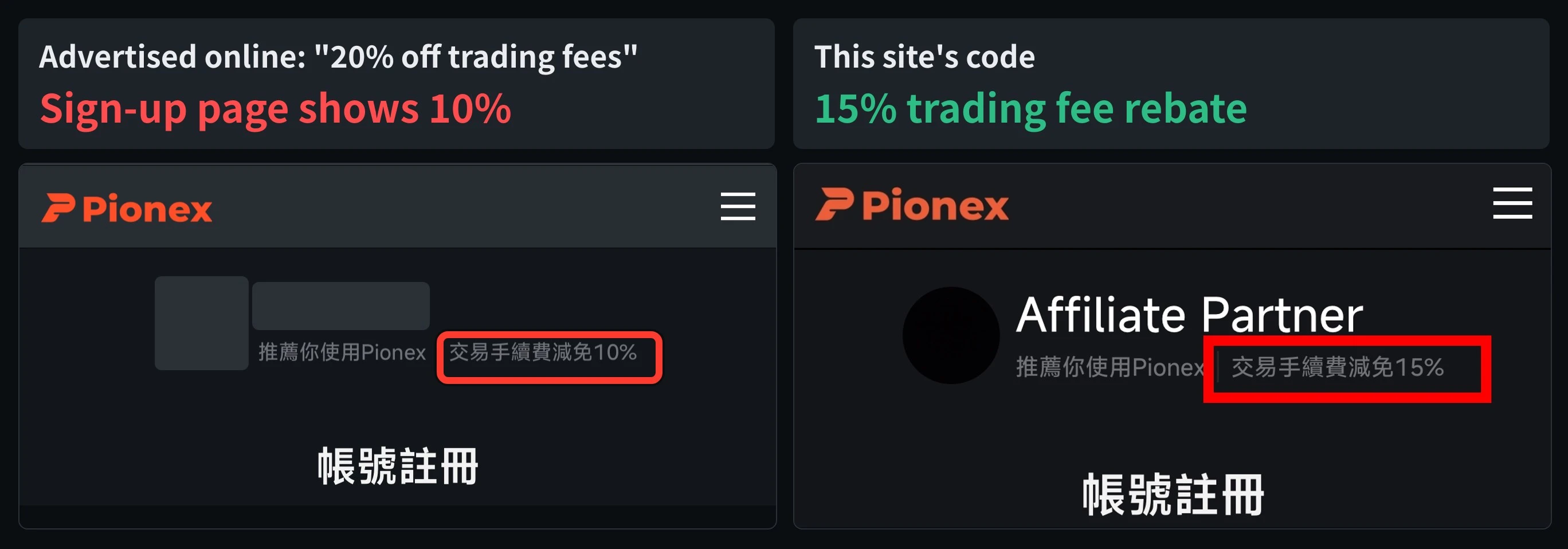
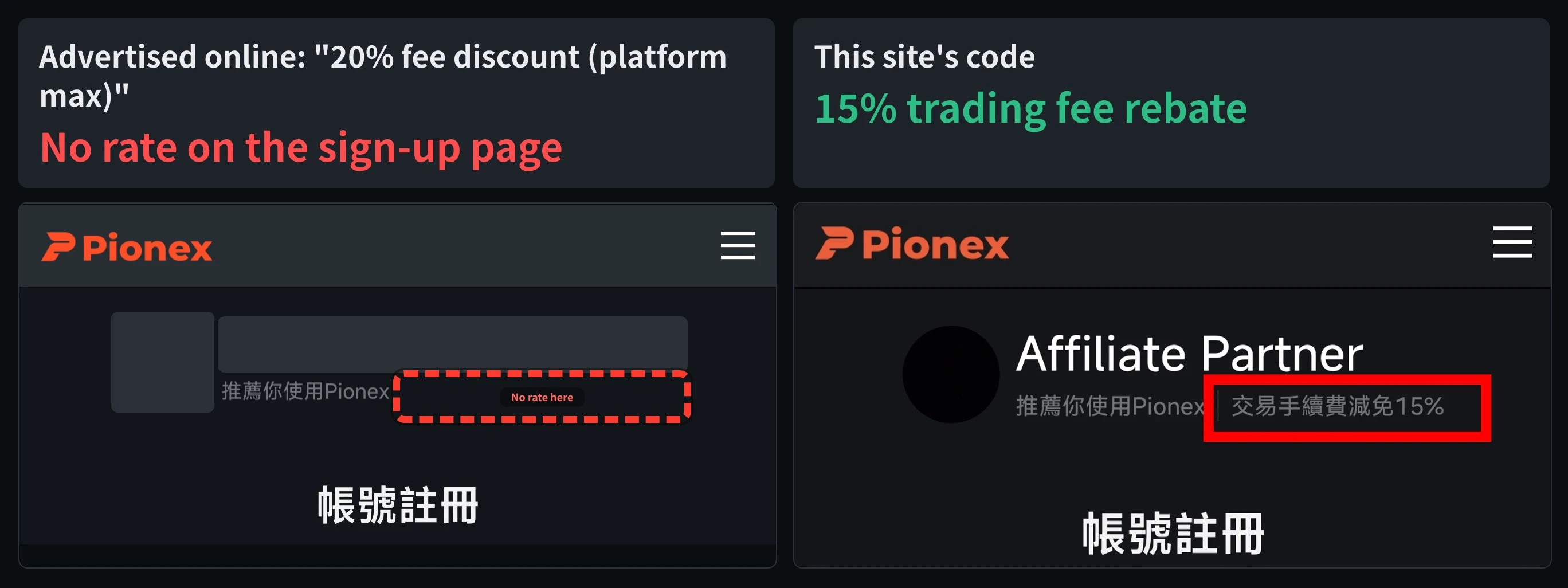
Pionex gives every ordinary inviter a fixed 20% spot and 15% futures commission, and the invitee's rebate is a share of it, so 15% is the most on futures. This site's code shows a 15% trading fee rebate right on Pionex's sign-up page, so you can see it before signing up. On 7 November 2026, two codes advertised online at 20% showed no rate and 10% on the sign-up page.
Suits
- People who mainly trade futures and want to check a code's rate first
- People who have seen 20% Pionex codes and want to know if they are real
Doesn't suit
- People who signed up more than 14 days ago, or placed an order more than 3 days ago: the code can no longer be added
- People in Pionex's restricted regions, such as mainland China, Hong Kong, the US, Singapore, the UK and Canada
What would change this verdict
- Pionex changes its inviter commission rules
- Pionex redesigns the sign-up page and stops showing the rate
- This site's code changes its rate (the referral box syncs daily)
A Pionex referral code gives at most 15% off fees on futures. Pionex’s commission rules state that every ordinary inviter gets a fixed commission of 20% on spot and 15% on futures, and the rebate an invitee receives is a share the inviter passes on from that commission. There is no way to pass on more than 15% on futures. Open Pionex’s sign-up page with this site’s code and the top of the page says “交易手續費減免15%” (15% trading fee rebate), so you can see it before you sign up.
Some Pionex codes online are advertised at “20%”. On 7 November 2026 I opened two of them on my phone. The one advertised as “20% fee discount (platform max)” showed no rate at all on Pionex’s sign-up page, and the one advertised as “20% off trading fees” showed a 10% trading fee rebate (the two comparison images at the top of this article).
This article is a summary of information, not investment advice. The rules come from Pionex’s help center, and the sign-up page images are phone screenshots taken on 7 November 2026. Pionex changes its rules and pages, so go by the page as it is when you sign up. This site does not name other websites or creators, and does not give advice on futures or leveraged trading.
Why 15% is the ceiling on futures: Pionex’s commission rules
Pionex’s Affiliate Program page (rules in force from 31 July 2025, page updated 15 September 2026) says: “All inviters receive a fixed spot commission rate of 20% and futures commission rate of 15%.” In other words, every inviter gets the same: 20% on spot (including leveraged tokens) and 15% on futures.
The same page explains where the invitee’s rebate comes from: the inviter may “allocate a portion of your commission rate as a rebate ratio for your friends, which serves as their trading fee discount.” So:
| Inviter’s commission (fixed) | Most the invitee can get | |
|---|---|---|
| Spot (incl. leveraged tokens) | 20% | 20% |
| Futures | 15% | 15% |
- A futures rebate of 20% isn’t possible under these rules: the futures commission is only 15%, so even if the inviter passes on all of it, you get 15%.
- Spot could in theory reach 20%, but only if the inviter gives up the entire spot commission. The sign-up page shows a single number, so you can’t tell the spot and futures rates apart there. According to the data synced daily, this site’s code gives 15% on both spot and futures.
What the 20% Pionex codes show on the sign-up page
Pionex’s sign-up page shows the inviter’s name at the top with the line “推薦你使用Pionex” (recommends Pionex to you). For a code with a fee rebate, the line continues with “交易手續費減免X%” (X% trading fee rebate). That line is part of Pionex’s own page, not text the inviter can edit.
On 7 November 2026 I opened two codes advertised online at 20% on my phone:
| Advertised online | Pionex sign-up page shows |
|---|---|
| “20% fee discount (platform max)” | Only “推薦你使用Pionex”, no rate at all |
| “20% off trading fees” | “交易手續費減免10%” (10% trading fee rebate) |
| This site’s code | “交易手續費減免15%” (15% trading fee rebate) |
Even if the “platform max” code did come with a rebate, it could give at most 15% on futures; with nothing shown on the sign-up page, there’s no sign of any rebate. Both screenshots are what I saw on my own phone, with the inviters’ names and avatars hidden.
I only checked two codes, so this doesn’t mean every Pionex code advertised at 20% is the same. But you can check any of them yourself before signing up, using the method below. Results for other exchanges’ codes are collected in Crypto exchange invitation codes tested.
Check it yourself before signing up: the line next to the recommendation
- Open Pionex’s sign-up page through the code’s dedicated address:
pionex.com/zh-TW/signUp?r=followed by the code. Make sure the address is on pionex.com. - Look under the inviter’s name at the top. A code with a rebate shows “推薦你使用Pionex|交易手續費減免X%”.
- If you only see “推薦你使用Pionex” with no percentage after it, you can’t see any rebate. Don’t rely on the number a web page gives you.
Once you have checked the rate, you can sign up on the same page: Pionex’s sign-up page offers six ways, Google, Apple, Line, Telegram, email and phone number. For Pionex’s sign-up process, security and proof of reserves, see the Pionex review.
JASONFINHow much the 15% rebate saves
Using the regular rates in Pionex’s help center (spot maker and taker 0.05%, futures maker 0.02%, taker 0.05%):
| Trade | Regular fee | With the 15% rebate |
|---|---|---|
| 1,000 USDT spot trade | 0.5 USDT | 0.425 USDT |
| 10,000 USDT futures taker trade (contract value) | 5 USDT | 4.25 USDT |
| 10,000 USDT futures maker trade (contract value) | 2 USDT | 1.7 USDT |
| 100,000 USDT of futures taker trades a month, for a year | 600 USDT | 510 USDT |

Compared with the 10% code, 100,000 USDT of futures taker trades a month saves 30 USDT more over a year; compared with the code that shows no rate on the sign-up page, it saves 90 USDT more.
According to Pionex’s How to check your fee discount ratio and cashback records (updated 19 August 2026), the rebate isn’t deducted when you place the order: the order page and fee calculation still show the full fee. It is paid back to your account separately after the trade settles, and the records update hourly. After signing up, you can check it here:
- Rate: in the app, tap your avatar at the top left, then “Referral Code” (on the website: avatar at the top right, then “Dashboard”, then the i next to “Referral Code”).
- Rebate records: in the app, “Home”, then “My Account”, then “Deposit”, then the clock icon for wallet records, and swipe right to “Invitee Cashback” (on the website: “More” in the top menu, then “Rebate”).
Pionex’s own rates are low among international exchanges; for a comparison, see International exchange fee comparison.
Already signed up without a referral code?
Pionex lets you add one, but only for a short time. Pionex’s Refill Referral Code article (updated 24 September 2026) says you can add a referral code within 14 days of signing up, and within 3 days if you have already placed an order. After that, it can’t be added. Other exchanges’ deadlines are in Deadlines for adding an invitation code after sign-up.
If family members or friends were already planning to open a Pionex account, they can sign up with this site’s code in their own name, for their own use. Please don’t open an account under someone else’s identity for yourself.
Pionex is an international exchange serving Chinese-speaking users worldwide. The code, link and rate in the referral box below come from data synced daily:
This site’s referral codes are not for residents of the UK or Hong Kong; please follow the laws where you live. For how fee rebates work at each exchange, see What is an exchange fee rebate?.
FAQ
What is the maximum fee rebate with a Pionex referral code?
Under Pionex's Affiliate Program rules (in force from 31 July 2025, page updated 15 September 2026), every ordinary inviter gets a fixed commission of 20% on spot and 15% on futures, and the invitee's fee rebate is a share of that commission. So an ordinary code gives at most 15% on futures and at most 20% on spot.
Are the 20% Pionex referral codes online real?
On 7 November 2026 I checked two codes advertised at 20%: one showed no rate at all on Pionex's sign-up page, and the other showed a 10% trading fee rebate. Under the official rules, the futures rebate can't exceed 15% anyway.
How can I tell what rebate a Pionex referral code gives?
Open Pionex's sign-up page through the code's dedicated address (pionex.com/zh-TW/signUp?r= followed by the code) and check whether a trading fee rebate percentage appears next to the line recommending Pionex at the top. If there's no percentage, you can't see any rebate.
Can I add a Pionex referral code after signing up?
Yes, within a time limit. Pionex's Refill Referral Code article (updated 24 September 2026) says you can add a code within 14 days of signing up, or within 3 days if you have already placed an order.
What fees do I pay with this site's Pionex code?
This site's code gives a 15% fee rebate. At Pionex's regular rates, spot goes from 0.05% to 0.0425%, futures taker from 0.05% to 0.0425% and futures maker from 0.02% to 0.017%. According to Pionex's help center, the rebate isn't deducted when you trade; it is paid back to your account after the trade settles, and the records update hourly.

Comments
Sign in with Google to comment. Your comment will not show your Google profile picture or name; it appears under a randomly generated nickname to protect your privacy.
By signing in you agree to this site's privacy policy.