 Jason Finance
Bybit Referral Code 2026: Is There a Fee Rebate? What Do the 50% and 33% Codes Actually Give? 32 Codes Checked, the Two Kinds of Codes and the Deadline for Adding One Later

Disclosure: this page contains exchange invitation links and codes. If you sign up through them, the exchange may pay Jason Finance a referral commission. It does not raise the fees you pay; the invitation fee rebate is set by the exchange. Our ratings follow the published methodology, where the invitation rebate counts only toward the fees item.
On this page
The short answer
Most Bybit referral codes give no fee rebate: neither Bybit's Referral nor Affiliate Program gives invitees one. Of 32 codes I checked on 4 November 2026, just 3 showed "fee cashback" on Bybit's page (20%, 20%, 33%); one sold as 50% showed 20%, and none topped 33%. This site's code has none either; it gets Bybit's official sign-up rewards. Before signing up, check codes at bybit.com/en/invite?ref=
Suits
- People who haven't signed up for Bybit yet and want to know whether a referral code really gives a fee rebate
- People who have seen 50% or 33% Bybit codes and aren't sure whether to trust them
Doesn't suit
- People living where Bybit doesn't offer its services, such as the US, the Chinese Mainland, Hong Kong, Singapore and Canada
- People living in the European Economic Area or Australia: Bybit's affiliate terms don't allow referring residents of these regions
What would change this verdict
- Bybit changes the rules of its Referral Program, Affiliate Program or new-user rewards
- Bybit redesigns its sign-up page and stops showing fee cashback
Bybit referral codes mostly give no fee rebate. Neither Bybit’s Referral Program nor its Affiliate Program documentation gives invitees a fee rebate. A few codes show a “fee cashback” line on Bybit’s sign-up page, but Bybit has not published any terms for that line. This site’s Bybit invitation code has no fee rebate either; what it offers is Bybit’s official sign-up rewards.
On 4 November 2026 I searched for terms such as “Bybit 邀請碼” (Bybit invitation code) and “Bybit referral code”, took the 32 codes listed on about 30 pages, and checked each one on Bybit’s official invite page. Only 3 showed fee cashback (20%, 20% and 33%), a code advertised at 50% actually showed 20%, and none went above 33%. This article covers Bybit’s official rules, what my check found, how to check a code yourself before signing up, the difference between the two kinds of codes, and Bybit’s official rules on adding a code later and on rebinding.
This article is a summary of information, not investment advice. The rules come from Bybit’s help center, its affiliate program terms and its Rewards Hub FAQ, and the check results are what Bybit’s official pages showed on 4 November 2026. Bybit changes its rules and pages, so go by the page as it is when you sign up. This site does not name other websites, and does not give advice on futures or leveraged trading.
Bybit has two kinds of codes, and invitees get different things
| Referral Program (users inviting users) | Affiliate Program | |
|---|---|---|
| Who has one | Every Bybit user | Promoters who have joined Bybit’s Affiliate Program |
| What the invitee gets | Task rewards: a first trade of at least $50 within 14 days earns 50 USDT each for both sides; reaching $500 and then $10,000 in trading volume earns another 100 USDT each time (for sign-ups from 10 October 2026) | Bybit’s sign-up rewards for new users, claimed in the Rewards Hub; a few affiliate codes also show “fee cashback” |
| Fee rebate | None in the documentation | None in the documentation; only a few codes show a line on the sign-up page |
| Adding a code after sign-up | Not possible | Possible within 14 days of sign-up (conditions below) |
| Official source | Bybit’s Referral Program FAQ (10 October 2026) | Bybit’s Affiliate Program FAQ, Affiliate Program Terms and Conditions (effective 2 November 2026) |
For the Referral Program’s task rewards, Bybit says “all rewards are subject to a 3-day risk review period before being credited to your account. Once distributed, rewards must be claimed within 10 days and will expire thereafter.” This site’s code is an affiliate code.
Conditions to watch on the sign-up rewards (Bybit’s Rewards Hub FAQ and Affiliate Bonuses FAQ):
- You must complete KYC identity verification to claim rewards.
- Bonuses “cannot be withdrawn under any circumstances”, but profits from trading with them can be withdrawn; submitting a withdrawal request zeroes the bonuses for that coin.
- Bonuses and fee saver vouchers expire if not used within 21 days of redemption.
- Rewards differ by region, so go by what the Rewards Hub shows after you log in. From the network I used for research, Bybit’s Traditional Chinese pages showed 「立即獲得至少 20 USDT 獎勵」 (“get at least 20 USDT in rewards now”), and the invite page mentioned a “$5,100 standard welcome gift”. The “30,000 USDT” figure that circulates online can’t be found on any of Bybit’s current public pages.
I checked 32 Bybit codes found online
On 4 November 2026 I searched for terms such as “Bybit 邀請碼” (Bybit invitation code), “Bybit 推薦碼” (Bybit referral code), “Bybit 返佣” (Bybit rebate) and “Bybit referral code”, collected about 30 pages (in Traditional Chinese, Simplified Chinese and English), and entered each of the 32 codes into Bybit’s official invite page in Traditional Chinese, bybit.com/zh-TW/invite?ref=<code>, to see whether fee cashback appeared under the “邀請碼(可選)” (Referral Code (Optional)) field:
| What the page claimed | Codes | What Bybit’s page actually showed |
|---|---|---|
| More than 33% (45%, 50%, “up to 58%”) | 6 | 20%: 1; none: 5 |
| 33% | 2 | 33%: 1; none: 1 |
| 20% to 30% | 7 | 20%: 1; none: 6 |
| Only “fee discount”, no number | 3 | None: 3 |
| Sign-up rewards only | 14 | None: 13; invalid code: 1 |
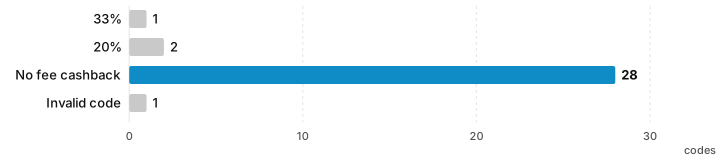
A few patterns:
- Of the 32, only 3 showed fee cashback, at most 33%. None of the 45%, 50% or 58% figures appeared on Bybit’s pages.
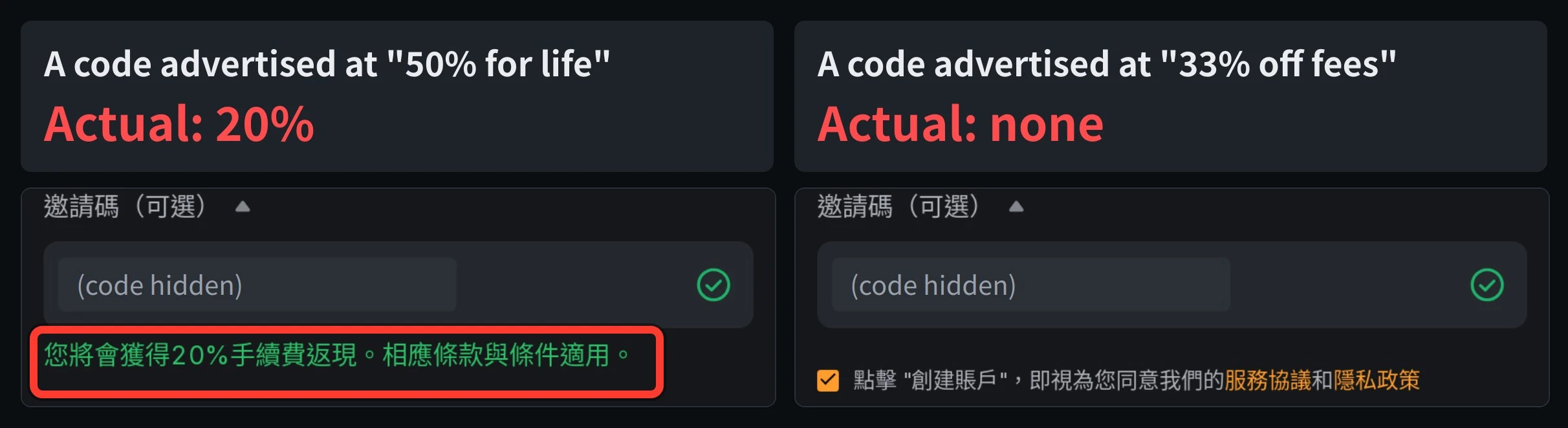
- The code advertised as “50% rebate for life” actually showed 20% (the left image at the top of the article). “Up to 58%” was worked out by adding the MNT fee discount to the code, but the MNT discount is available without any code (see “Bybit fees”).
- Fee cashback belongs to the code, not the account: of two codes introduced by the same promoter on the same page, one showed 20% and the other showed nothing. What you need to check is the exact code you are going to enter.
- Bybit’s pages also show text written by the inviter: some codes’ pages show the inviter’s own “valid for life”, which is not a promise from Bybit. Only the “You will be eligible to X% fee cashback” line under the field is shown by Bybit’s system.
- No page included a screenshot of the rate shown on Bybit’s page.
- Some pages offer to “add or switch” your code for you (by contacting them on LINE, or signing up again with a new email). None of these are official Bybit channels.
My view: Bybit’s “fee cashback” appears on only a few codes, and Bybit has not published its terms: who pays it, for how long and where it is credited are all unstated. More important than the numbers are the conditions of Bybit’s official sign-up rewards, and the rules below on adding a code later and on rebinding.
For the results at all 8 exchanges side by side, see Crypto exchange invitation codes tested.
Check a Bybit referral code yourself before signing up
In your browser, type https://www.bybit.com/en/invite?ref= followed by the code. First make sure the address is bybit.com, then look at the “Referral Code (Optional)” field:
- A green check mark after the code means it is valid; “Please check your code and try again.” means it is invalid.
- If the line under the field says “You will be eligible to X% fee cashback. Terms & condition apply.”, the code has fee cashback, and X is the rate.
- If there is nothing under the field, the code has no fee cashback.
This site’s code JASONFIN shows a green check mark and no fee cashback under the field. That is how the page looked to me on 4 November 2026. Bybit has no official explanation of it, and it may differ by region or after a redesign.
Bybit’s Rewards Hub FAQ also says that when you qualify for several fee promotions at once (including the VIP Program and the Affiliate Program), only the one with the greatest discount applies and they don’t stack; if your VIP rate is better, the VIP rate applies.
Already signed up without a code?
According to Bybit’s “How to Add and Check Registered Affiliate Code” (updated 5 June 2026), you can add an affiliate code within 14 days of sign-up, on these conditions:
- “Only the Main Account is allowed to add the invitation code manually.”
- It must be within 14 days of sign-up, and the account must not be bound to any affiliate or referrer yet; “Any request to add an invitation code after 14 days will not be accepted.”
- Only Affiliate Program codes can be added: “Referral code provided by other Bybit users (Referral Program) is not supported.”
- “Once the Affiliate code is added, you will not be able to cancel or change the registered invitation code.”
Steps: Account page → the “Account Info” tab → “Join an Affiliate’s Community”, then enter the code and a reason and submit. If you don’t see this entrance, you don’t meet the conditions above. The full steps and the rule on rebinding after 180 days of inactivity are in “How to change your Bybit referral code”. Whether other exchanges let you add a code after sign-up, and for how long, is covered in “Adding a referral code after sign-up”. If you qualify, paste this site’s code:
JASONFINBybit’s 180-day rules: Bybit’s Affiliate Program FAQ says the affiliate relationship may be terminated if a user doesn’t trade for 180 consecutive days. Section 7.7 of the affiliate terms effective 2 November 2026 also says that an account registered on or after 1 September 2025 that trades less than US$1 in any 180 consecutive days is an “Inactive User” and “may be reactivated through any Channel”, meaning it may be rebound through another channel. Whether an account qualifies is Bybit’s call; users can’t check it themselves.
Signing up for Bybit with a code: steps
- Open Bybit’s sign-up page from the invitation link. The affiliate sign-up page opened by this site’s invitation link doesn’t show a code field, because the code is already carried in the link. If you want to see the code, use
bybit.com/en/invite?ref=JASONFINinstead. - Enter your email or phone number and complete verification as shown on screen.
- Complete KYC identity verification: Rewards Hub rewards can only be claimed after KYC.
- Claim the sign-up rewards in the Rewards Hub, and mind the 21-day window for using them.
Where you can’t sign up
Bybit’s documents list different restricted regions:
| Official document | Restricted regions |
|---|---|
| “Service Restricted Countries” (16 October 2026) | The United States, the Chinese Mainland, Hong Kong, Singapore, Canada, North Korea, Cuba, Iran, Uzbekistan, the Crimea region of Ukraine and the non-government controlled areas of the Donetsk, Luhansk, Kherson and Zaporizhzhia regions, Sudan and Syria |
| Affiliate terms, section 11.2 (excluded jurisdictions) | Most of the regions above, plus France and the United Kingdom |
| Affiliate terms, section 11.3 (residents affiliates must not refer) | Every country in the European Economic Area (including Spain, Germany, France and Ireland), Iceland, Liechtenstein, Norway, Hong Kong, and from 1 July 2026 Australia |
In other words, Bybit doesn’t allow affiliates to refer people living in the European Economic Area or Australia, so this site’s Bybit invitation code doesn’t apply to them.
Saving on Bybit fees
Bybit’s regular user fees are 0.1% for spot, and 0.02% maker and 0.055% taker for futures. Since most codes give no fee rebate, the practical ways to save are USDC trading pairs (50% off taker fees), the MNT discount, limit orders and VIP levels, covered in “Bybit fees”. If you want an invitation code that does give a fee rebate, look at other exchanges; see “Crypto exchange fee rebates”.
Bybit is an international exchange. The invitation code and link in the box below come from data synced daily. Sign up with this site’s invitation code and you get Bybit’s official sign-up rewards:
This site’s invitation code is not for UK or Hong Kong residents. Please follow the laws where you live. Bybit’s security, its 2025 hack and its proof of reserves are covered in the “Bybit review”.
FAQ
Do Bybit referral codes give a fee rebate?
Mostly not. Neither Bybit's Referral Program nor its Affiliate Program documentation gives invitees a fee rebate. Of 32 Bybit codes I found online, only 3 showed "fee cashback" on Bybit's page (20%, 20% and 33%). This site's Bybit invitation code has no fee rebate either; what it offers is Bybit's official sign-up rewards.
Are the 50% Bybit referral codes online real?
On 4 November 2026 I found 6 Bybit codes advertised at 33% or more (45%, 50% or 58%). Only 1 showed fee cashback on Bybit's page, and it was 20%, not the advertised 50%; the other 5 showed no fee text at all. No rate above 33% appeared anywhere on Bybit's pages.
How can I tell whether a Bybit referral code has fee cashback?
Open bybit.com/en/invite?ref= followed by the code and look under the "Referral Code (Optional)" field. If there is cashback, it says "You will be eligible to X% fee cashback. Terms & condition apply." If that line isn't there, the code has none.
Can I add a Bybit referral code after signing up?
An affiliate code, yes; a Referral Program code, no. Bybit's "How to Add and Check Registered Affiliate Code" says you can add an affiliate code manually on the Account Info page only within 14 days of sign-up, from the main account, and only if the account isn't yet bound to any affiliate or referrer. Once added, it can't be canceled or changed.
Can a Bybit referral relationship be replaced?
Under Bybit's rules, yes. Bybit's Affiliate Program FAQ says the affiliate relationship may be terminated if a user doesn't trade for 180 consecutive days. The affiliate terms effective 2 November 2026 also say that accounts registered on or after 1 September 2025 that trade less than US$1 in any 180 consecutive days may be rebound through another channel.

Comments
Sign in with Google to comment. Your comment will not show your Google profile picture or name; it appears under a randomly generated nickname to protect your privacy.
By signing in you agree to this site's privacy policy.