 Jason Finance
OKX Invitation Code (Referral Code) 2026: Fee Rebate Up to 20%, So Where Do 30% and 50% Come From? How to Check Before You Sign Up, Plus Sign-Up and Identity Verification Steps

Disclosure: this page contains exchange invitation links and codes. If you sign up through them, the exchange may pay Jason Finance a referral commission. It does not raise the fees you pay; the invitation fee rebate is set by the exchange. Our ratings follow the published methodology, where the invitation rebate counts only toward the fees item.
On this page
- 1.What an OKX invitation code gets you: a 0% to 20% fee rebate, set by the inviter
- 2.OKX invitation codes advertised at 30% or 50%: I checked them
- 3.Check an OKX invitation code yourself before signing up: three checks
- 3.1Check 1: open OKX’s official sign-up page and look at the header
- 3.2Check 2: who pays the part above 20%, and how
- 3.3Check 3: OKX does not guarantee “lifetime” or “permanent”
- 4.Signing up for OKX with an invitation code: steps
- 4.1Identity verification (KYC): what you need and how long it takes
- 4.2Common reasons identity verification fails
- 4.3Where you can’t sign up
- 5.After signing up, check that the fee rebate applies
- 6.Already signed up without an invitation code?
- FAQ
The short answer
OKX invitation codes officially give a 0% to 20% fee rebate, set by the affiliate behind the code, so 20% is the cap. Anything above 20% is an extra rebate the website itself promises to pay, not OKX. Of 9 such codes I checked, none showed more than 20% on OKX's sign-up page and 4 had no rebate. Open okx.com/join/ plus the code and check whether the header says "X% off on trading fees".
Suits
- People who haven't signed up for OKX yet and want to check whether an invitation code comes with a fee rebate
- People who have an OKX invitation code from someone else and aren't sure whether to trust a 30% or 50% claim
- People who want to know what they need for OKX sign-up and identity verification
Doesn't suit
- People who already have an OKX account they still use: you cannot add or change an invitation code yourself, only through OKX's official rebinding ways (see "How to change your OKX referral code")
- People living in Hong Kong: OKX does not provide trading services to Hong Kong residents
- People who only use Convert or Buy/Sell: the fee rebate does not apply (OKX's EEA FAQ)
What would change this verdict
- OKX changes the invitee's 0% to 20% range or the Affiliate Program rules
- OKX redesigns its sign-up page and the header no longer shows the rate
- The fee rebate rate on this site's invitation code changes (the invitation box is synced daily)
Under OKX’s own rules, the fee rebate you can get with an OKX invitation code is 20% at most: OKX’s Affiliate FAQ says the invitee’s rate is 0% to 20%, set by whoever provides the invitation code. So with headlines like “OKX invitation code 50%”, the part above 20% cannot come from OKX. It can only be extra rebates the website itself promises to pay.
On 31 October 2026 I searched for terms such as “OKX 邀請碼” (OKX invitation code) and “OKX referral code”, and entered the invitation codes from about 30 pages in the first few pages of results into OKX’s official sign-up page, one by one. Of the 9 that claimed more than 20%, none showed more than 20% on OKX’s page, and 4 had no fee rebate at all; 3 of the codes that claimed 20% also turned out to have no rebate. This article covers OKX’s official rules, what my check found, how to verify a code yourself before signing up, and the steps for sign-up and identity verification.
This article is a summary of information, not investment advice. The rules come from OKX’s help center, Affiliate Program rules and terms of service, and the check results are what OKX’s official sign-up page showed on 31 October 2026. OKX changes its rules and pages, so go by the page as it is when you sign up. This site does not name other websites, and does not give advice on futures or leveraged trading.
What an OKX invitation code gets you: a 0% to 20% fee rebate, set by the inviter
OKX has two kinds of invitation code, and only one of them comes with a fee rebate:
| Code type | Who has one | What the invitee gets | Official source |
|---|---|---|---|
| Affiliate invitation code | Promoters who have applied to join the OKX Affiliate Program | A 0% to 20% fee rebate, at a rate set by the affiliate; can also join new-user campaigns | Affiliate FAQ (updated 15 September 2026), Affiliate Program rules (updated 29 September 2026) |
| A regular user’s invite-a-friend code | Every OKX user | New-user campaigns; the help page does not mention a fee rebate for the invitee | Referral Program FAQ (updated 5 October 2026) |
The Affiliate FAQ says: “The invitee’s rebate rate ranges from 0% to 20%.” The Affiliate Program rules also say the affiliate sets the invitee’s rate. In other words, codes that are all called “OKX invitation codes” can come with 0%, 10% or 20%, depending on how the person who gave you the code set it up.
Within OKX’s system, an affiliate can set at most 20%; where a higher rate is advertised, the extra can only be paid by the affiliate itself, outside OKX.
This site’s OKX invitation code gives 20%, the same for futures and spot; the rate comes from the data synced daily to the invitation box below. The rebate is not taken off when the trade fills: you are first charged the standard rate for your tier, and the rebate is refunded to the funding account afterward. Convert and Buy/Sell are not covered. How the refund works and how it combines with VIP are covered in “OKX fees”.
OKX invitation codes advertised at 30% or 50%: I checked them
On 31 October 2026 I searched five sets of keywords, including “OKX 邀請碼”, “OKX 邀请码 返佣”, “OKX referral code” and “OKX 返佣 2026”. From the first few pages of results I collected about 30 pages that listed an invitation code (in Traditional Chinese, Simplified Chinese and English), entered each code into OKX’s official sign-up page at okx.com/join/ followed by the code, and noted the rate the page showed:
| What the page claimed | Pages | What OKX’s sign-up page actually showed |
|---|---|---|
| More than 20% (30%, 40%, 50%, “up to 52%”) | 9 | 20%: 4; 10%: 1; no fee rebate: 4 |
| 20% | 19 | 20%: 16; no fee rebate: 3 |
| 15% | 2 | 15%: 1; 1 with no data found |
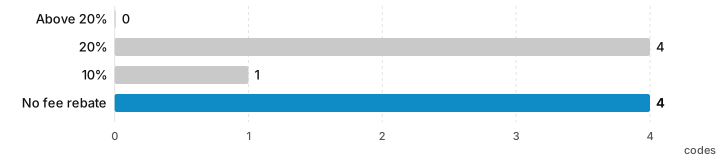
A few patterns:
- Not one rate above 20% showed up on OKX’s page. Of the pages claiming 50%, one actually had 20% and another had no rebate at all; one page claiming 30% actually had only 10%.
- The “up to 52%” claims add the invitation code’s 20% to an OKB discount and VIP tiers. But OKX’s trading fee FAQ says the platform currently does not offer a way to use OKB to offset trading fees.
- 2 pages said outright that the part above 20% is paid by the website itself (for example, “if you trade a lot, contact the site owner about a higher rate”), and neither published any payout rules. Who pays, when, the minimum, how to apply: none of it was written down.
- None of the 9 pages claiming 30% or more included a screenshot of OKX’s sign-up page showing that rate. About 5 pages included screenshots, all of them showing 20%.
- “Lifetime”, “permanent” and “highest anywhere” are common. OKX’s rules give no “lifetime” guarantee (see the next section), and since 20% is the system cap, there is no “highest” to compare.
- On one English page, the “sign up on OKX” button linked to a domain other than okx.com. I could not confirm what that domain was, but the OKX Affiliate Program rules forbid promoters from using imitation domains.
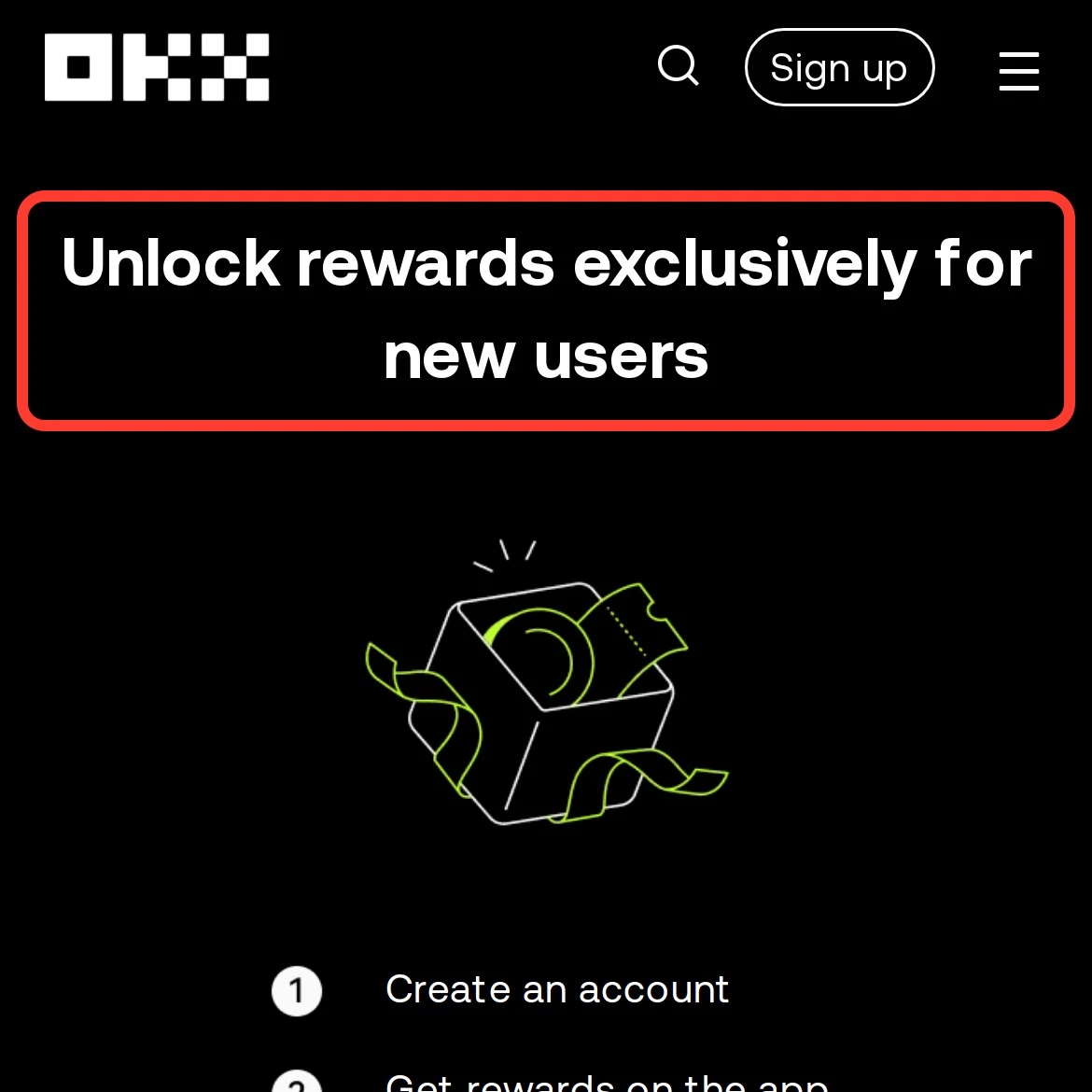 An invitation code advertised under the headline “up to 20% permanent rebate”, entered on OKX’s official sign-up page: the header reads “Unlock rewards exclusively for new users”, with no fee rebate (red box added by this site). Screenshot from 1 November 2026; rate last verified 7 November 2026
My view: many pages give only a number, with no screenshot and no payout rules, and their aim is to get people to sign up with their invitation code. After you sign up, the promised rebate may never be paid. The method in the next section lets you check these numbers one by one before you sign up.
For the results at all 8 exchanges side by side, see Crypto exchange invitation codes tested.
Check an OKX invitation code yourself before signing up: three checks
Check 1: open OKX’s official sign-up page and look at the header
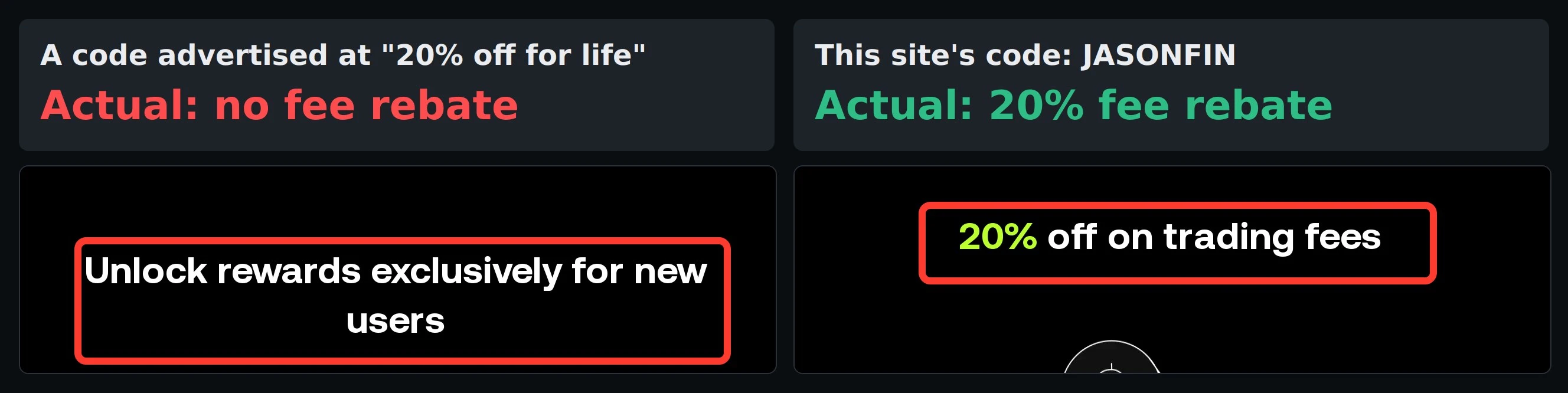
In your browser, enter https://www.okx.com/join/ followed by the invitation code. For example, open my invitation link and you will see OKX’s official header saying “20% off on trading fees”. First make sure the address is okx.com, then look at the large text in the header:
- If it says “20% off on trading fees” (or another rate, such as 10%): the code comes with a fee rebate, at the rate shown in the header.
- If it says “Unlock rewards exclusively for new users”: the code has no fee rebate, only new-user campaigns.
When you enter a code with a rebate in the sign-up form, OKX’s interface shows a note next to the field saying the rate, for example 20%, is in effect. The sign-up screenshot in the invitation box below shows this screen.
This is how the page looked when I checked on 31 October 2026. OKX has not officially explained it, and it may differ by region or after a redesign. If the page shows no rate, go by what OKX says: the invitee’s rate is set by the affiliate, and OKX will not add one afterward on the affiliate’s behalf.
Check 2: who pays the part above 20%, and how
OKX’s Affiliate FAQ for users in the European Economic Area (updated 22 October 2026) puts it plainly: any reward, campaign or community perk that a channel advertises separately is run by that channel, not OKX; not every affiliate invitation code comes with a fee rebate, the rate is set by each channel, and OKX cannot change it or add it afterward; and “If you signed up because of a rate a channel advertised, go back to that channel”.
So when you see a rate above 20%, get clear answers to the following. If they can’t answer, assume there is nothing:
- Who pays: a company name or a responsible person, not a nickname.
- How it is calculated and when it is paid: on what basis, whether daily, weekly or monthly, and where it is paid to.
- Minimums and conditions: the minimum payout, whether you must complete identity verification or deposit first, and any trading volume requirement.
- Written rules: whether there is a public terms page, rather than “message the site owner”.
- Evidence: a screenshot of OKX’s sign-up page showing the rate, or records of actual payouts.
None of this is OKX’s responsibility. If the other party doesn’t pay, OKX’s position is that you go back to that channel. The OKX Affiliate Program Agreement (updated 23 August 2026) also says affiliates are independent parties with no authority to take on liability on OKX’s behalf.
Check 3: OKX does not guarantee “lifetime” or “permanent”
In OKX’s Affiliate Program rules and FAQ, OKX’s official policy sets out several cases in which rebates stop or are not generated:
- The rules say the affiliate and referral relationship “is not permanent” and does not guarantee lifetime rebates.
- If an account has no activity for 180 days (the pages define this slightly differently: deposits, trades, withdrawals, transfers or logins), it may be recalled by another channel, and the system automatically removes the original referral relationship.
- Under OKX’s rules, accounts at VIP 7 and above generate no rebates; VIP 5 and 6 accounts also stop generating them once they reach the monthly cap set by OKX.
- Fees paid with trial funds, futures vouchers or rebate cards do not get the rebate.
- Zero-fee pairs and accounts with special fee rates are not covered.
Read the other way, these rules also tell you whether the rebate can stop: what removes the original referral relationship is 180 days with no activity on the account. As long as you trade now and then and do not leave the account unused for long, the referral relationship and the 20% fee rebate continue (except at VIP 7 and above). The rules page defines activity as deposits, trades, withdrawals or transfers and does not mention logging in, so logging in without trading may not count.
Two more things to watch for at sign-up (OKX Affiliate FAQ):
- The invitation code field is already filled in and can’t be edited: this means the device clicked someone else’s invitation link within the past 30 days, or downloaded the app from a paid ad. To use an invitation code you chose yourself, OKX suggests signing up on the website in a private (incognito) window.
- If you click an invitation link and then download the app to sign up, the invitation code may not be linked. OKX suggests finishing sign-up on the website first, then downloading the app and logging in.
Signing up for OKX with an invitation code: steps
When you sign up for OKX, you link both a phone number and an email address. The invitation code field is optional, and this is the only step where you can fill it in. The steps follow OKX’s “How do I sign up for an OKX account?” (updated 11 August 2026):

- Open the OKX website or app and choose to sign up.
- Choose your country or region of residence, read the terms of service, the risk and compliance disclosure and the privacy notice, and tick the box to agree.
- Enter your email, put the invitation code in the optional invitation code field, check that a rate is shown next to it, then sign up.
- Enter the verification code sent to your email.
- Enter your phone number (with the right country code), then the SMS verification code, to finish signing up.
OKX is an international exchange. The invitation code, link, rate and sign-up screenshot in the box below come from data synced daily. Sign up with this site’s invitation code and you get a 20% trading fee rebate, the same for futures and spot:
Identity verification (KYC): what you need and how long it takes
You can’t trade right after signing up. OKX’s “How do I verify an individual account?” (updated 25 August 2026) says you need to complete advanced identity verification before you can buy and sell, deposit, withdraw and transfer, and you must be 18 or older.
- Where to find it: in the app, the icon at the top left → Account settings → Profile → Identity verification; on the website, your profile picture at the top right → Identity verification → Individual account.
- Details to enter: country of residence, nationality, name, date of birth, ID number and type, and address.
- ID document: a valid government-issued ID showing your name, date of birth, and issue and expiry dates, with all four corners in the photo. Screenshots are not accepted.
- Selfie: no mask, glasses or hat.
- Proof of address (when required): outside the European Economic Area, a document from the past 3 months; within it, the past 6 months.
- Review time: OKX says within 24 hours.
- One set of identity details can verify only one account, and after verification you can’t change your identity details yourself.
Common reasons identity verification fails
The reasons listed in OKX’s “Why did my identity verification fail?” (updated 25 August 2026) fall into three groups. The reason for a failure is sent to your email:
| Type | Reasons OKX lists |
|---|---|
| ID document | The document is already used on another account; it has expired or is not supported; the name or date of birth is missing or unreadable; no headshot photo; the passport is not signed |
| Photos | Blurry, cropped or covered; screenshots, scans, printouts, black-and-white or edited files; missing pages; the selfie doesn’t match the ID |
| Eligibility | Under 18; country or region not supported; proof of address not in your name or older than 3 months; a different person or ID document used partway through (this restriction cannot be lifted); not following the on-screen steps; camera permission or app version problems |
Where you can’t sign up
Restricted regions in OKX’s Risk & Compliance Disclosure (updated 8 July 2026):
- No service at all: Afghanistan, Canada, Cuba, Hong Kong, Iran, India, Japan, Malaysia, Nepal, North Korea, Syria, Crimea/Donetsk/Luhansk, some US jurisdictions and all US territories, and Uzbekistan. OKX stopped providing centralized virtual asset trading services to Hong Kong residents on 31 May 2024.
- Partial restrictions: the UK (derivatives, CeFi earn, P2P), Australia (derivatives, CeFi), Brazil (derivatives, P2P), South Korea (derivatives, P2P), Russia (fiat), the Bahamas (retail users) and Eritrea (P2P).
This site’s invitation code is not for UK or Hong Kong residents. Please follow the laws where you live.
After signing up, check that the fee rebate applies
Once you have signed up and completed identity verification, there are two places to check:
- “Invite perks” on the profile page: in the app, go to user center → account info. Accounts registered with this site’s invitation code show 20. The global site’s Affiliate FAQ puts it under “User Center → My Rewards”; if you can’t see this row, no rate has been set.
- Refund records in the funding account: trades are charged the standard rate, and the rebated part is refunded afterward to “Assets → Order center → Funding history”.
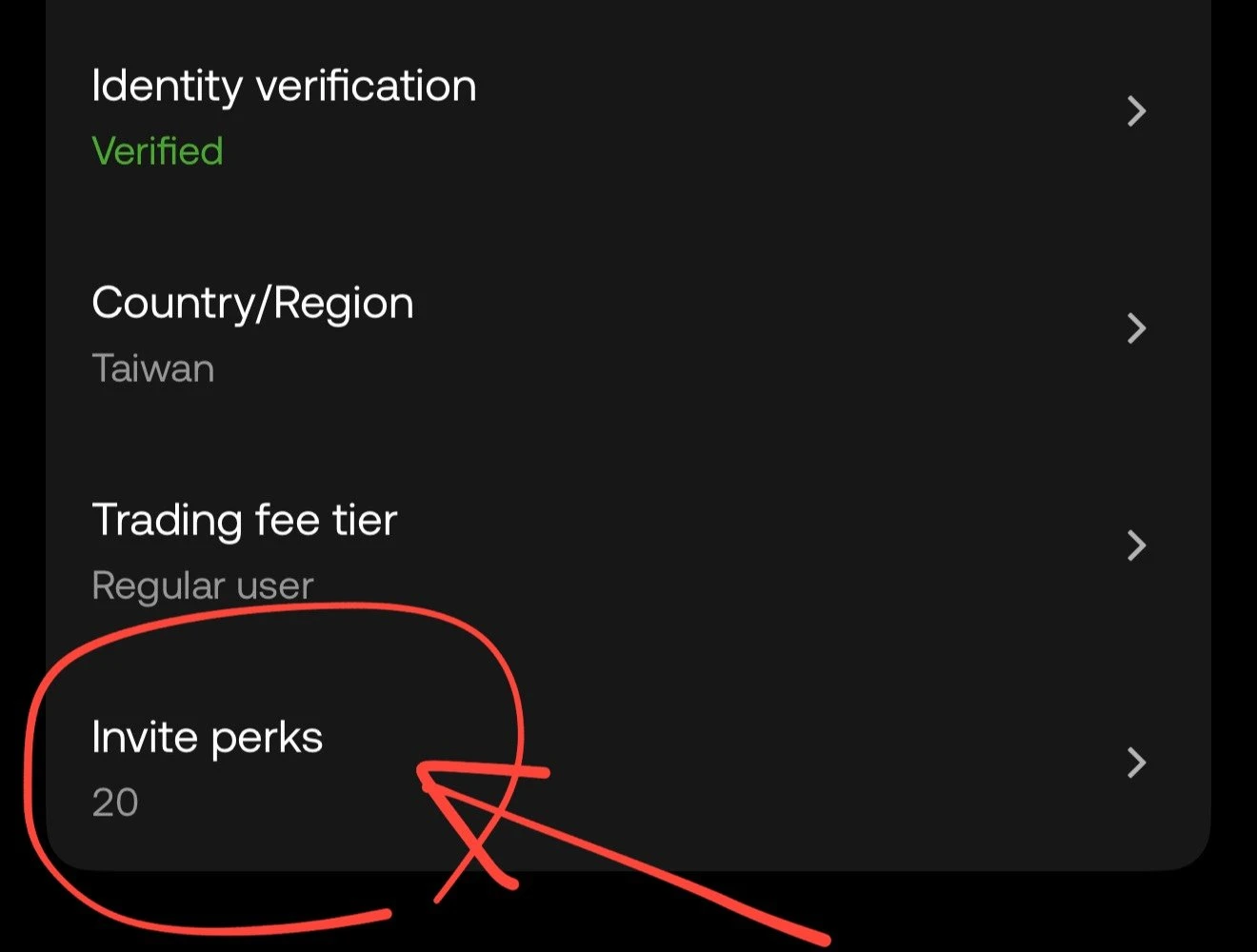 An OKX account registered with an invitation code: “Invite perks” on the profile page shows 20. Screenshot from October 2026
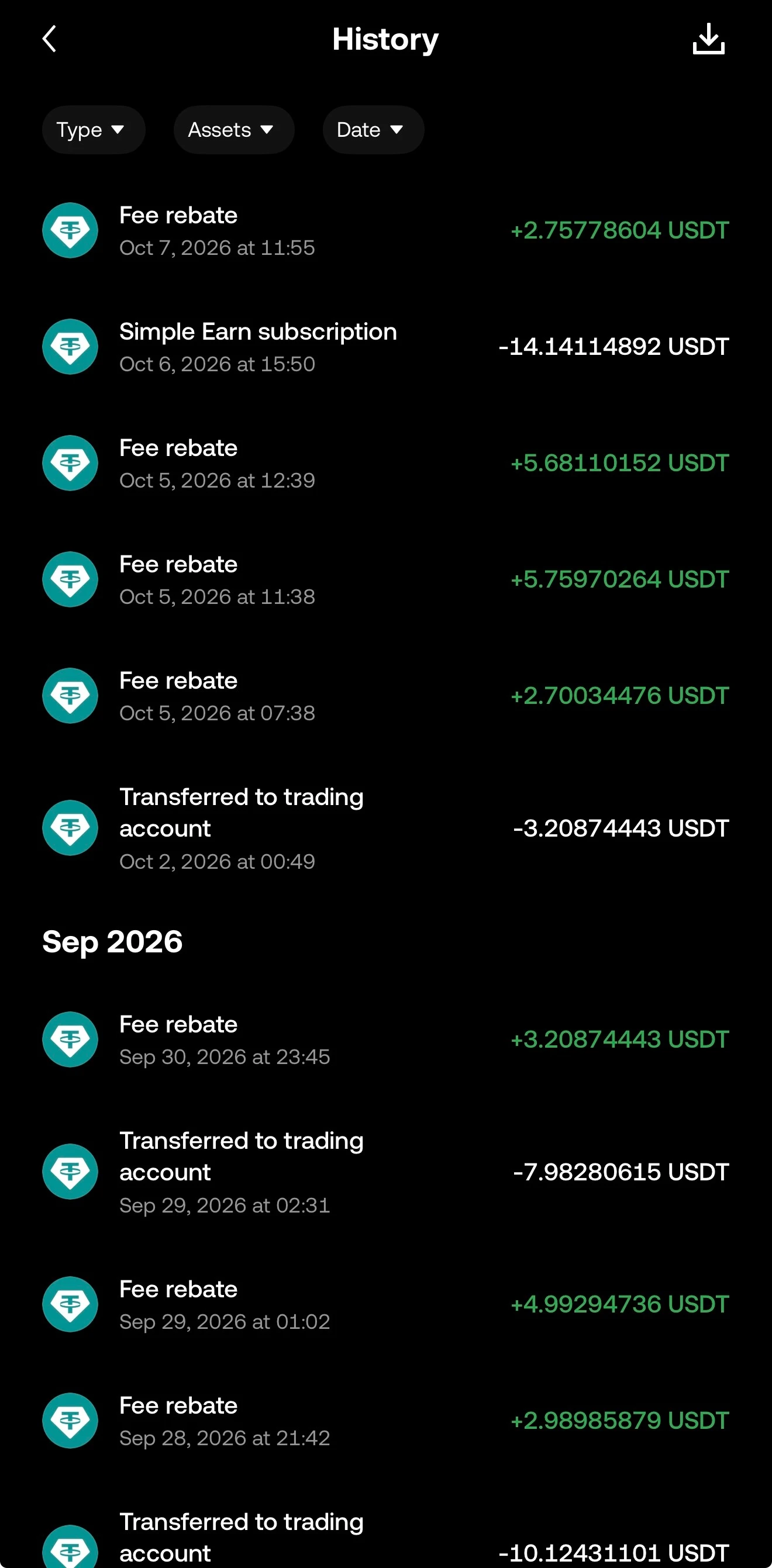 Fee rebates refunded every day in my funding account history. Screenshot from October 2026
For how to check fees trade by trade, see “How to check your fee rate and that the fee rebate applies” in “OKX fees”.
Already signed up without an invitation code?
OKX’s Referral Program FAQ says: “Referral codes must be added before invitees create their accounts. It won’t be possible to add or change the referral code once the account has been created.” You can’t add one yourself in your account; the EEA FAQ says support cannot assign or change it manually, and the Affiliate FAQ says you can’t switch by deleting and re-creating an account. OKX has 2 official ways to rebind:
- Accounts with no activity for 180 days: log in through an invitation link. Open my invitation link in a browser (also in the invitation box above) and choose “Already have an account? Log in” on the sign-up page. The system then binds your account to my invitation code automatically, and you get a 20% fee rebate. Opening the OKX app and logging in directly does not count.
- If the first way doesn’t work: submit a rebind application. Open OKX’s rebind application page in a browser, log in, paste this site’s invitation code and a reason, and submit. OKX reviews daily and binds eligible accounts within 24 hours at the latest.
Both ways remove the original referral relationship. The conditions, an invitation code and reason you can copy directly, and how to confirm the binding are covered in “How to change your OKX referral code”. Whether other exchanges let you add a code after sign-up, and for how long, is covered in “Adding a referral code after sign-up”.
If neither way works for you, the only ways left to lower your fees are VIP tiers and maker rates, covered in “OKX fees”. OKX’s security, proof of reserves and past incidents are covered in the “OKX review”; how fee rebates work at each exchange is in “Crypto exchange fee rebates”.
Sign up for OKX with this site’s invitation code to get a 20% trading fee rebate:
FAQ
What is the maximum fee rebate with an OKX invitation code?
20%. OKX's Affiliate FAQ (updated 15 September 2026) says the invitee's rate is 0% to 20%, set by the affiliate who provides the invitation code. On sites that advertise 30% or 50%, the part above 20% does not come from OKX.
Are the 50% OKX invitation codes online real?
On 31 October 2026 I entered the 9 invitation codes from search results that claimed more than 20% on OKX's official sign-up page: 4 showed 20%, 1 showed 10% and 4 had no fee rebate at all. None went above 20%. Anything above that can only be extra rebates paid by the website itself, and OKX says such offers are the responsibility of that channel, not OKX.
How can I tell whether an OKX invitation code comes with a fee rebate?
Open OKX's official sign-up page, okx.com/join/ followed by the invitation code, and look at the large text at the top of the page. A code with a rebate shows a rate, such as "20% off on trading fees"; one without shows "Unlock rewards exclusively for new users". The address must be okx.com. This is what the page showed on 31 October 2026; OKX has not officially explained this display.
Can I add an OKX invitation code after signing up?
Usually not. OKX's Referral Program FAQ says the invitation code must be entered when you sign up and cannot be added or changed after the account is created, and you cannot delete your account and sign up again. But OKX has 2 official ways to rebind: if your account has had no activity for 180 days, logging in through a new invitation link re-binds it; if that doesn't work, open OKX's rebind application page and enter an affiliate invitation code and a reason, and the account is bound once approved. Both remove the original referral relationship.
Is the OKX invitation code fee rebate for life?
OKX does not say "lifetime", but it does not set an end date either. Under the Affiliate Program rules, the original referral relationship is removed when an account has no activity for 180 days and is recalled by another channel. So as long as you trade now and then and do not leave the account unused for long, the referral relationship and the 20% fee rebate continue. The exception: accounts at VIP 7 and above no longer generate rebates.
How long does OKX identity verification take?
OKX's help center says it reviews within 24 hours. You need advanced identity verification before you can trade, deposit and withdraw. It requires a government-issued ID and a selfie, and in some cases proof of address (outside the European Economic Area, a document from the past 3 months).
Can I sign up for OKX in Hong Kong?
No. OKX stopped providing centralized virtual asset trading services to Hong Kong residents on 31 May 2024, and Hong Kong is on OKX's list of restricted regions. UK residents cannot use derivatives, CeFi earn or P2P.

Comments
Sign in with Google to comment. Your comment will not show your Google profile picture or name; it appears under a randomly generated nickname to protect your privacy.
By signing in you agree to this site's privacy policy.