 Jason Finance
How to Buy USDT: Buying with TWD on MAX and BitoPro, Steps and Costs Compared, and How to Buy from Outside Taiwan
How to buy USDT: in Taiwan, deposit TWD on MAX or BitoPro and buy; fees and networks compared with a 1,000 USDT example. Abroad: local platforms, cards, P2P.

On this page
- 1.How to buy USDT: choose a route by where you live
- 2.Buying USDT with TWD in Taiwan: MAX and BitoPro costs compared
- 2.1Example: buying 1,000 USDT, how much do the two differ?
- 3.Steps to buy USDT with TWD
- 3.1MAX: transfer to your dedicated deposit account, then order on USDT/TWD
- 3.2BitoPro: deposit by bank transfer, then use one-click trade or spot trading
- 3.3Invitation codes for TWD crypto apps
- 4.After you buy USDT: withdrawing to your own wallet and choosing a network
- 5.Outside Taiwan: compliant local platforms, card purchases on international exchanges, and P2P
- 5.1Check your local regulator’s list first
- 5.2Buying USDT by card: the fee depends on the card type and where it was issued
- 5.3Buying USDT on P2P: no platform fee does not mean no cost
- 5.4Invitation codes for international exchanges
- FAQ
Disclosure: this page contains exchange invitation links and codes. If you sign up through them, the exchange may pay Jason Finance a referral commission. It does not raise the fees you pay; the invitation fee discount is set by the exchange. Our ratings follow the published methodology, where the invitation discount counts only toward the fees item.
How you buy USDT depends on where you are. If you are in Taiwan and paying with New Taiwan dollars, a TWD crypto app such as MAX or BitoPro is the most direct route: deposit by bank transfer from a linked account in your own name, place an order in the USDT/TWD market, and once you have the USDT you can withdraw it to your own wallet. Neither charges a fee for TWD deposits. For regular users, trading fees are 0.08% maker and 0.16% taker on MAX, and 0.1% maker and 0.2% taker on BitoPro (checked 14 October 2026).
The short answer first: a lower fee rate does not mean a cheaper purchase. At 13:05 on 14 October 2026, I used the two public order books to work out a market buy of 1,000 USDT. MAX had the lower fee rate and BitoPro the lower ask, and the total cost including fees differed by only about NT$3. Look at the prices on both before you order. If you can wait, place a maker order: in this example, a maker order saved more than the difference between the two platforms’ fee rates. Readers outside Taiwan will find the options and risks in the last section.
This article is a summary of information and is not investment, tax or legal advice. Each platform’s fees, limits, service regions and rules can change. The figures were checked against official help pages and public APIs on the dates shown, and the examples are snapshots of a single moment that say nothing about later prices. Check what the platform shows at the time you use it, and follow the law where you live.
How to buy USDT: choose a route by where you live
| Your situation | Route | How you pay | Main costs |
|---|---|---|---|
| In Taiwan, paying with TWD | TWD crypto app: MAX, BitoPro | Bank transfer from your own linked account, then an order in TWD | Trading fee of 0.08% to 0.2%, plus the bid-ask spread |
| Outside Taiwan, with a compliant local platform | A locally licensed or registered platform | Local bank transfer | Each platform’s own trading, deposit and withdrawal fees |
| Outside Taiwan, a small amount needed right away | Card purchase on an international exchange | Visa, Mastercard, Apple Pay and similar | About 1.1% to 3.05% per purchase (Bybit as an example) |
| Outside Taiwan, with no convenient local fiat route | P2P market | You transfer money to the seller yourself | Platform fee of 0% to 0.35%, plus the merchant’s price markup and bank transfer fees |
Whichever route you take, pay from an account in your own name. If a platform does not serve your region, switch to a compliant route; do not try to get around regional restrictions or identity verification.
Buying USDT with TWD in Taiwan: MAX and BitoPro costs compared
MAX’s operating company (現代財富科技) and BitoPro’s operating company (幣託科技) are both on the Securities and Futures Bureau of Taiwan’s Financial Supervisory Commission list of operators that have completed anti-money laundering registration (SFB VASP page, in Chinese, updated 2026-09-29). Both accept TWD deposits only by transfer from a linked bank account in your own name.
| Item (regular users, checked 2026-10-14) | MAX | BitoPro |
|---|---|---|
| Maker fee | 0.08% | 0.1% |
| Taker fee | 0.16% | 0.2% |
| Paying fees with the platform token | MAX Token: you pay 70% of the original fee | BITO: 0.08% maker, 0.16% taker |
| Quick buy without placing an order | Convert: conversions involving USDT or TWD capped at the equivalent of NT$30,000 each | One-click trade: minimum NT$100, fee built into the quote |
| TWD deposits | No fee; transfers only from a verified bank account | No fee; only from the linked bank account |
| TWD withdrawals | NT$30 each, minimum NT$100; free with a linked Bankee account | NT$30 each, minimum NT$100 |
| Minimum USDT withdrawal | 6 USDT | 10 USDT |
Sources: MAX fee page and VIP rates from the public API, MAX Token fee payment, Convert FAQ, TWD deposit and withdrawal fees (revised 2026-09-04), TWD deposit guide (revised 2026-09-04), MAX currencies and networks API; BitoPro fees and limits from the public API, buying USDT with TWD guide (updated 2026-07-20), one-click trade guide (updated 2026-06-16), deposit guide, withdrawal guide. The help pages are in Chinese.
Signing up on either with an invitation code gets you a fee discount for a period of time. See the invitation code boxes below for the rate, period and conditions. For how an invitation code discount and a platform token discount work together, see “What is a crypto exchange fee discount”.
Example: buying 1,000 USDT, how much do the two differ?
The fee rate is only half the picture; the other half is the price at that moment. At 13:05 Taiwan time on 14 October 2026, the top of each USDT/TWD order book was as follows (MAX public API, BitoPro public API):
| Exchange | Best bid | Best ask | Bid-ask spread |
|---|---|---|---|
| MAX | 32.197 | 32.198 | 0.001 |
| BitoPro | 32.169 | 32.182 | 0.013 |
Buying 1,000 USDT at these prices (on both, the best ask had more than 1,000 USDT available):
| Order type | MAX | BitoPro |
|---|---|---|
| Market buy (taker): trade amount | 32,198 | 32,182 |
| Taker fee (MAX 0.16%, BitoPro 0.2%) | 51.52 | 64.36 |
| Market buy total | 32,249.52 | 32,246.36 |
| Order at the best bid, waiting to be filled (maker): trade amount | 32,197 | 32,169 |
| Maker fee (MAX 0.08%, BitoPro 0.1%) | 25.76 | 32.17 |
| Maker buy total | 32,222.76 | 32,201.17 |
Amounts in TWD. These are my own calculations: the fee is converted to TWD as “trade amount × rate”, although in practice the platform may deduct it from the USDT you receive. Invitation code discounts and platform token discounts are not included.
This example shows two things:
- The platform with the lower fee rate is not necessarily cheaper. MAX’s taker rate is 0.04 percentage points lower than BitoPro’s, but BitoPro’s ask was 0.016 lower, so its market buy total came out about NT$3 less.
- In this example, using a maker order saved more than choosing the exchange. On both, a maker order cost roughly NT$27 to NT$45 less than a market buy. The trade-off is that if the price moves up, your order may never fill.
Both platforms’ prices change constantly, and next time the result may be the other way round. For a large amount, open the USDT/TWD page on both before you order, check the top price on each, and then decide where to buy and how to place the order. For how MAX decides between maker and taker, and how to use Post-only, see “MAX USDT to TWD”.
Steps to buy USDT with TWD
The process is the same on both: sign up, complete identity verification and link a bank account in your own name → deposit TWD → buy USDT with TWD.
MAX: transfer to your dedicated deposit account, then order on USDT/TWD
- Complete verification: your MAX account must reach level 2 before you can use TWD deposits and withdrawals (deposit and withdrawal limits).
- Deposit TWD: after logging in, tap “Wallet” > “TWD” > “Deposit” to see your dedicated deposit account number. Transfer to it by online banking or ATM from your verified bank account.
- Buy USDT: place an order in the USDT/TWD market. To pay the maker fee, set the price at the current best bid (or lower), or tick Post-only. If you are in a hurry or the amount is small, you can use a market order or Convert.
MAX’s TWD deposit guide specifically warns that cash remittances, over-the-counter remittances, transfers from other banks or corporate online banking, and third-party payment services cannot be used to deposit. If a deposit does not arrive, you need to contact customer service for a refund, and the refund carries an NT$30 interbank transfer fee.
BitoPro: deposit by bank transfer, then use one-click trade or spot trading
- Complete verification: according to BitoPro’s guide, you upload both sides of your national ID card and a selfie holding it. Review takes about 3 to 7 business days, and you link a bank account in your own name.
- Deposit TWD: in the app, tap “Assets” > “Deposit” > “TWD” and transfer from your linked bank account to BitoPro’s designated account. BitoPro says it usually arrives in about 5 to 15 minutes. Convenience store deposits have been suspended since 29 May 2025, and credit cards and third-party payment services such as LINE Pay and Taiwan Pay cannot be used to deposit (deposit guide).
- Buy USDT: for small amounts you can use one-click trade, with a minimum of NT$100. The quote is valid for 30 seconds and cannot be cancelled once you confirm. For larger amounts, use spot trading, with a minimum of 1 USDT; you can place your own maker order and pay the 0.1% maker fee.
With one-click trade the fee is built into the quote, so you cannot see a separate rate. To find out what you actually paid, divide the TWD you paid by the USDT you received to get the price per coin, then compare it with the spot order book (this is my own way of comparing, not a rate the platform publishes).
Invitation codes for TWD crypto apps
After you buy USDT: withdrawing to your own wallet and choosing a network
USDT circulates on several different blockchains. It is the same USDT, but if you choose the wrong network you may not get it back. The USDT withdrawal networks and fees on the two platforms (2026-10-14, MAX API, BitoPro API):
| Network | MAX withdrawal fee | BitoPro withdrawal fee |
|---|---|---|
| TRC20 (Tron) | 3 USDT | 2.5 USDT |
| ERC20 (Ethereum) | 0.4 USDT | 0.3 USDT |
| BEP20 (BNB Smart Chain) | 0.02 USDT | 0.1 USDT |
| Polygon | 0.02 USDT | 0.1 USDT |
| Arbitrum | 0.11 USDT | Not supported |
| Avalanche C-Chain | 0 USDT | Not supported |
| Aptos | 0.11 USDT | Not supported |
| Kaia | Not supported | 0.2 USDT |
Below are the screens I saw in the BitoPro app (14 October 2026). When withdrawing USDT, the fee for each chain matched the API figures in the table above. USDT deposits support the same five chains.
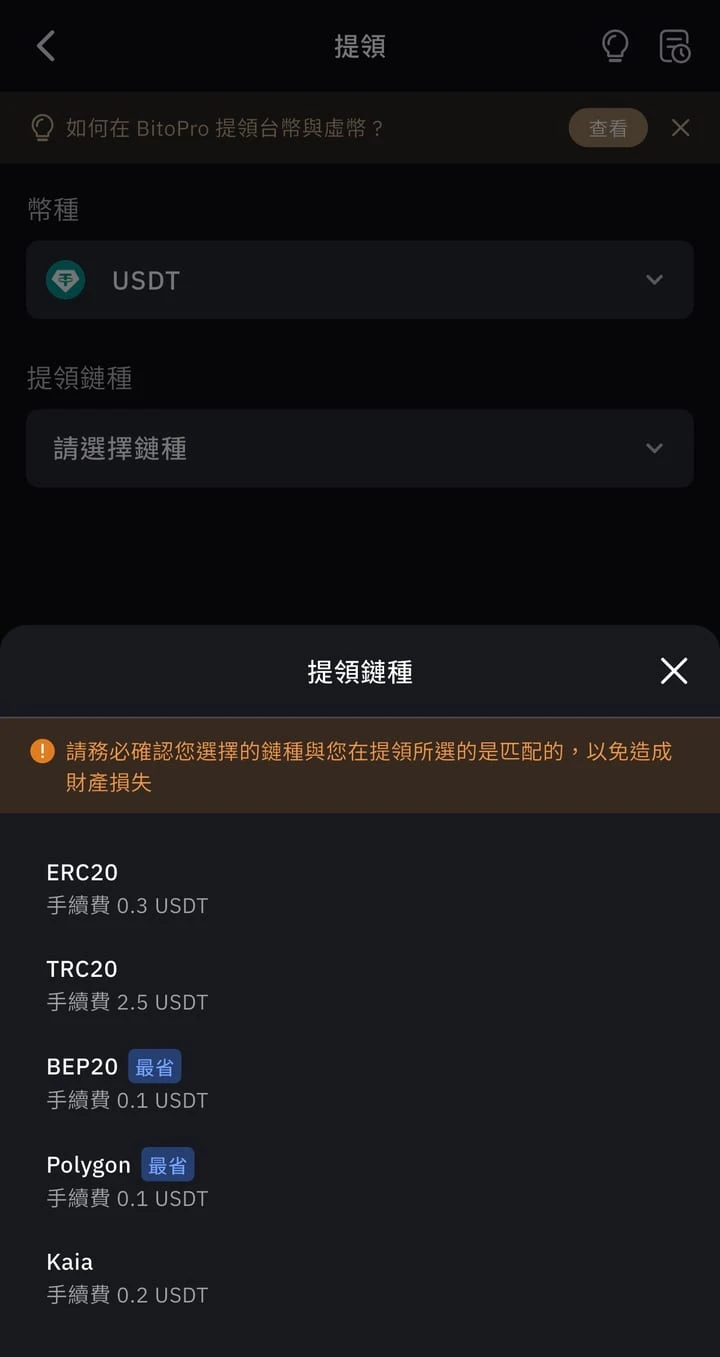
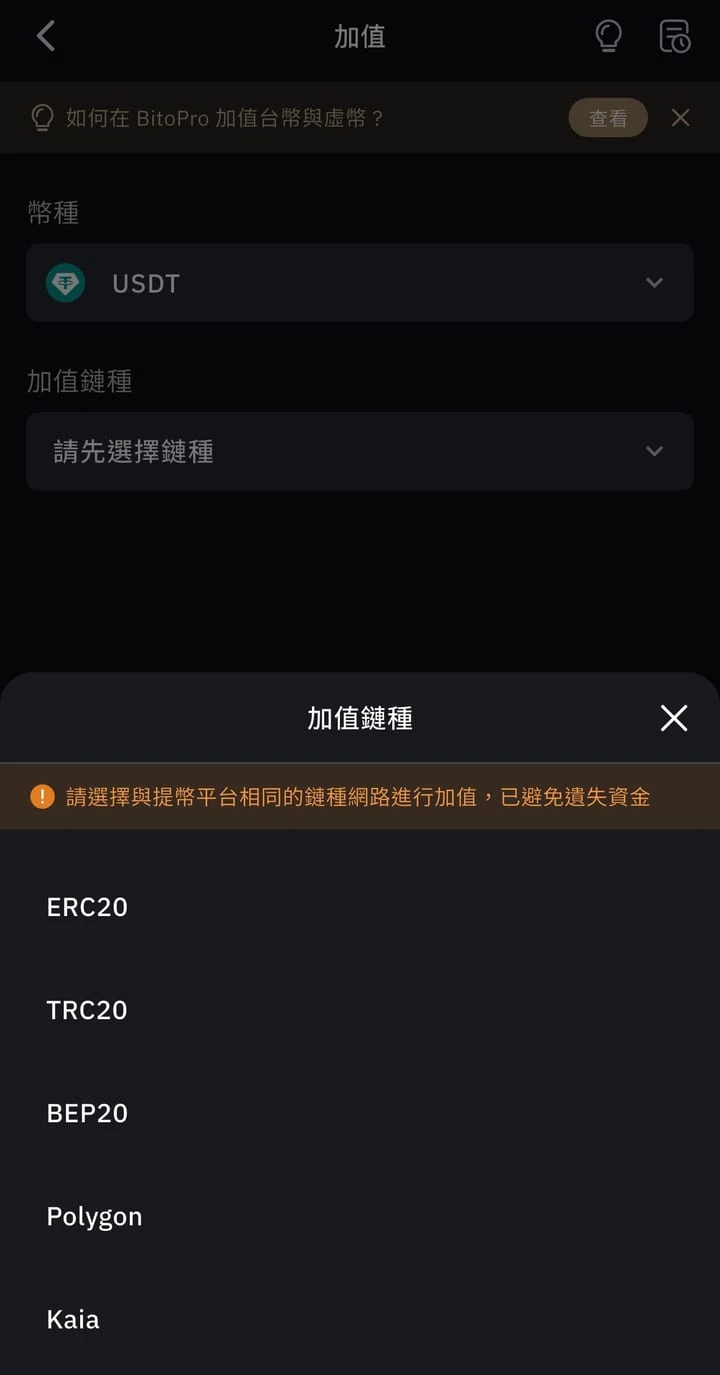
At this point, TRC20 was the most expensive network in the table on both platforms: sending 100 USDT costs 2.5 to 3 USDT. If the receiving side also supports BEP20 or Polygon, the withdrawal fee is a fraction of that. Withdrawal fees change with on-chain conditions, so go by what the withdrawal page shows before you submit.
Before you send, go through these steps in order:
- Start with the receiving side: you can only choose from the networks the destination wallet supports.
- Pick the network with the lowest withdrawal fee that both sides support. For a comparison of other exchanges’ withdrawal fees on each network, see “How to choose a USDT withdrawal network”.
- The first time you send to a new address, send a small amount first, and send the rest once it arrives. The test costs one extra withdrawal fee, far less than what you would lose to a mistake.
- Check the address and Memo: copy and paste the address, then check the first and last few characters. If the receiving side asks for a Memo (also called a note or Tag), you must fill it in. On BitoPro, you can turn on “withdraw only to whitelisted addresses” in the security settings (withdrawal guide).
If you do pick the wrong network, see “USDT sent on the wrong network?”. For where to keep USDT while it sits idle, see “Where to park idle USD and USDT”. If you plan to hold for the long term, the difference that holding your own private keys makes is covered in “Cold wallet vs hot wallet vs exchange custody”.
Outside Taiwan: compliant local platforms, card purchases on international exchanges, and P2P
This section is for Chinese-speaking readers living outside Taiwan. The fees below were checked against each platform’s official help pages on 12 October 2026.
Check your local regulator’s list first
Whether a platform is compliant depends on the list kept by the regulator where you live. Whatever a platform says about itself does not count:
- EU: the MiCA transitional period ended on 1 July 2026. ESMA warns that clients of unauthorized providers do not get MiCA’s protections, including protection of client assets, and asks users to check ESMA’s register to confirm that their provider is MiCA-authorized (ESMA statement of 23 June 2026).
- Hong Kong: the Securities and Futures Commission publishes a list of formally licensed virtual asset trading platforms (SFC list).
- Elsewhere: check the public lists or warning lists on your local financial regulator’s website. They are usually labeled “licensed”, “registered” or “authorized”.
For where each international exchange holds licences or registrations, see “How to choose a crypto exchange” and the individual reviews, such as the “OKX review” and “Bybit review”.
Buying USDT by card: the fee depends on the card type and where it was issued
Taking Bybit as an example (Bybit bank card payment FAQ, updated 2026-07-29):
| Payment method | Card issued in | Fee per purchase | Fee on a US$1,000 purchase (my calculation) |
|---|---|---|---|
| Visa, Mastercard | EU | 1.1% | About US$11 |
| Mastercard | Outside the EU | 2.7% | About US$27 |
| Visa | Outside the EU | 3.05% | About US$30.50 |
| Apple Pay | Anywhere | 1.8% + €0.24 | About US$18 plus €0.24 |
The calculation simply multiplies the rate by US$1,000 and leaves out exchange rate differences and the issuing bank’s fees. A Visa card issued outside the EU (3.05%) costs about 2.8 times as much as a card issued in the EU (1.1%). Conditions from the same FAQ: you must complete individual identity verification, and corporate cards are not supported. Each purchase must be between US$10 and US$10,000, and with standard verification you can buy at most US$20,000 a day and US$100,000 a month.
There are two more things that can happen on the issuing bank’s side (Binance guide to buying crypto by card, updated 2025-12-09): some banks classify crypto purchases as cash-like transactions and charge an extra fee, and some banks and card issuers decline crypto transactions under their internal policies.
Buying USDT on P2P: no platform fee does not mean no cost
On P2P, you transfer money to the seller’s account yourself, and the seller releases the coins after confirming payment. During the trade, the platform holds the seller’s coins (OKX P2P guide).
| Exchange | P2P platform fee | Official source (updated) |
|---|---|---|
| OKX | No service fee; banks or payment methods may charge a transfer fee | P2P guide (2026-09-15) |
| Binance | Charged to both makers and takers, 0% to 0.35%, depending on the fiat market and trading pair | P2P merchant guidelines (2026-03-04) |
| Bybit | Charged to both makers and takers, depending on the fiat currency, advertiser tier and ad type; payment providers may charge extra | P2P buying guide (2026-09-02) |
Merchants set their own P2P prices, so work out the real cost the same way: the fiat you paid divided by the USDT you received.
The biggest risk is that the other party’s money comes from a scam. Binance has explained that some buyers use money obtained through scams to buy crypto on P2P, and after the victims report it, the bank accounts of both the scammer and the unsuspecting P2P seller are frozen (Binance guide). OKX and Bybit both require the name on the paying account to match the name verified on the platform (OKX P2P selling FAQ, Bybit P2P buying guide). Binance recommends payment methods that cannot be reversed, and treats an account name that does not match the user’s personal details as a warning sign (Binance P2P article, 2021-08-12).
A checklist before a P2P trade:
- Pay only from an account in your own name, and do not accept payment made on someone else’s behalf.
- Check the merchant’s reviews, completion rate and number of completed orders, and prefer merchants verified by the platform.
- If the other party’s name does not match their verified name on the platform, cancel the order. If you have already received money from a third party, return it to the original account under the platform’s rules and then file an appeal.
- Keep the conversation in the platform’s chat. OKX says chat records can be used as evidence in an appeal.
- When selling, release the coins only after you see the payment arrive in your own banking app, not just a screenshot from the other party.
If your account does get frozen, Binance advises contacting your bank right away, providing transaction records to the local authorities as requested, seeking legal help if needed, and contacting the platform’s customer service with screenshots of the order.
Invitation codes for international exchanges
These invitation codes are for readers outside Taiwan. Before signing up, check that your region is within the exchange’s service area.
More articles are on the crypto topic page.
FAQ
Where can I buy USDT with New Taiwan dollars?
If you are in Taiwan, you can use a TWD crypto app such as MAX or BitoPro: deposit by bank transfer from a linked account in your own name, then buy USDT with TWD. Both are on the Securities and Futures Bureau of Taiwan's Financial Supervisory Commission list of operators that have completed anti-money laundering registration (updated 29 September 2026).
What are the fees for buying USDT on MAX and BitoPro?
On 14 October 2026, regular users paid a 0.08% maker fee and 0.16% taker fee on MAX, and a 0.1% maker fee and 0.2% taker fee on BitoPro. Neither charges a fee for TWD deposits, and TWD withdrawals cost NT$30 each.
Is MAX or BitoPro cheaper for buying USDT?
It depends on the price at the moment you order, not just the fee rate. At 13:05 on 14 October 2026, I used both order books to work out a market buy of 1,000 USDT, and the total cost including fees differed by about NT$3. That is a snapshot of one moment, so compare the two yourself before each order.
What is the difference between BitoPro's one-click trade and spot trading?
With one-click trade, BitoPro quotes you a price directly, the minimum is NT$100, and the fee is built into the quote. With spot trading, you place your own order in the order book, the minimum is 1 USDT, and you pay a separate 0.1% maker or 0.2% taker fee.
Which network should I use to withdraw USDT from MAX or BitoPro?
First check which networks the receiving wallet supports, then pick the one with the lowest withdrawal fee among the networks both sides support. On 14 October 2026, both platforms charged more to withdraw on TRC20 than on BEP20 or Polygon. The first time you send to a new address, send a small amount first.
How do I buy USDT if I am not in Taiwan?
Start with a platform that is compliant where you live: in the EU you can check ESMA's list of MiCA-authorized providers, and in Hong Kong the SFC's list of licensed platforms. Paying by card is fastest but has high fees; P2P may have no platform fee, but you carry the risk of receiving scam money and having your bank account frozen.
Related articles
- MAX USDT to TWD: How to Save When Maker and Taker Fees Differ by 2x, and How Long a TWD Withdrawal to Your Bank TakesMAX exchange USDT to TWD: maker 0.08% vs taker 0.16%, about NT$266 apart on 10,000 USDT. TWD withdrawals: the NT$30 fee, the 11:00 cutoff, bank changes.
- What Is BFUSD? BYUSDT, LDUSDT, BGUSD and Other Yield-Bearing Exchange Margin Assets: Where the Yield Comes From, Conversion Fees and RisksWhat is BFUSD? Official rules for BFUSD, LDUSDT, BYUSDT, BGUSD and OKX USDG rewards: yield source, margin modes, collateral ratios, fees, redemption limits.
- Cold Wallet vs Hot Wallet vs Exchange Custody: Who Holds the Private Keys, the Risks of Each, and How to Split Your CryptoCold wallet vs hot wallet vs exchange custody: none is fully safe; each guards different risks. Split by purpose: trade on exchanges, hold long term cold.

Jason
Account Manager in Google Large Customer Sales and Columbia MBA admit, sharing the money tools and experience he actually uses.
Comments
Sign in with Google to comment. Your comment will not show your Google profile picture or name; it appears under a randomly generated nickname to protect your privacy.
By signing in you agree to this site's privacy policy.