 Jason Finance
XT Referral Code 2026: Advertised at 50%, XT's Official API Shows 0% and 11%; How to Check Any Code Before You Sign Up

On this page
- 1.Two XT referral codes advertised at 50%: what XT’s official API shows
- 2.Look up any code with XT’s official API
- 2.1How to read the response
- 2.2What the address can’t tell you
- 3.Three pieces of evidence for this site’s code: the API, XT’s back office and a public identity
- 4.Where the rebate goes, and VIP tiers
- 5.Check before you sign up: XT has no published way to add a code later
- 5.1How to sign up
- 5.2Where XT.COM can’t be used
- FAQ
The short answer
XT's sign-up page doesn't always show a code's rate, but anyone can open the official address it reads. On 9 November 2026, 697VR8, advertised at 50%, showed 0% on spot and futures; REBATE showed 11% futures, 10% spot; this site's code showed 60% futures, 35% spot, matching XT's back office. XT has no published way to add a code later, so check first.
Suits
- People who haven't signed up for XT.COM and want to check a code's rate first
- People holding an XT code advertised at 50% who want to verify it themselves
Doesn't suit
- People who already have an XT.COM account: there is no official way to add a code
- People in XT.COM's restricted regions, such as the US, Canada, mainland China and Singapore, or in places with regulator warnings, such as the UK and Dubai
What would change this verdict
- XT shuts down or changes this lookup address
- XT's sign-up page starts showing the rate for every code
- This site's code rates change (the referral box is synced daily)
Disclosure: this page contains exchange invitation links and codes. If you sign up through them, the exchange may pay Jason Finance a referral commission. It does not raise the fees you pay; the invitation fee rebate is set by the exchange. Our ratings follow the published methodology, where the invitation rebate counts only toward the fees item.
XT.COM’s sign-up page doesn’t always tell you how much rebate a referral code gives: open it with this site’s code and no rate appears anywhere on the page. But the sign-up page reads an official address in the background, and anyone can open that address in a browser to look up the spot and futures rebate of any XT referral code. At 9 a.m. Taiwan time on 9 November 2026, I used it to check two XT codes advertised on other sites at 50%: 697VR8 is advertised at 50%, and XT’s official API shows 0%; REBATE is advertised at 50% and shows 11% on futures and 10% on spot. This site’s code shows 60% on futures and 35% on spot.
This post is for information only and is not investment advice. The API results were retrieved on 9 November 2026; XT’s rules and fees come from XT’s website and help center, each with the date I checked it. XT may change any of this at any time, so go by what you find when you sign up. I don’t name the websites or creators that publish these codes, and this site doesn’t give advice on futures or leveraged trading.
Two XT referral codes advertised at 50%: what XT’s official API shows
On 9 November 2026, many of the top results for “XT referral code” advertised “50% Fee Discount” or “Up to 50% Off”. I took two of the codes advertised at 50% and ran them, along with this site’s code, through XT’s official lookup address:
| Code | Advertised on other sites | API: futures | API: spot | Futures taker 0.06% becomes | Spot 0.2% becomes |
|---|---|---|---|---|---|
| 697VR8 | 50% | 0% | 0% | 0.06% | 0.2% |
| REBATE | 50% | 11% | 10% | 0.0534% | 0.18% |
| This site’s code | n/a | 60% | 35% | 0.024% | 0.13% |
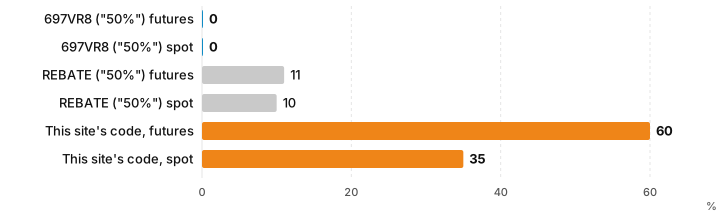
- When: 09:02 Taiwan time on 9 November 2026, with an ordinary request and without logging in. I also checked on 7 November 2026, and all three codes returned the same numbers.
- The two right-hand columns apply XT’s regular-user (VIP 0) rates: 0.06% for futures takers and 0.2% for spot, the official rates of 22 October 2026 from XT.COM fees. On the same 10,000 USDT futures taker trade, the fee with the three codes is 6, 5.34 and 2.4 USDT.
- 697VR8 is not an invalid code: XT recognizes it (
correctInviteCodeistrue), but both rates are set to 0. You can still open an account with it; you just pay the full fee. - “50%” appears nowhere in XT’s data: the highest of the two codes’ four numbers is 11%.
The same search results showed other XT codes too, so I looked up 4 more (10:16 Taiwan time on 9 November 2026):
| Code | API: futures | API: spot | 0.06% futures taker becomes | 0.2% spot becomes |
|---|---|---|---|---|
| R8TP3M | 17% | 5% | 0.0498% | 0.19% |
| XT2026 | 0% | 0% | 0.06% | 0.2% |
| SAVE10 | 5% | 10% | 0.057% | 0.18% |
| 2JC77P | 6% | 5% | 0.0564% | 0.19% |
With the two above, that is 6 XT codes from other sites and 12 rates. The highest is R8TP3M’s 17% on futures, and 2 of the codes are 0% on both spot and futures.
That’s only 6 codes, and it doesn’t mean every XT code on other sites is the same. But you can check any XT code with the method in the next section and see the rate XT itself records before you sign up, without trusting anyone’s numbers, this site’s included. Results for other exchanges are in Exchange referral code test results.
Look up any code with XT’s official API
-
Paste this address into your browser’s address bar and replace the code at the end with the one you want to check (REBATE is the example here):
https://www.xt.com/rfapi/public/custom-register-page/REBATE -
The page shows a block of text data. Find the numbers after
futuresCommissionRebate(futures) andspotCommissionRebate(spot). -
The numbers are decimals: 0.60 means 60%, 0.11 means 11%, and 0 means no rebate.
Here is what REBATE returned (only the fields that matter here):
{"correctInviteCode":true,"spotCommissionRebate":0.1000,"futuresCommissionRebate":0.1100,"isClose":0}A few things to keep in mind:
- Check that the address is
www.xt.comfirst. This is an address on XT’s own website; a “lookup tool” someone else gives you doesn’t count. - It is the data XT’s own sign-up page uses: after you enter a code, XT’s sign-up page reads that code’s data from this same address. XT has not documented the address, though, so it may change or stop working.
- Upper or lower case doesn’t matter: I tried this site’s code in lower case and got the same numbers.
- A mistyped or nonexistent code returns
correctInviteCodeasfalse, with the rate fields asnull(empty).
How to read the response
| Field | Meaning | This site’s code (9 November 2026) |
|---|---|---|
correctInviteCode |
true: XT recognizes the code; false: it doesn’t exist |
true |
futuresCommissionRebate |
Futures fee rebate, as a decimal | 0.6000 (60%) |
spotCommissionRebate |
Spot fee rebate, as a decimal | 0.3500 (35%) |
Other fields (type, isClose, isLimit, countryIds and so on) |
XT hasn’t explained them | type and isClose are 0 for all three codes; the rest are null |
“Rebate” in these field names means the same as this site’s “fee rebate”: the part of your own trading fee you don’t pay.
What the address can’t tell you
- Extra payouts promised elsewhere: some pages advertise more than XT’s data shows. If the difference exists at all, it can only be paid separately by whoever promised it, not by XT, and XT won’t answer for it. Whether to believe it depends on whether they can explain who pays, how it’s calculated and when it’s paid.
- Whether you can use XT where you live: the response includes fields such as
isLimit,countryWhiteandcountryIds, but XT hasn’t explained what they mean, so I don’t interpret them. For regional restrictions, see XT’s user agreement (last section). - What happens once you reach a VIP tier: see “Where the rebate goes, and VIP tiers” below.
Three pieces of evidence for this site’s code: the API, XT’s back office and a public identity
I found no cap on the invitee’s fee rebate on XT’s website or in its help center. XT’s Affiliate Program page says affiliates “can create discounted referral links”. In other words, codes that are all called XT referral codes give whatever rebate that particular code is set to, and 697VR8’s 0% is a setting too. When you judge a code, the number in a headline doesn’t count as evidence.
This site’s code has three pieces of evidence you can check against each other:
- XT’s official API: the address in the previous section, which anyone can check. On 9 November 2026 it returned 0.6000 for futures and 0.3500 for spot.
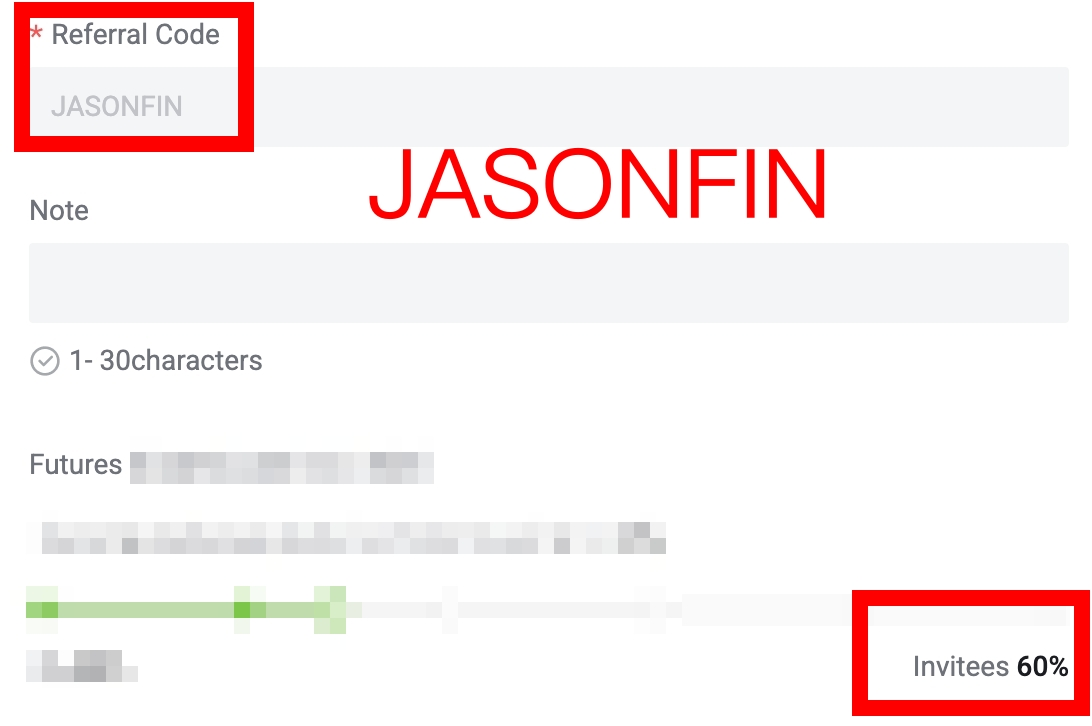
- The setting screen in XT’s back office: the image below shows this site’s code in XT’s back office, with the red box reading “Invitees 60%”, which sits in the Futures section. The screenshot comes from the referral data this site syncs daily; click it to see it at full size.
Sign-up screenshot
- Who wrote this: my real name, work background and education are public on About Jason and LinkedIn, and Instagram, YouTube and Threads are public accounts run by the same person, with over 50,000 followers combined. If a number here is wrong, you know who to hold to it.
The API and the back-office screen are two independent sources, and both show 60% for futures. If the rates change, the referral box below follows the daily sync, but the numbers in this post’s tables are the 9 November record; go by what you find when you check.
Where the rebate goes, and VIP tiers
I couldn’t re-check these two points on 9 November 2026: that day XT’s help center showed my connection a browser verification page first, and I didn’t try to get around it. What follows is what this site’s XT.COM fees post found on 22 October 2026.
- Where it goes: XT’s help center referral FAQ says the fees you save on spot and futures after signing up with a referral code are credited to your spot account, under Spot Account, then Fund History, then Distribution. It doesn’t say when they are credited.
- How it’s calculated: XT’s Refer to get a rebate article (updated 11 February 2026) gives “trading volume × the user’s own fee rate × the allocation ratio”, paid instantly to the spot account. But that describes the regular user referral program, and XT’s pages don’t show which document applies to this site’s code.
- How it stacks with VIP tiers and the XT token discount: XT doesn’t say clearly. Looking only at regular-user rates, a 60% rebate takes the futures taker fee to 0.024%, below the 0.028% of the top Premium VIP tier; the 0.2% spot fee less 35% is 0.13%, between VIP 2 and VIP 3. The fee for each tier, two comparison charts and a worked example on 1,000 USDT are in the section of XT.COM fees on why the 60% futures rebate beats Premium VIP, so I won’t repeat them here.
Check before you sign up: XT has no published way to add a code later
I searched XT’s help center on 1 and 7 November 2026 and found no way to add or change a referral code after signing up; on 9 November the help center wouldn’t load for me, so I couldn’t confirm again. The referral code field on XT’s sign-up page is labeled “Referral Code (Optional)”, so you can submit without one, but after that I found no official way to fix it. So the order is: check the rate with the address above first, then sign up. Whether other exchanges let you add a code after signing up is in Deadlines for adding an invitation code after sign-up.
How to sign up
- Open XT’s sign-up page from the link in the referral box and check whether the “Referral Code (Optional)” field is already filled in; if not, paste the code yourself.
- Create the account with an email address or phone number and enter the verification code you receive.
- To raise your withdrawal limit or use fiat or P2P features, complete identity verification (KYC) in your account.
JASONFINIf you already have an account but family members or friends were planning to open an XT account anyway, they can sign up with this site’s referral code: the account must be verified with their own ID and used by them. Please don’t open an account under someone else’s identity for yourself.
Where XT.COM can’t be used
Under section 3.3.4 of XT.COM’s user agreement (checked 9 October 2026), users in the US, Canada, mainland China, Cuba, North Korea, Singapore, Sudan, Venezuela and Crimea can’t use it, and the list may change at any time. The UK’s Financial Conduct Authority (FCA) and Dubai’s Virtual Assets Regulatory Authority (VARA) have issued warnings, and Quebec and Ontario in Canada have permanently banned it from operating. For these records, along with XT.COM’s proof of reserves and its 2024 wallet theft, see XT.COM review.
XT.COM is an international exchange serving Chinese-speaking users worldwide. This site’s referral codes are not for residents of the UK or Hong Kong; please follow the laws where you live. For how each exchange’s fee rebate takes effect and how to confirm it, see What is an exchange fee rebate?.
FAQ
How do I check the fee rebate on an XT referral code?
Open https://www.xt.com/rfapi/public/custom-register-page/ followed by the code in your browser, and look at futuresCommissionRebate (futures) and spotCommissionRebate (spot) in the data it returns. The numbers are decimals: 0.60 means 60%, and 0 means no rebate. This is the official data XT's sign-up page reads in the background; XT has not published separate documentation for it.
Are the 50% XT referral codes on other sites real?
On 9 November 2026 I checked two codes advertised on other sites at 50% in XT's official API: 697VR8 returned 0% on both spot and futures, and REBATE returned 11% on futures and 10% on spot. Neither is 50%.
What is this site's XT referral code, and what is the rebate?
This site's XT referral code is JASONFIN. On 9 November 2026, XT's official API returned 60% on futures and 35% on spot, matching the setting in XT's back office; the rates in the referral box are synced daily.
Can I add an XT referral code after signing up?
I searched XT's help center on 1 and 7 November 2026 and found no way to add a referral code after signing up. The referral code field on XT's sign-up page is optional, so you can submit without one, but I found no official way to add one afterwards. Fill it in when you sign up. To use this site's code, check whether the "Referral Code (Optional)" field is already filled in when you open the link in the referral box; if not, paste JASONFIN yourself.
Where does the XT fee rebate go?
According to XT's help center referral FAQ (checked 22 October 2026), the fees you save on spot and futures after signing up with a referral code are credited to your spot account and can be found under Spot Account, then Fund History, then Distribution. XT doesn't say separately when they are credited.
Where can't XT.COM be used?
Under section 3.3.4 of XT.COM's user agreement (checked 9 October 2026), users in the US, Canada, mainland China, Cuba, North Korea, Singapore, Sudan, Venezuela and Crimea can't use it. The UK's FCA and Dubai's VARA have also issued warnings, and this site's referral codes are not for residents of the UK or Hong Kong.

Comments
Sign in with Google to comment. Your comment will not show your Google profile picture or name; it appears under a randomly generated nickname to protect your privacy.
By signing in you agree to this site's privacy policy.