 Jason Finance
Running WordPress Without Knowing SSH: How Jason Career Manages Its Site with Claude Code, SSH and WP-CLI
Jason Career is a WordPress site with 65 plugins, a shop and courses. I can't read SSH or code, so Claude Code runs it: 10 days of work, problems, safeguards.
On this page
- 1.What kind of site Jason Career is
- 2.How Claude Code connects to WordPress: SSH and WP-CLI, not MCP
- 3.What Claude Code did in 10 days
- 3.1Cards at the start and end of each post
- 3.225 posts translated and published in under half an hour
- 3.3One screenshot, one conversation, one mobile promotion bar
- 4.Problems and how they were handled
- 5.How I limit what AI can do on a live website
- FAQ
Jason Career is my WordPress site about careers, job hunting and studying abroad. I can’t read SSH or code, so since October 2026 I have run it with Claude Code: I tell it in Chinese what needs doing, Claude Code connects to the server over SSH, changes the site with WP-CLI, and then reports back with the results and how to undo them.
The short version: from 2 to 11 October, Claude Code added site-wide internal links, author cards and summary cards for 103 posts, launched 40 Simplified Chinese and 10 English translations, and built a promotion bar at the bottom of mobile article pages. Along the way it ran into problems with caching, translation wording, old data and a broken deployment tool. All of them were fixed, and the live site never went down or lost data. What made this possible was writing the rules first, limiting what AI can do on a live website.
This is a record of how I run my own website, not a tool tutorial or a recommendation. The site’s setup, plugins and methods will change; the figures reflect the state on 11 October 2026.
What kind of site Jason Career is
| Item | Details (11 October 2026) |
|---|---|
| Topics | Careers, job hunting, résumés, SOPs, interviews, study-abroad applications and professional growth |
| System | WordPress 7.1.3, PHP 8.4, Flatsome 3.20 theme |
| Plugins | 65 active, including WooCommerce (with subscriptions and memberships), FunnelKit, LearnDash courses, Rank Math, WP Rocket, Polylang and others |
| Payments | PayUni, LINE Pay, Stripe |
| Hosting | Cloudways, behind Cloudflare |
| Posts | 110 in Traditional Chinese, 40 in Simplified Chinese, 10 in English |
This is not a simple blog. It sells e-books, application-document and résumé consulting, courses and memberships, and a problem in any one plugin could affect checkout. So what I care about most is not how much AI can do, but making sure it can’t do anything reckless.
How Claude Code connects to WordPress: SSH and WP-CLI, not MCP
Many people assume you need a special plugin or an MCP before AI can manage WordPress. Jason Career keeps it simple:
- Claude Code runs on a Linux server on Oracle Cloud.
- It connects to the Cloudways server over ordinary SSH.
- On the server, it uses WP-CLI, the WordPress command-line tool, to look up data, change settings and update content.
The site’s custom code (author cards, category page headings, llms.txt, the mobile promotion bar and so on) lives in two plugins, Code Snippets and Simple Custom CSS & JS, rather than in edits to the theme. A copy of the source code is also kept in a private GitHub repo, so every change is recorded.
What Claude Code did in 10 days
| Date | What was done | Scale |
|---|---|---|
| 2 October | Exported the live site’s custom code as a Git baseline and set up a “preview first, then apply” deployment process | Deployment tool and safety rules |
| 7 October | Site-wide internal links | 100 posts, 326 links |
| 7 October | Added H1 headings to category pages; built a custom /llms.txt for AI search engines to read |
2 custom code snippets |
| 10 October | SEO and reading-experience audit; deleted empty categories with 301 redirects; related reading now matched by category; author structured data | Audit report with screenshots |
| 11 October | New author card; smaller, left-aligned headings on mobile; “updated on” date shown below the heading | All posts |
| 11 October | Added a 「Jason 學長的備忘錄」 (“Jason’s notes”) card at the start of every post and a 「心得總結」 (“key takeaways”) card at the end | 103 posts |
| 11 October | Launched the Simplified Chinese and English translations, with a language switcher, a home page for each language, sitemap and hreflang | 40 in Simplified Chinese, 10 in English |
| 11 October | Removed duplicate sections from robots.txt, share images for the home and category pages, an iPhone home-screen icon, and set the course overview page to noindex | 4 small SEO fixes |
| 11 October | Promotion bar at the bottom of mobile article pages, promoting the matching e-book or IELTS coupon for each post’s topic | All posts (except the English versions) |
I should also be clear about what was not done in these 10 days: major updates to WordPress core and plugins (38 plugins were still waiting for updates on 11 October), backup restore drills and PHP version upgrades have not yet been handed to Claude Code.
Cards at the start and end of each post
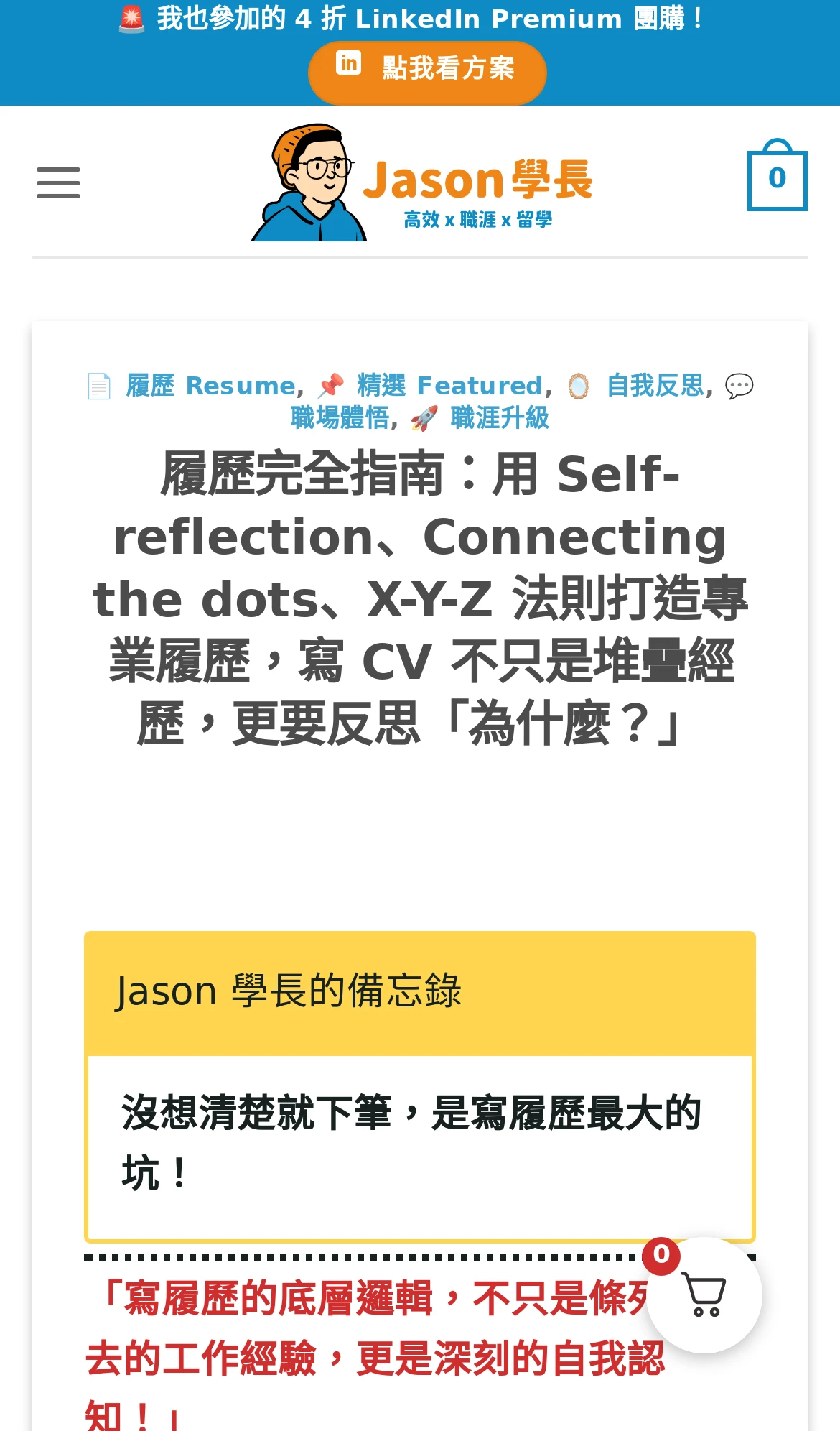 Before the redesign, 10 October 2026 (Chinese interface)
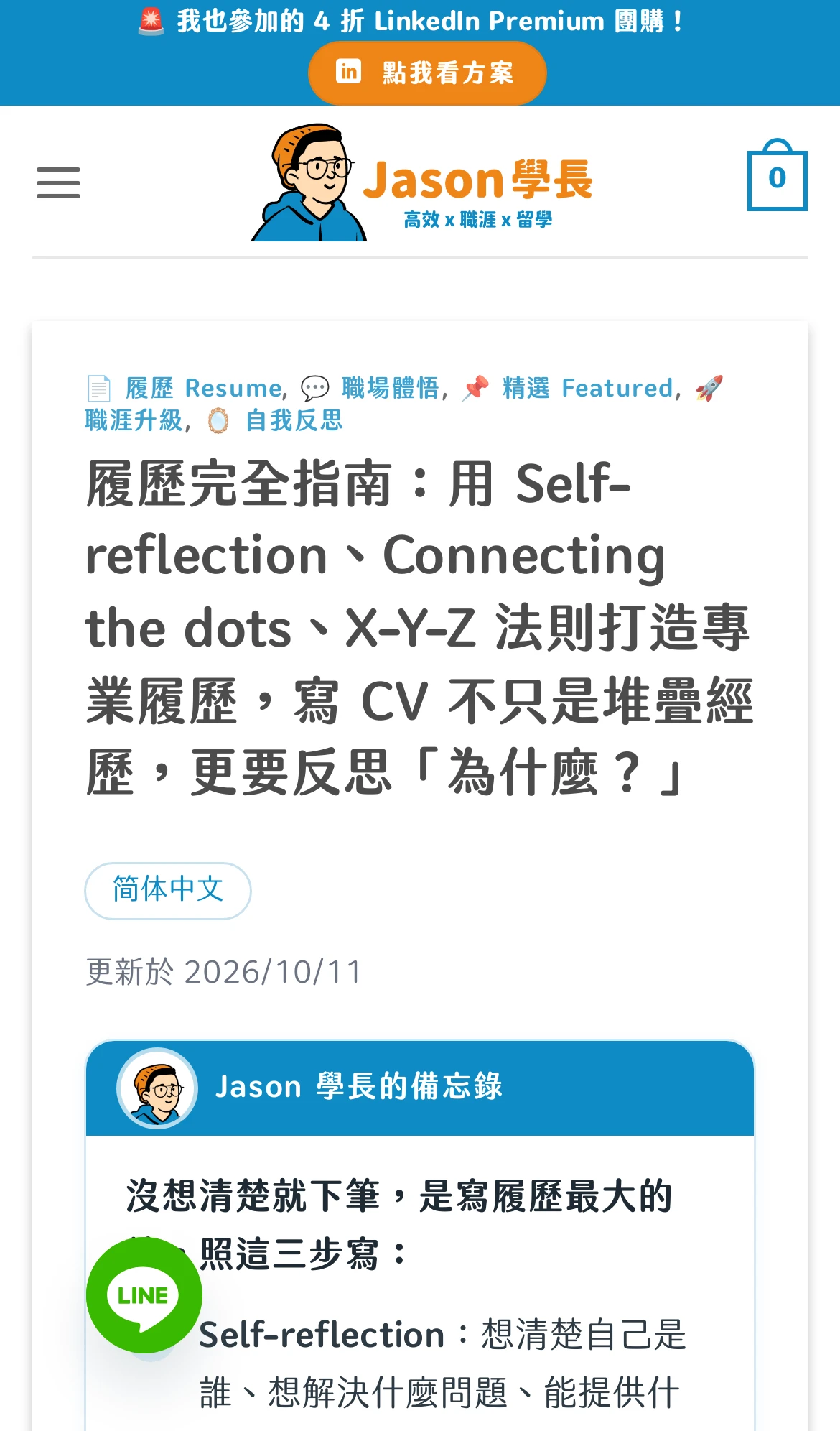 After the redesign, 11 October 2026 (Chinese interface)
I reviewed the opening notes and closing takeaways for the first 11 posts one by one. After I replied that 「初稿是全部 OK」 (“the first drafts are all OK”), I added: 「下一批全部都給你自己寫,自行更新發佈」 (“write the whole next batch yourself and update and publish it on your own”). Claude then wrote the remaining 92 in groups, polished them and published them directly, and after they went live it checked the order and number of cards on each post.
 The key takeaways card at the end of a post (Chinese interface)
25 posts translated and published in under half an hour
The timeline for the second batch of translations on 11 October (UTC): 14:18 database backup, 14:25 20 Simplified Chinese posts live, 14:32 5 English posts live, 14:33 links between translated posts pointed to the same-language versions. The 5 English posts were translated at the same time by 5 Claude subagents. From backup to all 25 posts going live took about 15 minutes, not counting the time I spent deciding which posts to translate.
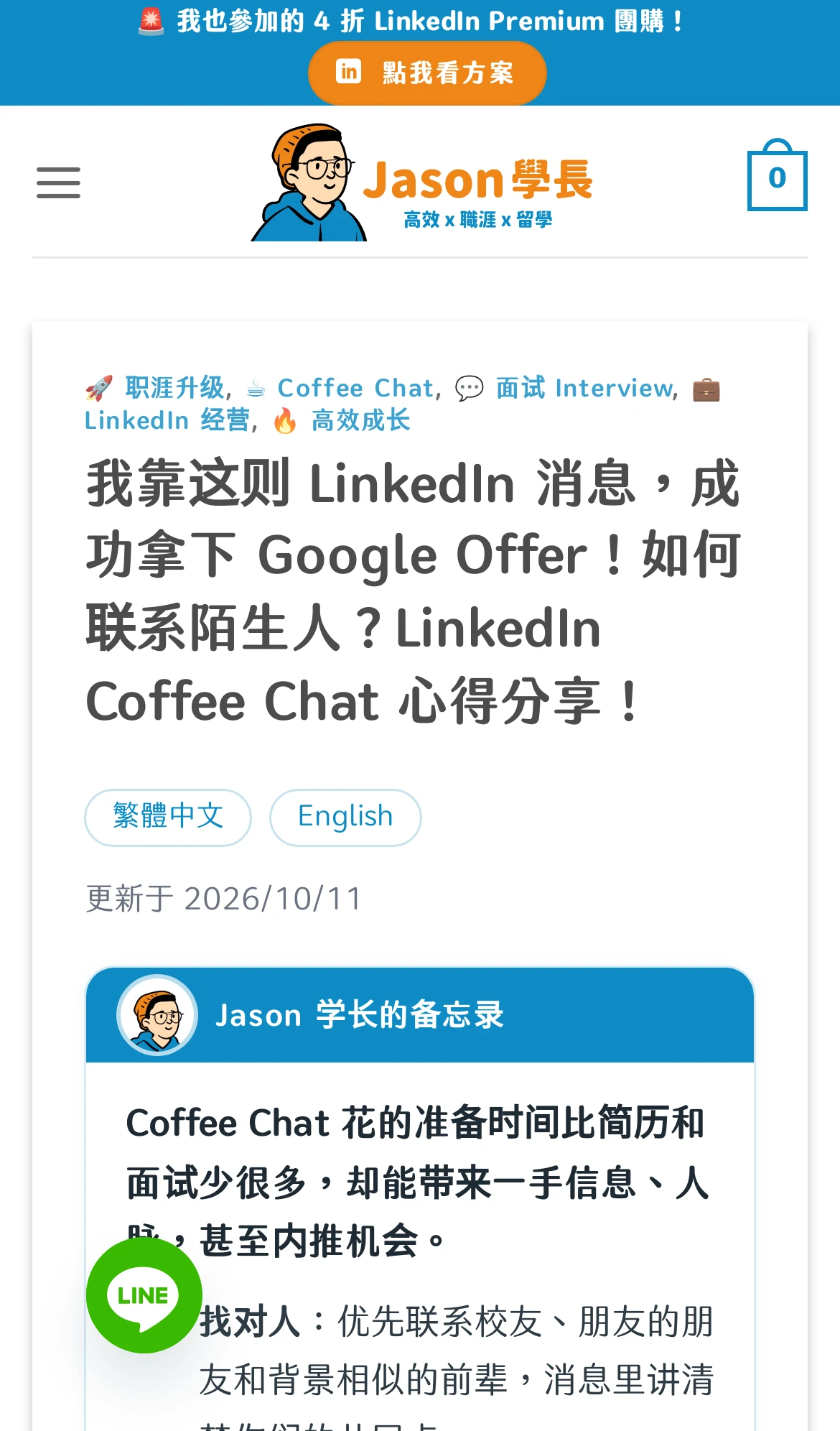 Simplified Chinese version (Chinese interface)
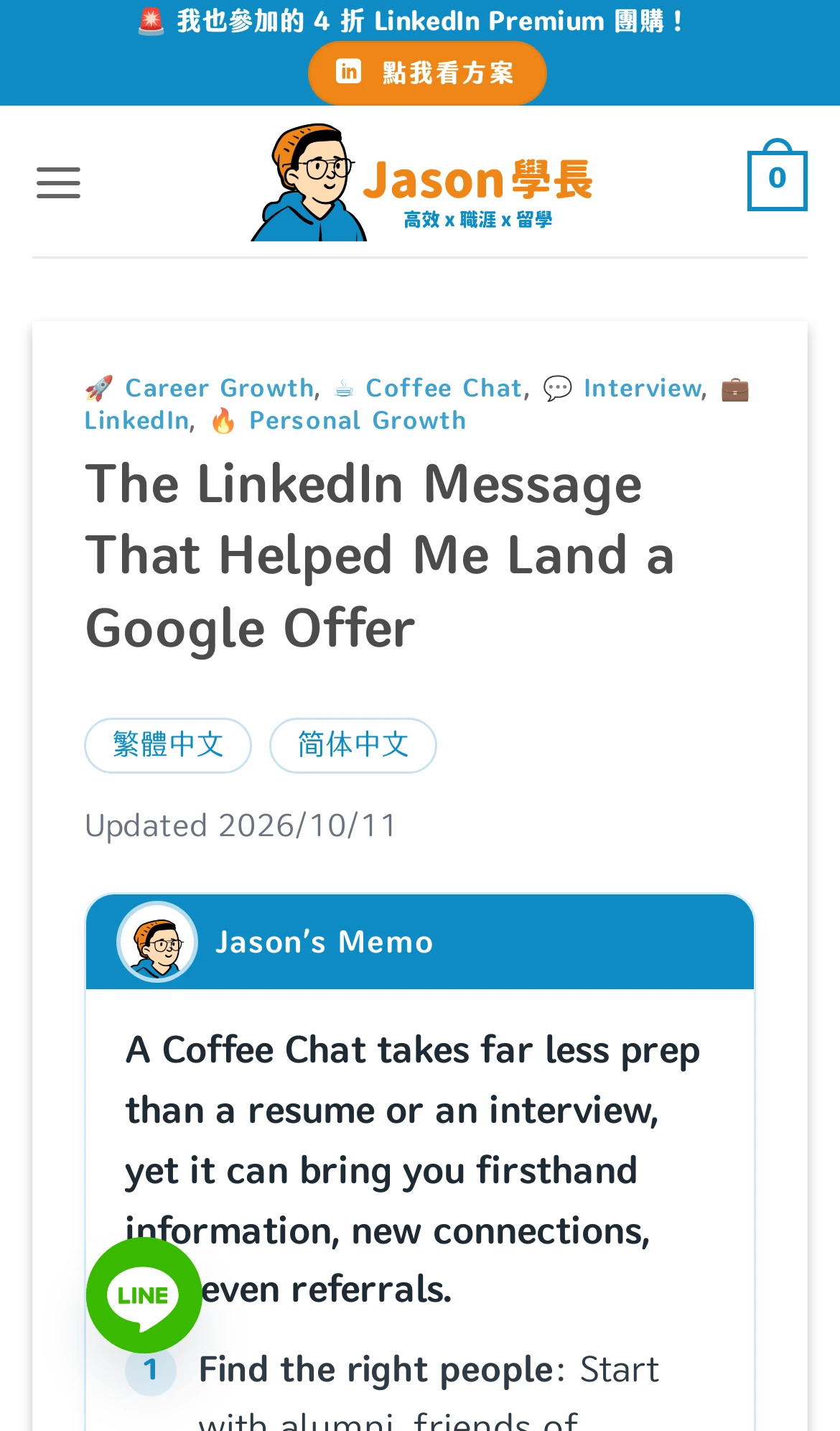 English version
One screenshot, one conversation, one mobile promotion bar
In a conversation, I pasted a screenshot of a promotion bar at the bottom of another site’s mobile pages and asked: “now do we have a mobile cta under every articles like the screenshot?” Then I answered a few questions from Claude: an ✕ on the right; it should appear again on the next post after a reader closes it; study-abroad posts promote the SOP e-book; the discount code is BLOG100, already used in the posts; IELTS posts show a registration coupon.
In that same conversation, Claude wrote the promotion bar, previewed it on real posts, deployed it and verified it. The bar switches automatically by post category between résumés, interviews, the SOP e-book and the IELTS coupon; the Simplified Chinese version switches to Simplified text; it does not appear on English pages, product pages or checkout pages.
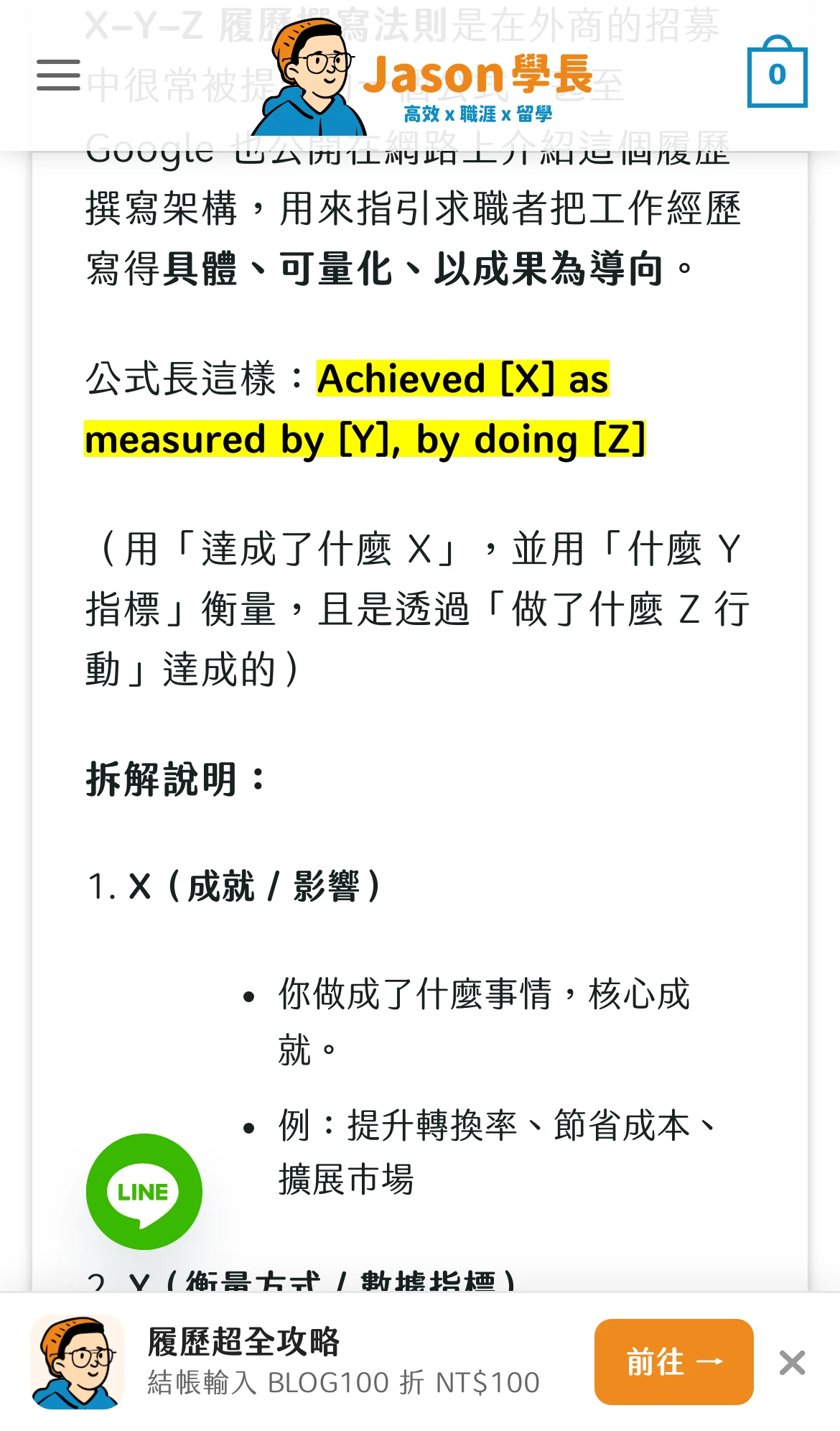 The promotion bar on a résumé post (Chinese interface)
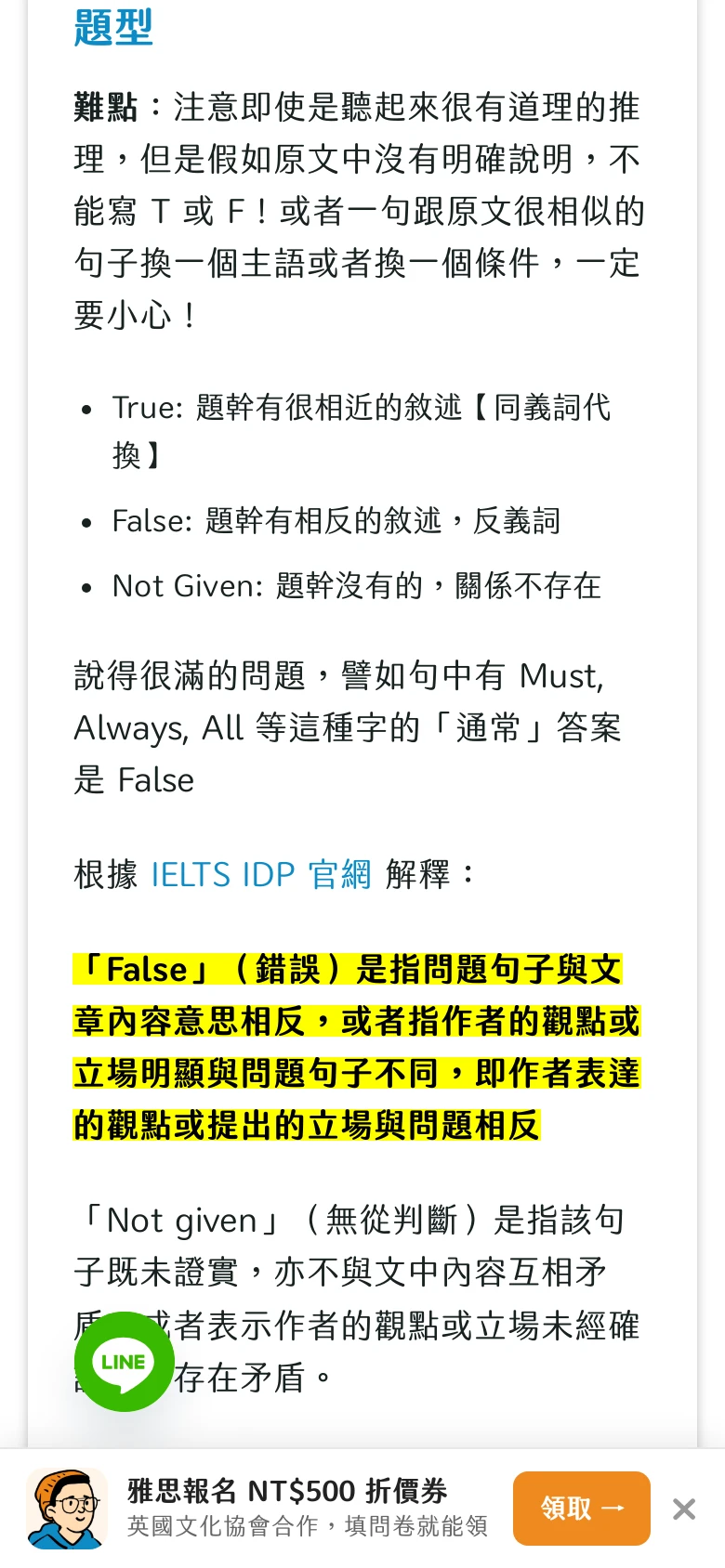 IELTS posts switch automatically to the IELTS registration coupon (Chinese interface)
Problems and how they were handled
All of these really happened between 10 and 11 October, and all have been dealt with:
- Changes that didn’t show up: Cloudways has a Varnish cache at the server level, so clearing WP Rocket alone was not enough. Every deployment now clears both layers, and this is also in Claude’s long-term memory.
- Wrong wording from automatic Traditional-to-Simplified conversion: a general conversion tool turned 「模擬考」 (mock exam) into 「仿真考」 (simulation exam) and 「建立人脈」 (build a network) into 「创建人脉」 (create a network). It now converts only the characters, then applies a manually reviewed list of mainland Chinese terms, for example 履歷→简历 (résumé), 外商→外企 (foreign company) and 雪梨→悉尼 (Sydney).
- Old multilingual data from 2023: the old Simplified Chinese categories had been deleted long ago, but their records remained, leaving some Simplified Chinese posts without a category. The stale records were cleared and the categories rebuilt.
- The deployment tool itself broke: another Claude session left an error while editing the deployment tool, and the pre-deployment backup step failed. The tool is designed not to deploy if the backup fails, so nothing on the site changed. Under the rules, changes to the deployment tool need my approval first, so Claude stopped, explained the cause and the fix, and only after I replied “ok” did it make the fix, test the backup and deploy again.
- A new element covering an old button: at first the bottom promotion bar covered the LINE customer service button. Claude caught this while previewing screenshots on real posts before launch, and adjusted it before it went live.
How I limit what AI can do on a live website
These rules are written in the project’s CLAUDE.md and in programmatic checks:
- Judge the effect, not the tool: Claude can read, inspect, back up and preview on its own; changing settings or content, deploying and deleting data require it to explain the scope and risk first. The rule’s original heading is “Judge the EFFECT, not the tool”.
- One confirmation per task: on 11 October I said, “I will always allow claude to execute SQL or delete production files, I cannot understand that SSH or coding. Don’t always ask me for approval. Just confirm the scope and risk/changes once before the changes”. Now, before starting, Claude explains in plain language what it will change or delete, the risks and how to undo it. Once I confirm, it no longer asks me about each step within that scope; it asks again only if the work goes beyond it.
- A preview plan before every deployment: the plan carries a verification code, and only the plan that was just previewed can be applied. If anything changes in the meantime, the plan becomes invalid.
- Automatic backup before every deployment: if the backup fails, the whole deployment is aborted.
- A programmatic guard: it blocks writes that bypass the deployment process; rewriting Git history and force pushing always need my approval.
- No secrets in Git: every commit is scanned for passwords and keys first; databases, uploads and backups are kept out of the repo.
Jason Finance, this site, takes a different approach: no WordPress, with posts stored on GitHub and the site hosted on Cloudflare. See Building a Website Without Reading Code. More posts are on the AI startup topic page.
FAQ
Can Claude Code manage a WordPress site?
Yes. At Jason Career, Claude Code runs on a Linux server, connects to the Cloudways server over SSH, and then uses WP-CLI, the WordPress command-line tool, to change settings, content and custom code. Between 2 and 11 October 2026 it added internal links, author cards and summary cards for 103 posts, and launched the Simplified Chinese and English translations, among other work.
Do I need to install a Cloudways MCP?
Jason Career does not use MCP. Claude Code can work on WordPress with an ordinary SSH connection and WP-CLI.
How do you keep AI from breaking a live site it edits directly?
I use several checkpoints: whether Claude asks me depends on the effect of the change; before each task it explains the scope and risk once; before deploying it generates a preview plan; it backs up automatically before deploying and aborts if the backup fails; and a programmatic guard blocks writes that bypass the deployment process. As of 11 October 2026, nothing Claude did had taken the live site down or lost data.
What problems come up when running WordPress with Claude Code?
The ones I ran into: the Varnish cache at the Cloudways server level has to be cleared separately before changes show up; automatic Traditional-to-Simplified conversion turned 「模擬考」 (mock exam) into 「仿真考」 (simulation exam); old data left by a multilingual plugin in 2023 left Simplified Chinese posts without categories; and when the deployment tool itself broke, the backup failed and the deployment was aborted.
Related articles
- Building a Website Without Reading Code: How I Built Jason Finance Cheaply with Claude Code + GitHub + Cloudflare, and What It CostsI can't read code. Jason Finance runs on Claude Code, GitHub, Cloudflare Workers and Supabase free plans. The setup, costs, AI permissions and limits.
- Git Can Push, but Claude Code Can't Read GitHub Issues: SSH vs GitHub API PermissionsClaude Code can't read GitHub Issues but git push works? SSH keys only cover Git. Sign in with gh CLI, check scope, protect the token, go from Issue to PR.
- Running Multiple Claude Code Remote Controls on One Server: Linux Users, systemd and git worktreeMultiple Claude Code Remote Controls on one server: Linux users by trust, one systemd service each, git worktree for dev vs writing, --spawn=worktree limits.

Jason
Account Manager in Google Large Customer Sales and Columbia MBA admit, sharing the money tools and experience he actually uses.
Comments
Sign in with Google to comment. Your comment will not show your Google profile picture or name; it appears under a randomly generated nickname to protect your privacy.
By signing in you agree to this site's privacy policy.