 Jason Finance
USDT Deposit Delayed: What to Do, and My Stuck Solana Deposit to Bitfinex
USDT deposit delayed? What to check when a transfer is confirmed on-chain but not credited, what to tell support, and my stuck Solana deposit to Bitfinex.
On this page
- 1.What happened: confirmed on-chain in two minutes, credited about 6 hours later
- 1.1What support said
- 2.How long a USDT deposit normally takes
- 3.What to check, in order, when a USDT deposit is delayed
- 4.Contacting support: when to open a ticket and what to include
- 5.How to avoid getting stuck next time
- FAQ
Disclosure: this page contains exchange invitation links and codes. If you sign up through them, the exchange may pay Jason Finance a referral commission. It does not raise the fees you pay; the invitation fee discount is set by the exchange. Our ratings follow the published methodology, where the invitation discount counts only toward the fees item.
In the early hours of 8 October 2026, I sent 134,515 USDT from OKX to Bitfinex on the Solana network. It was confirmed on-chain within two minutes, but the deposit never appeared in my Bitfinex deposit history. On a normal Solana deposit, the pending deposit shows up on the Bitfinex deposit page quickly. This time nothing appeared for over 30 minutes, so I opened a support ticket. Support replied that Solana deposits were facing technical delays and there was no time for a fix yet. The deposit was finally credited at 09:32 that morning, about 6 hours after on-chain confirmation.
The short answer: when a USDT deposit is delayed, if it is confirmed on-chain but not credited, first check on a block explorer that the transaction succeeded and that the receiving address and network are correct. If all three are right, the funds are already at the exchange’s deposit address and what remains is the exchange’s crediting problem. Contact support with the transaction ID and do not send again. For a large amount, send a small test first, and avoid transferring at the last minute when you need the money.
This article is my personal experience and research, not investment, tax or legal advice. Deposit rules, supported networks and processing times can change, so check the exchange’s official pages. Assets held on an exchange carry the risk of the exchange itself.
What happened: confirmed on-chain in two minutes, credited about 6 hours later
All times are UTC+8:
| Time | What happened |
|---|---|
| 8 Oct 03:28 | Submitted the USDT withdrawal on OKX, network Solana, network fee 0.33 USDT |
| 03:30 | The Solana transaction succeeded and was finalized; the USDT was at the deposit address Bitfinex gave me |
| 04:01 | More than 30 minutes after confirmation, still nothing in my Bitfinex deposit history; opened a ticket |
| 04:07 | Received the ticket’s automatic acknowledgement |
| 04:29 | Support replied: technical delays on the Solana network, no time for a fix yet |
| 05:09 | Still not credited, about 1 hour 40 minutes after on-chain confirmation |
| 09:32 | Credited by Bitfinex, about 6 hours after on-chain confirmation |
 The Bitfinex deposit-completed email at 09:32, captured October 2026
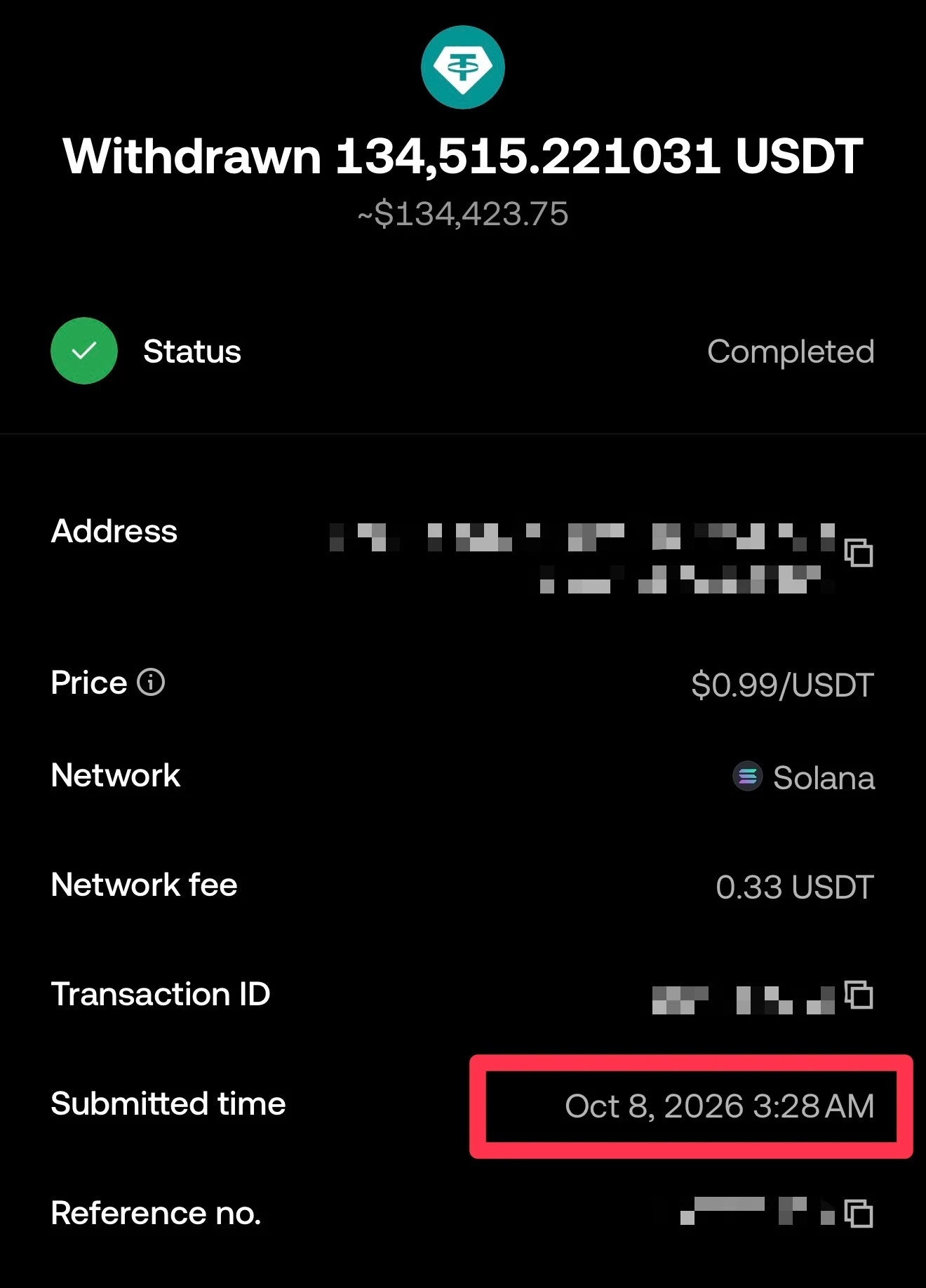 The OKX withdrawal record shows completed, captured October 2026, address, transaction ID and reference number masked
“Completed” on OKX means OKX broadcast the transaction and it succeeded. I looked the transaction up on a Solana block explorer: it succeeded, the receiving address was the one on my Bitfinex deposit page, the token was native USDT, and the USDT was sitting at that address. The problem was that Bitfinex had not yet credited it to my account.
What support said
In the ticket I included the amount, transaction ID, receiving address and the block explorer link. Bitfinex support replied at 04:29:
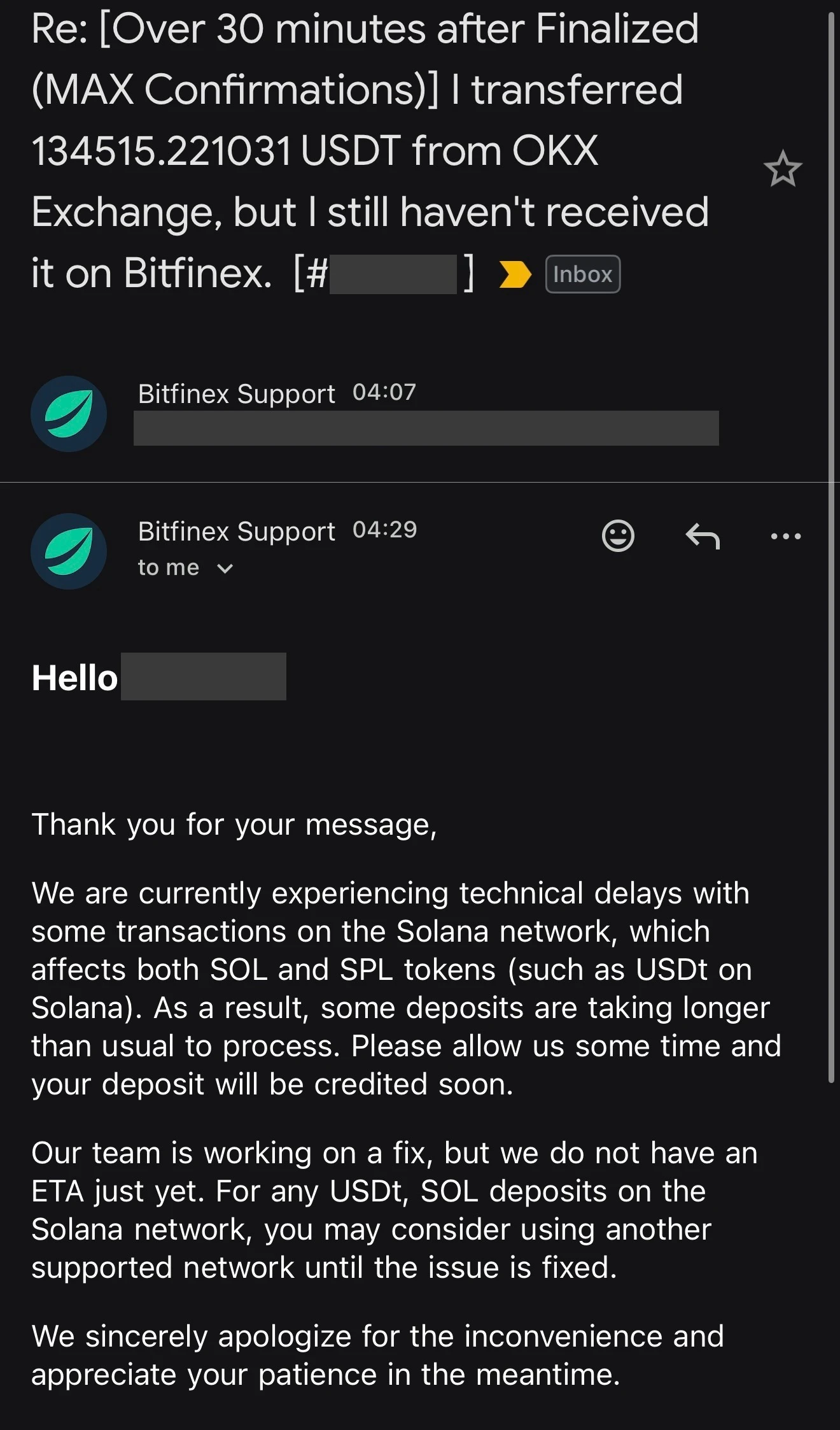 Bitfinex support’s reply, captured October 2026, name and ticket number masked
We are currently experiencing technical delays with some transactions on the Solana network, which affects both SOL and SPL tokens (such as USDt on Solana). As a result, some deposits are taking longer than usual to process. Please allow us some time and your deposit will be credited soon.
Our team is working on a fix, but we do not have an ETA just yet. For any USDt, SOL deposits on the Solana network, you may consider using another supported network until the issue is fixed.
Bitfinex support responded quickly: I opened the ticket at 04:01, got the acknowledgement at 04:07 and a reply from a person at 04:29 explaining the cause and an alternative, not a generic “please be patient”.
Note that at the time the Bitfinex status page showed all systems operational, and Bitfinex’s public deposit status data showed Solana USDT deposits as open. A status page showing normal does not mean deposits on a given chain are not delayed.
How long a USDT deposit normally takes
Crediting has two stages:
- Blockchain confirmation: Solana produces blocks quickly, so on-chain confirmation usually takes seconds to tens of seconds. This time it took about two minutes from submission to finalization, including OKX’s withdrawal processing.
- Exchange crediting: the exchange waits for its required number of confirmations, then runs its own review and crediting. On 8 October 2026, Bitfinex’s public setting for Solana USDT was 5 confirmations. Bitfinex also says the required confirmations vary with verification level and that crediting can be affected by transaction review, and it does not promise a fixed time (official article).
So “Solana is fast” only describes the first stage. When the second stage is stuck, a fast chain does not help. When I send USDT to Bitfinex on Solana, the pending deposit normally shows up on the deposit page quickly; that is my experience, not a time Bitfinex guarantees.
What to check, in order, when a USDT deposit is delayed
| Step | What to check | Where |
|---|---|---|
| 1 | Did the sender actually broadcast it, with a transaction ID, rather than still “processing”? | The sender’s withdrawal history |
| 2 | Did the transaction succeed and finalize on-chain? | A block explorer, e.g. Solana Explorer or Solscan for Solana, Tronscan for Tron |
| 3 | Is the receiving address the one the exchange’s deposit page currently shows? | The exchange’s deposit page |
| 4 | Do the network and token match on both sides, and is it native USDT? | The withdrawal record and the exchange’s supported list |
| 5 | Does the deposit appear in the exchange’s history, and how many confirmations does it have? | The exchange’s deposit history or reports page |
| 6 | Has the exchange announced maintenance or delays on that chain? | Exchange announcements and status page |
If something in steps 1 to 4 is wrong, the issue is on the sending side or with the address, so start with the sender or the address. If steps 1 to 4 are all fine and step 5 shows nothing, it is the exchange’s crediting problem.
For Solana deposits to Bitfinex, one more thing: Bitfinex upgraded its Solana token support on 25 November 2022, and deposit addresses created before the upgrade must not be used. Funds sent to an old address may be lost (official article). Bitfinex also does not accept bridged USDT (such as USDT.e), and funds sent by mistake may not be recoverable.
Contacting support: when to open a ticket and what to include
On the Bitfinex support form, the option for a missing deposit reads “over 30 minutes after finalized”. My approach is to open a ticket if the deposit has not appeared 30 minutes after on-chain confirmation.
Include the following so support does not have to come back with questions:
- Coin and network (e.g. USDT, Solana)
- Amount
- Transaction ID (TxID)
- Receiving address
- A block explorer link to the transaction
- The sending platform (e.g. sent from OKX)
Give the transaction ID and address only in an official support ticket, not in public groups or communities. Anyone who messages you claiming to be support and offering to help with a deposit is usually a scammer. Real support will never ask for your password, verification codes or seed phrase.
How to avoid getting stuck next time
This was also a reminder to myself: never send a large amount in one go again. With 134,515 USDT in a single transfer, the whole amount was stuck, this time for about 6 hours. Had I sent a small test first and then the rest in batches, a delay would have held up only part of it.
- Do not send again: the first transfer is stuck in the exchange’s crediting process. Sending again will not speed it up and only puts more money in the same queue.
- Test with a small amount first: send a small amount, wait until it is credited, then send the rest.
- Do not transfer at the last minute: if you need the funds by a certain time or price, for converting or lending, move them in early to leave room for problems.
- Have a second network ready: exchanges usually support several USDT networks, and support suggested another one this time while Solana had problems. Before switching, check that both the sender and the exchange support that network; withdrawal fees also differ by network.
If you are moving USDT to Bitfinex to convert it to dollars: Bitfinex now charges no trading fees, and the price, slippage and withdrawal fees to watch are covered in Bitfinex USDT to USD.
More exchange guides and comparisons are on the crypto topic page.
FAQ
How long does a USDT deposit on Solana usually take?
Solana produces blocks quickly, so on-chain confirmation usually takes seconds to tens of seconds. The exchange still has to reach its required confirmations and run its own crediting process, and Bitfinex does not promise a fixed time. When I send USDT to Bitfinex on Solana, the pending deposit normally shows up on the deposit page quickly.
The transaction succeeded on-chain but the exchange has not credited it. Is the money lost?
If the address and network are correct, the funds are already at the exchange's deposit address and the exchange has usually just not credited them yet. Confirm on a block explorer that the transaction succeeded and the receiving address is right, then contact the exchange's support with the transaction ID. A wrong address or network may mean the funds cannot be recovered.
How long should I wait before contacting support?
On the Bitfinex support form, the option for a missing deposit is 'over 30 minutes after finalized'. My approach is to open a ticket if the deposit has not appeared 30 minutes after on-chain confirmation.
Should I send the deposit again?
No. Sending again will not make the first transfer arrive sooner and only puts more money in the same queue. When support suggests another network, that is for later transfers.

Jason
Account Manager in Google Large Customer Sales and Columbia MBA admit, sharing the money tools and experience he actually uses.
Comments
Sign in with Google to comment. Your comment will not show your Google profile picture or name; it appears under a randomly generated nickname to protect your privacy.
By signing in you agree to this site's privacy policy.